שמור קובץ json ב-Python
Python מאפשר מניפולציה של קבצים (יצירה, שמירה, קריאה, כתיבה, מחיקת קבצים ועוד רבים). Python מפשטת שמירת פורמטים רבים של קבצים ושומרת מספר פורמטים של קבצים.
JSON הוא סימון אובייקט JavaScript . הנתונים מאוחסנים ונשלחים באמצעות קובץ סקריפט (ניתן להרצה) בשפת מחשב מבוסס טקסט.
מודול ה-json של Python תומך ב-JSON. JSON משתמש במחרוזת במירכאות עם מיפוי מפתח-ערך בתוך סוגריים מסולסלים { }.
שלבים לשמירת קובץ json
יש את השלבים הבאים ליצירה ולשמירה של קבצי json:
1. ייבוא חבילת json
import json
2. כתוב נתוני json בפורמט hash
Json_value ={ 'best_student': { 'key1': 'value1', 'key2': 'value2' }, } 3. צור קובץ json והשתמש במצב 'w' (כתיבה) כדי לשמור נתונים וקבצים.
save_file = open('filename', 'w')
4. השתמש בשיטת json.dump כדי לחבר נתוני קובץ ונתוני json.
5. סגור את הקובץ.
save_file.close()
דוגמאות
הדוגמה הבאה מציגה את קובץ ה-json השומר ב-Python.
דוגמה מס' 1
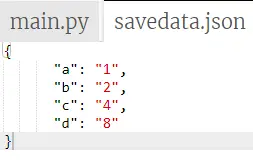
הדוגמה הנתונה של Python שומרת נתוני אובייקט בקובץ json. זה נתונים בסיסיים להמיר קובץ ל-json ולשמור בקובץ. הדוגמה מציגה נתונים של משתנה בודד לשמירה בקובץ json.
import json # python objects can store in json format value ={ 'a': '1', 'b': '2', 'c': '4', 'd': '8' } # the json file to save the output data save_file = open('savedata.json', 'w') json.dump(value, save_file, indent = 6) save_file.close() תְפוּקָה:
התמונה למטה מציגה את קובץ json וערך האובייקט בפורמט json.
דוגמה מס' 2
הדוגמה הנתונה של Python שומרת נתוני אובייקט בקובץ json. בדוגמה זו, אנו יכולים להשתמש במספר שלם ובערך מחרוזת באובייקט בודד ולהציג אותם בקובץ json.
import json # python objects can store in json format value ={ 'best_student': { 'name': 'Ram', 'subject': 'python', 'age': '24', 'marks': '98' }, } # the json file to save the output data save_file = open('savedata.json', 'w') json.dump(value, save_file, indent = 6) save_file.close() תְפוּקָה
התמונה למטה מציגה את קובץ json וערך האובייקט בפורמט json.

דוגמה מס' 3
הדוגמה הנתונה של Python שומרת נתוני אובייקט בקובץ json. כאן, אנו יכולים להשתמש במספר אובייקטים ובנתונים שלהם כדי להמיר לקבצי json ולשמור אותם באמצעות Python.
import json # python objects can store in json format Topper_student ={ 'student1': { 'name': 'Ram', 'subject': 'python', 'age': '24', 'marks': '98' }, 'student2': { 'name': 'sam', 'subject': 'Java', 'age': '24', 'marks': '92' }, 'student3': { 'name': 'Radha', 'subject': 'Html', 'age': '24', 'marks': '96' }, } # the json file to save the output data save_file = open('savedata.json', 'w') json.dump(Topper_student, save_file, indent = 6) save_file.close() תְפוּקָה
התמונה למטה מציגה את קובץ json וערך האובייקט בפורמט json.

דוגמה מס' 4
הדוגמה הנתונה בפיתון שומרת נתוני אובייקט בקובץ json. כאן נוכל לראות את ערך האובייקט ללא שם ושימוש בפורמט המערך לערכים.
import json # python objects can store in json format value =[{ 'a': '1', 'b': '2', 'c': '4', 'd': '8' }, { 'a1': '11', 'b1': '21', 'c1': '41', 'd1': '18' }, { 'a2': '21', 'b2': '22', 'c2': '42', 'd2': '28' }] # the json file to save the output data save_file = open('savedata.json', 'w') json.dump(value, save_file, indent = 6) save_file.close() תְפוּקָה
התמונה למטה מציגה את קובץ ה-json וערך האובייקט בפורמט json.

דוגמה מס' 5
הדוגמה הנתונה בפיתון שומרת נתוני אובייקט בקובץ json. אנו יכולים להשתמש באובייקטים שונים ובשמו כנתוני פורמט גיבוב. בדוגמה זו, אנו יכולים ליצור שני קבצי Json עבור אובייקטים שונים.
import json # python objects can store in json format Topper_student =[{ 'a': '1', 'b': '2', 'c': '4', 'd': '8' }, { 'a1': '11', 'b1': '21', 'c1': '41', 'd1': '18' }] value = { 'a2': '21', 'b2': '22', 'c2': '42', 'd2': '28' } # the json file to save the output data save_file = open('savedata.json', 'w') save_file1 = open('save.json', 'w') json.dump(Topper_student, save_file, indent = 6) json.dump(value, save_file1, indent = 6) save_file.close() save_file1.close()# the json file to save the output data save_file = open('savedata.json', 'w') save_file1 = open('save.json', 'w') json.dump(Topper_student, save_file, indent = 6) json.dump(Topper_student, save_file1, indent = 6) save_file.close() save_file1.close() תְפוּקָה
התמונה למטה מציגה את קובץ json וערך האובייקט בפורמט json.

סיכום
אנו יכולים לשמור קבצי json באמצעות שפת Python עם נתוני אובייקט. Python מאחסן נתוני אובייקט בקובץ json לאחר המרה לפורמט hash. נתונים אלה מכילים בקובץ ומאוחסנים על שולחן העבודה של המשתמש.