Trieda Java.io.PipedOutputStream v jazyku Java
Trieda Java.io.PipedInputStream v jazyku Java
Rúry v IO poskytujú prepojenie medzi dvoma vláknami bežiacimi v JVM súčasne. Takže potrubia sa používajú ako zdroj alebo cieľ.
- PipedInputStream je tiež prenášaný pomocou PipedOutputStream. Takže dáta môžu byť zapisované pomocou PipedOutputStream a môžu byť zapisované pomocou PipedInputStream. Ale použitie oboch vlákien súčasne spôsobí uviaznutie pre vlákna.
- PipedOutputStream posiela koniec potrubia. Údaje sa zapisujú do PipedOutputStream. Rúra sa považuje za prerušenú, ak PipedInputStream, ktorý čítal údaje, už neexistuje.
Vyhlásenie:
 public class PipedOutputStream
  extends OutputStream
     Konštruktor:
- PipedOutputStream() : vytvorí PipedOutputStream, ktorý nie je pripojený.
- PipedOutputStream(PipedOutputStream inStream) : vytvorí PipedOutputStream, že to
je pripojený k PipedInputStream - 'inStream'.
Metódy:
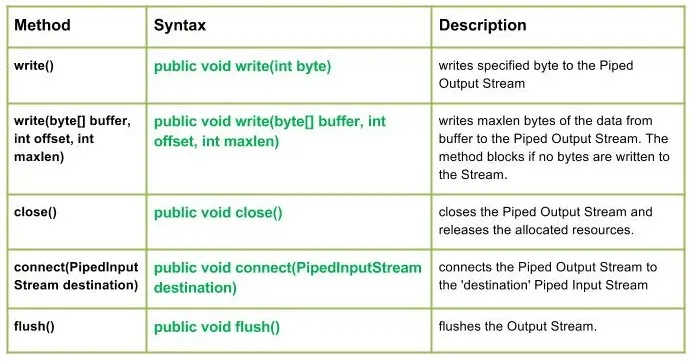
write() : java.io.PipedOutputStream.write(int byte) zapíše určený bajt do Piped Output Stream.
Syntax:
public void write(int byte)
Parameters :
byte : byte to be written
Return : void
Exception :
-> IOException : if in case IO error occurs.write(byte[] buffer int offset int maxlen) : java.io.PipedOutputStream.write(byte[] buffer int offset int maxlen) zapíše maxlen bajtov dát z vyrovnávacej pamäte do Piped Output Stream. Metóda sa zablokuje, ak do streamu nie sú zapísané žiadne bajty.
Syntax:
public void write(byte[] buffer int offset int maxlen)
Parameters :
buffer : data of the buffer
offset : starting in the destination array - 'buffer'.
maxlen : maximum length of array to be read
Return : void
Exception :
-> IOException : if in case IO error occurs. Javavýstup:
Use of write(buffer offset maxlen) : J A V A
- close() : java.io.PipedOutputStream.close() zatvorí Piped Output Stream a uvoľní pridelené zdroje.
Syntax:
 public void close()
    Parameters :
 --------------
    Return :
 void
    Exception :
 ->      IOException :     if in case IO error occurs.
- connect (cieľ PipedInputStream) : java.io.PipedOutputStream.connect (cieľ PipedInputStream pripája výstupný tok s potrubím k „cieľovému“ potrubnému vstupnému toku a v prípade, že „cieľ“ sú potrubia s nejakým iným tokom, je vyvolaná výnimka IO
Syntax:
 public void connect(PipedInputStream destination)
    Parameters :
 destination : the Piped Input Stream to be connected to
    Return :
 void
    Exception :
 ->      IOException :     if in case IO error occurs.
- flush() : java.io.PipedOutputStream.flush() prepláchne výstupný tok.
Syntax:
public void flush()
Parameters :
------------
Return :
void
Exception :
-> IOException : if in case IO error occurs.
Java kód ilustrujúci fungovanie metód triedy PipedOutputStream:
Javavýstup:
Use of flush() method :
G E E K S
Closing the Output stream
Vytvoriť kvíz