얼굴 감지를 위한 Opencv Python 프로그램
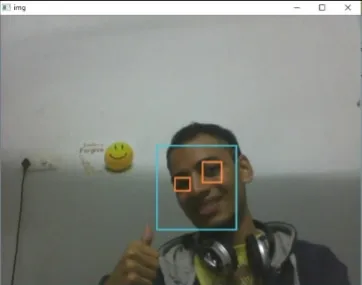
주어진 프로그램의 목적은 실시간으로 관심 객체(얼굴)를 감지하고 동일한 객체를 계속 추적하는 것입니다. 이것은 Python에서 얼굴을 감지하는 방법에 대한 간단한 예입니다. 필요한 개체에 대해 분류기를 훈련하여 검색할 다른 개체의 훈련 샘플을 사용할 수 있습니다. 아래 요구 사항을 다운로드하는 단계는 다음과 같습니다.
단계:
- Python 2.7.x 버전 numpy 및 Opencv 2.7.x 버전을 다운로드합니다. Windows가 32비트 또는 64비트와 호환되는지 확인하고 그에 따라 설치합니다.
- Python에서 numpy가 실행 중인지 확인한 다음 opencv를 설치해 보세요.
- haarcascade_eye.xml 및 haarcascade_frontalface_default.xml 파일을 동일한 폴더에 넣습니다(아래 코드에 제공된 링크).
구현
Python # OpenCV program to detect face in real time # import libraries of python OpenCV # where its functionality resides import cv2 # load the required trained XML classifiers # https://github.com/opencv/opencv/tree/master # data/haarcascades/haarcascade_frontalface_default.xml # Trained XML classifiers describes some features of some # object we want to detect a cascade function is trained # from a lot of positive(faces) and negative(non-faces) # images. face_cascade = cv2 . CascadeClassifier ( 'haarcascade_frontalface_default.xml' ) # https://github.com/opencv/opencv/tree/master # /data/haarcascades/haarcascade_eye.xml # Trained XML file for detecting eyes eye_cascade = cv2 . CascadeClassifier ( 'haarcascade_eye.xml' ) # capture frames from a camera cap = cv2 . VideoCapture ( 0 ) # loop runs if capturing has been initialized. while 1 : # reads frames from a camera ret img = cap . read () # convert to gray scale of each frames gray = cv2 . cvtColor ( img cv2 . COLOR_BGR2GRAY ) # Detects faces of different sizes in the input image faces = face_cascade . detectMultiScale ( gray 1.3 5 ) for ( x y w h ) in faces : # To draw a rectangle in a face cv2 . rectangle ( img ( x y )( x + w y + h )( 255 255 0 ) 2 ) roi_gray = gray [ y : y + h x : x + w ] roi_color = img [ y : y + h x : x + w ] # Detects eyes of different sizes in the input image eyes = eye_cascade . detectMultiScale ( roi_gray ) #To draw a rectangle in eyes for ( ex ey ew eh ) in eyes : cv2 . rectangle ( roi_color ( ex ey )( ex + ew ey + eh )( 0 127 255 ) 2 ) # Display an image in a window cv2 . imshow ( 'img' img ) # Wait for Esc key to stop k = cv2 . waitKey ( 30 ) & 0xff if k == 27 : break # Close the window cap . release () # De-allocate any associated memory usage cv2 . destroyAllWindows ()
산출:
다음 기사:
얼굴 인식을 위한 Opencv C++ 프로그램 퀴즈 만들기