Java의 Java.io.PipedOutputStream 클래스
Java의 Java.io.PipedInputStream 클래스
파이프 IO에서는 JVM에서 동시에 실행되는 두 스레드 간의 링크를 제공합니다. 따라서 파이프는 소스 또는 대상으로 모두 사용됩니다.
- PipedInputStream은 PipedOutputStream으로도 파이프됩니다. 따라서 PipedOutputStream을 사용하여 데이터를 쓸 수 있고 PipedInputStream을 사용하여 쓸 수 있습니다. 그러나 두 스레드를 동시에 사용하면 스레드에 교착 상태가 발생합니다.
- PipedOutputStream이 파이프 끝을 보내고 있습니다. Data is written to the PipedOutputStream. 데이터를 읽고 있던 PipedInputStream이 더 이상 없으면 파이프가 끊어졌다고 합니다.
선언:
 public class PipedOutputStream
  extends OutputStream
     건설자:
- PipedOutputStream() : 연결되지 않은 PipedOutputStream을 생성합니다.
- PipedOutputStream(PipedOutputStream inStream) : PipedOutputStream을 생성합니다.
PipedInputStream - 'inStream'에 연결되어 있습니다.
행동 양식:
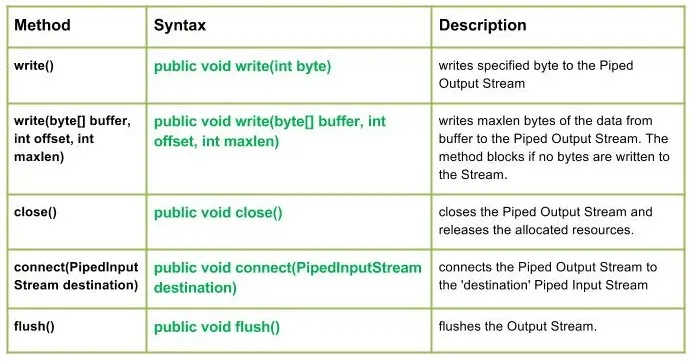
write() : java.io.PipedOutputStream.write(int 바이트) 파이프된 출력 스트림에 지정된 바이트를 씁니다.
구문:
public void write(int byte)
Parameters :
byte : byte to be written
Return : void
Exception :
-> IOException : if in case IO error occurs.write(byte[] buffer int offset int maxlen) : java.io.PipedOutputStream.write(byte[] buffer int offset int maxlen) 버퍼에서 파이프된 출력 스트림으로 데이터의 maxlen 바이트를 씁니다. Stream에 바이트가 기록되지 않으면 메서드는 차단됩니다.
구문:
public void write(byte[] buffer int offset int maxlen)
Parameters :
buffer : data of the buffer
offset : starting in the destination array - 'buffer'.
maxlen : maximum length of array to be read
Return : void
Exception :
-> IOException : if in case IO error occurs. Java산출:
Use of write(buffer offset maxlen) : J A V A
- 닫기() : java.io.PipedOutputStream.close() 파이프된 출력 스트림을 닫고 할당된 리소스를 해제합니다.
구문:
 public void close()
    Parameters :
 --------------
    Return :
 void
    Exception :
 ->      IOException :     if in case IO error occurs.
- connect(PipedInputStream 대상) : java.io.PipedOutputStream.connect(PipedInputStream 대상 파이프 출력 스트림을 '대상' 파이프 입력 스트림에 연결하고 '대상'이 다른 스트림이 있는 파이프인 경우 IO 예외가 발생합니다.
구문:
 public void connect(PipedInputStream destination)
    Parameters :
 destination : the Piped Input Stream to be connected to
    Return :
 void
    Exception :
 ->      IOException :     if in case IO error occurs.
- 플러시() : java.io.PipedOutputStream.flush() 출력 스트림을 플러시합니다.
구문:
public void flush()
Parameters :
------------
Return :
void
Exception :
-> IOException : if in case IO error occurs.
PipedOutputStream 클래스 메소드의 작동을 보여주는 Java 코드:
Java산출:
Use of flush() method :
G E E K S
Closing the Output stream
퀴즈 만들기