Javax.servlet.http.Java의 쿠키 클래스
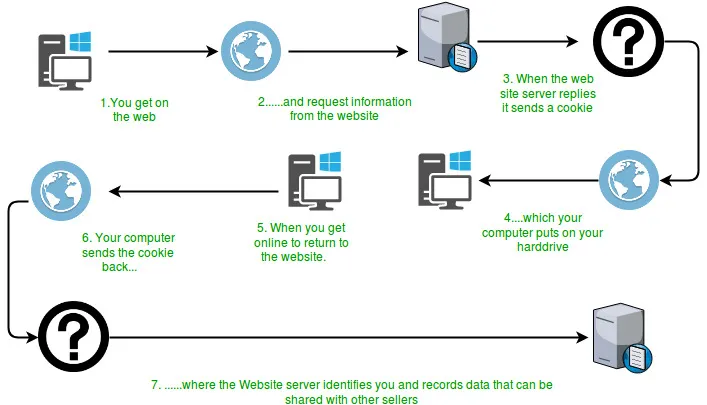
많은 웹사이트에서는 쿠키라고 하는 작은 텍스트 문자열을 사용하여 연결 간에 지속적인 클라이언트측 상태를 저장합니다. 쿠키는 서버에서 클라이언트로 전달되고 요청 및 응답의 HTTP 헤더를 통해 다시 전달됩니다. 쿠키는 서버에서 세션 ID, 장바구니 콘텐츠, 로그인 자격 증명, 사용자 기본 설정 등을 나타내는 데 사용될 수 있습니다.  위 다이어그램에서 볼 수 있듯이 사용자가 페이지를 처음 요청할 때 서버는 리소스와 함께 클라이언트 컴퓨터에 저장될 쿠키 개체를 보냅니다. 이 객체에는 요청 세부정보가 포함될 수 있습니다. 이제 나중에 사용자가 동일한 리소스를 다시 요청하면 사용자 경험을 더욱 향상시키기 위해 서버에서 사용할 수 있는 저장된 쿠키를 요청과 함께 보냅니다. 쿠키의 속성:
쿠키는 어떻게 작동하나요?
 위 다이어그램에서 볼 수 있듯이 사용자가 페이지를 처음 요청할 때 서버는 리소스와 함께 클라이언트 컴퓨터에 저장될 쿠키 개체를 보냅니다. 이 객체에는 요청 세부정보가 포함될 수 있습니다. 이제 나중에 사용자가 동일한 리소스를 다시 요청하면 사용자 경험을 더욱 향상시키기 위해 서버에서 사용할 수 있는 저장된 쿠키를 요청과 함께 보냅니다. 쿠키의 속성:
 - 먼저 서블릿은 test_cookie라는 이름의 쿠키를 설정합니다. 프로그램의 다른 라인은 최대 연령 도메인 값 등과 같은 쿠키의 속성을 설정합니다.
- 두 번째로 서블릿은 request.getCookies를 사용하여 들어오는 모든 쿠키를 찾고 해당 쿠키의 이름과 기타 해당 속성을 표시합니다.
- 첫 번째 요청의 경우처럼 쿠키가 발견되지 않으면 해당 페이지를 처음 방문했음을 알리는 간단한 표시 메시지가 표시됩니다.
Set-Cookie:session-id = 187-4969589-3049309
Set-Cookie: user = geek ;Domain =.foo.example.com
Set-Cookie: user = geek; Path =/ restricted
Set-Cookie: user = geek; expires = Wed 21-Feb-2017 15:23:00 IST
Set-Cookie: user = 'geek'; Max-Age = 3600건설자 : Creates a cookie with specified name-value pair.
Syntax : public Cookie(String name String value) Parameters : name : name of the cookie value : value associated with this cookie방법:
Syntax : public void setDomain(String pattern) Parameters : pattern : string representing the domain in which this cookie is visible.
Syntax : public String getDomain()
Syntax : public void setComment(String purpose) Parameters : purpose : string representing the purpose of this cookie.
Syntax : public String getComment()
Syntax : public void setMaxAge(long time) Parameters : time : time in seconds before this cookie expires
Syntax : public String getMaxAge()
Syntax : public void setPath(String path) Parameters : path : path where this cookie is returned
Syntax : public String getMaxAge()
Syntax : public void setSecure(boolean secure) Parameters: secure - If true the cookie can only be sent over a secure protocol like https. If false it can be sent over any protocol.
Syntax : public boolean getSecure()
Syntax : public String getName()
Syntax : public void setValue(String newValue) Parameters : newValue - a String specifying the new value
Syntax : public String getValue()
Syntax : public int getVersion()
Syntax : public void setVersion(int v) Parameters : v - 0 for original Netscape specification; 1 for RFC 2965/2109
Syntax : public Cookie clone()Below is a Java implementation of a simple servlet program which stores a cookie in the browser when user first requests for it and then for further requests it displays the cookies stored. Java
// Java program to illustrate methods // of Cookie class import java.io.IOException ; import java.io.PrintWriter ; import java.util.List ; import javax.servlet.ServletException ; import javax.servlet.annotation.WebServlet ; import javax.servlet.http.Cookie ; import javax.servlet.http.HttpServlet ; import javax.servlet.http.HttpServletRequest ; import javax.servlet.http.HttpServletResponse ; /** * Servlet implementation class cookieTest */ @WebServlet ( '/cookieTest' ) public class cookieTest extends HttpServlet { private static final long serialVersionUID = 1L ; /** * @see HttpServlet#HttpServlet() */ public cookieTest () { super (); // TODO Auto-generated constructor stub } /** * @see HttpServlet#doGet(HttpServletRequest request HttpServletResponse * response) */ protected void doGet ( HttpServletRequest request HttpServletResponse response ) throws ServletException IOException { response . setContentType ( 'text/html' ); // Create a new cookie with the name test cookie // and value 123 Cookie cookie = new Cookie ( 'test_cookie' '123' ); // setComment() method cookie . setComment ( 'Just for testing' ); // setDomain() method // cookie.setDomain('domain'); // setMaxAge() method cookie . setMaxAge ( 3600 ); // setPath() method cookie . setPath ( '/articles' ); // setSecure() method cookie . setSecure ( false ); // setValue() method cookie . setValue ( '321' ); // setVersion() method cookie . setVersion ( 0 ); response . addCookie ( cookie ); PrintWriter pw = response . getWriter (); pw . print ( ' ' ); Cookie ck [] = request . getCookies (); if ( ck == null ) { pw . print ( ' This is first time the page is requested.
' ); pw . print ( ' And therefore no cookies found
' ); } else { pw . print ( ' Welcome Again...Cookies found
' ); for ( int i = 0 ; i < ck . length ; i ++ ) { // getName() method pw . print ( ' Name :'
+ ck [ i ] . getName () + ' ' ); // getValue() method pw . print ( ' Value :'
+ ck [ i ] . getValue () + ' ' ); // getDomain() method pw . print ( ' Domain :'
+ ck [ i ] . getDomain () + ' ' ); // getPath() method pw . print ( ' Name :'
+ ck [ i ] . getPath () + ' ' ); // getMaxAge() method pw . print ( ' Max Age :'
+ ck [ i ] . getMaxAge () + ' ' ); // getComment() method pw . print ( ' Comment :'
+ ck [ i ] . getComment () + ' ' ); // getSecure() method pw . print ( ' Name :'
+ ck [ i ] . getSecure () + ' ' ); // getVersion() method pw . print ( ' Version :'
+ ck [ i ] . getVersion () + ' ' ); } pw . print ( ' ' ); } pw . close (); } /** * @see HttpServlet#doPost(HttpServletRequest request HttpServletResponse * response) */ protected void doPost ( HttpServletRequest request HttpServletResponse response ) throws ServletException IOException { doGet ( request response ); } }
산출: 다음 출력은 웹 브라우저에서 나온 것입니다. 첫 번째 요청의 경우: This is first time the page is requested. And therefore no cookies found.두 번째 요청의 경우:
Welcome Again...Cookies found Name :test_cookie Value :321 Domain :null Name :null Max Age :-1 Comment :null Name :false Version :0
위 프로그램을 어떻게 실행하나요?
먼저 Apache Tomcat과 같은 서버가 설치되어 있고 Eclipse와 같이 사용 중인 도구로 구성되어 있는지 확인하십시오. 사용 중인 서버 디렉토리의 전체 주소를 입력하여 서버나 로컬 브라우저에서 위 프로그램을 실행하기만 하면 됩니다. CookieTest 서블릿은 세 가지 작업을 수행하는 서블릿입니다.마음에 드실지도 몰라요

인기 기사