
JavaScriptを使用してJSONファイルを読み取る
JSON の略です JavaScript オブジェクト表記法 。これは、テキストを使用してスクリプト ファイル内のデータを整理し、データの保存と共有を容易にする方法です。
読む JSON ファイルがローカルに保存されているかサーバー上に保存されているかは、Web アプリケーションにとって非常に重要です。このチュートリアルでは、Web 開発者にとって非常に役立つ、JavaScript で JSON ファイルを読み取る 3 つの方法について説明します。
目次
- JavaScriptでJSONファイルを読み取るにはどうすればよいですか?
- fetch() API を使用して JSON ファイルを読み取る
- Require モジュールを使用して JSON ファイルを読み取る
- JSONファイルを読み込むモジュールをインポートすることで
- 結論
注記: JavaScript は内部で JSON をサポートしているため、JSON をインポートして表示するための追加モジュールは必要ありません。 JSON ファイルをインポートするだけで、簡単に直接使用して操作を実行できます。
JavaScriptでJSONファイルを読み取るにはどうすればよいですか?
JavaScript で JSON ファイルを読み取る 3 つの方法は次のとおりです。
注記: データの取得には以下の JSON ファイルが使用されます。
サンプル.json
{ 'users':[ { 'site':'techcodeview.com', 'user': 'Shobhit' } ] } 1. fetch() API を使用して JSON ファイルを読み取る
fetch() メソッドは、JSON ファイル (ローカル ファイルまたはアップロードされたファイル) を読み取るために使用されます。どちらのファイル タイプでも同じ構文を使用します。
構文
fetch('JSONFilePath').then().then().catch(); フェッチ API メソッドを使用して JSON ファイルを読み取るには、次の手順に従います。
- JSON ファイルを作成してデータを追加する
- JavaScript ファイルを開きます
- fetchメソッドではJSONファイルのパスを渡します。
- .json() メソッドを使用して、JSON 形式のデータを解析します。
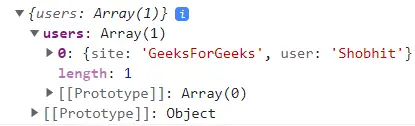
- コンソールにコンテンツを表示します。
JavaScriptでJSONファイルを読み取る例:
以下のコードは、JSON ファイルを読み取るための fetch() メソッドの使用法を理解するのに役立ちます。
HTML JSON ファイルのタイトル> head> を読み取ります <body> <h1>techcodeview.comh1> <h3>コンソールにアクセスして、取得したデータを確認してください。 h3> <script>function fetchJSONData() { fetch('./sample.json') .then((res) => { if (!res.ok) { throw new Error (`HTTP エラー! ステータス: ${res.status} `); } return res.json(); }) .then((data) => console.log(data)) .catch((error) => console.error('データを取得できません:',エラー)); fetchJSONData(); スクリプト>本文>html>> </pre> </code> <p dir='ltr'> <b> <strong>出力: </strong> </b> </p> <p dir='ltr'> <img src='//techcodeview.com/img/javascript-questions/49/read-json-file-using-javascript.webp' alt='API を取得した後の JSON データのコンソール ビュー'> </p> <h2 id='using-the-require-module-to-read-json-file'> <b> <strong>2. Require モジュールを使用して JSON ファイルを読み取る </strong> </b> </h2> <p dir='ltr'> <span>モジュールが必要 </span> <span>アプリケーションにモジュールを含めるために使用されます。これを使用して、Web アプリケーションにファイルを含めることができます。 </span> </p> <h3> <span>構文: </span> </h3> <pre>require(JSONFilePath); </pre> <p dir='ltr'> <span>JavaScript で必要なモジュールを使用して JSON ファイルを読み取るには、次の手順に従います。 </span> </p> <ul> <li value='1'> <span>前のアプローチで指定したように JSON ファイルを作成します </span> </li> <li value='2'> <span>script.js を作成し、ノードの必要なメソッドを使用して JSON ファイルをインポートします </span> </li> <li value='3'> <span>コンソール上のデータを印刷する </span> </li> </ul> <p dir='ltr'> <b> <strong>注記: </strong> </b> <span>ブラウザ上でプログラムを実行する代わりに、Node.js を使用してコンソール上でプログラムを実行します。少なくとも Node バージョン 17.0 があることを確認してください。 </span> </p> <h3> <b> <strong>例 </strong> </b> </h3> <p dir='ltr'> <span>以下のコードをスクリプト ファイルに直接貼り付けると (ノードがインストールされている必要があります)、実行して JSON データを取得できます。 </span> </p>JavaScript <code> <pre>const sample = require('./sample.json'); console.log(sample); </pre> </code> <p dir='ltr'> <b> <strong>出力: </strong> </b> </p> <pre>{ users: [ { site: 'GeeksForGeeks', user: 'Shobhit' } ] } </pre> <h2 id='by-importing-the-module-to-read-json-file'> <b> <strong>3. JSONファイルを読み込むモジュールをインポートする </strong> </b> </h2> <p dir='ltr'> <span>の </span> <span>インポートステートメント </span> <span>JSON ファイル要素を JavaScript の変数にインポートして保存するために使用できます。 </span> </p> <h3> <span>構文: </span> </h3> <pre>import nameOfVariable from 'JSONFilePath' assert {type: 'json'}; </pre> <ul> <li value='1'> <span>前の例で説明したように、JSON ファイルを作成します。 </span> </li> <li value='2'> <span>script.js ファイルを作成し、JSON ファイルをインポートします。 </span> </li> </ul> <h3> <b> <strong>JavaScriptでJSONファイルを読み取る例: </strong> </b> </h3> <p dir='ltr'> <span>以下のコードは、import ステートメントを使用して JSON ファイルをインポートして読み取ります。 </span> </p>HTML <code> <pre> <html lang='en'> <head> <meta charset='UTF-8'> <meta name='viewport' content= 'width=device-width, initial-scale=1.0'> <title>JSON ファイルのタイトル> head> を読み取ります <body> <h1>techcodeview.comh1> <h3>コンソールにアクセスして、取得したデータを確認してください。 h3> <script type='module' src='./script.js'>スクリプト>本文>html>> </pre> </code>JavaScript <code> <pre>// script.js import user from './sample.json' assert { type: 'json' }; console.log(user) </pre> </code> <p dir='ltr'> <b> <strong>出力: </strong> </b> </p> <p dir='ltr'> <img src='//techcodeview.com/img/javascript-questions/49/read-json-file-using-javascript.webp' alt='インポートモジュールを使用した JSON データのコンソールビュー'> </p> <h2 id='conclusion'> <span>結論 </span> </h2> <p dir='ltr'> <span>JSON ファイルはユーザー データ、構成データ、静的データ、その他の重要な情報を保存するために使用されるため、JavaScript で JSON ファイルを読み取ることは Web 開発者にとって非常に重要なタスクです。 </span> </p> <p dir='ltr'> <span>このガイドでは、JavaScript で JSON ファイルを読み取る 3 つの方法を例とともに説明しました。これらのテクニックを理解することで、開発者は自信を持って JSON ファイル関連のタスクに取り組むことができ、開発プロセスがよりスムーズになり、ユーザー エクスペリエンスが向上します。 </span> </p> <br> <br>
</div>
<!-- Article Footer with Prominent Share Buttons -->
<div class="px-6 md:px-8 py-8 bg-slate-50 dark:bg-slate-900/50 border-t border-slate-200 dark:border-slate-700/50">
<div class="flex flex-col sm:flex-row items-center justify-between gap-6">
<h4 class="text-base font-bold text-slate-700 dark:text-slate-300 uppercase tracking-wide flex items-center gap-2">
<i class="fa fa-share-alt text-tech-500"> </i>
共有 </h4>
<div class="flex flex-wrap justify-center gap-3">
<!-- Twitter -->
<a href="https://twitter.com/intent/tweet?text=JavaScriptを使用してJSONファイルを読み取る&url=https://www.techcodeview.com/ja/read-json-file-using-javascript"
target="_blank" rel="noopener noreferrer"
class="flex items-center gap-2 px-6 py-3 rounded-xl bg-[#1DA1F2]/10 text-[#1DA1F2] hover:bg-[#1DA1F2] hover:text-white transition-all duration-300 font-bold text-sm">
<i class="fa fa-twitter text-lg"> </i>
<span class="hidden sm:inline">Twitter </span>
</a>
<!-- Facebook -->
<a href="https://www.facebook.com/sharer/sharer.php?u=https://www.techcodeview.com/ja/read-json-file-using-javascript"
target="_blank" rel="noopener noreferrer"
class="flex items-center gap-2 px-6 py-3 rounded-xl bg-[#4267B2]/10 text-[#4267B2] hover:bg-[#4267B2] hover:text-white transition-all duration-300 font-bold text-sm">
<i class="fa fa-facebook text-lg"> </i>
<span class="hidden sm:inline">Facebook </span>
</a>
<!-- LinkedIn -->
<a href="https://www.linkedin.com/shareArticle?mini=true&url=https://www.techcodeview.com/ja/read-json-file-using-javascript&title=JavaScriptを使用してJSONファイルを読み取る"
target="_blank" rel="noopener noreferrer"
class="flex items-center gap-2 px-6 py-3 rounded-xl bg-[#0077b5]/10 text-[#0077b5] hover:bg-[#0077b5] hover:text-white transition-all duration-300 font-bold text-sm">
<i class="fa fa-linkedin text-lg"> </i>
<span class="hidden sm:inline">LinkedIn </span>
</a>
</div>
</div>
</div>
</article>
<!-- Comments Placeholder / Random Articles -->
<div class="mt-8 bg-white dark:bg-slate-800 border border-slate-200 dark:border-slate-700 rounded-xl p-6 md:p-8 shadow-sm">
<h3 class="text-xl font-bold text-slate-900 dark:text-white mb-6 uppercase tracking-wide border-b border-slate-200 dark:border-slate-700 pb-2">
あなたにおすすめ </h3>
<div class="grid grid-cols-1 md:grid-cols-2 gap-6">
<div class="group">
<a href="/ja/how-many-zeros-1-million" class="block aspect-video rounded-lg overflow-hidden bg-slate-200 dark:bg-slate-700 mb-3">
<img loading="lazy" src="https://techcodeview.com/img/maths/58/how-many-zeros-1-million.webp" onerror="this.onerror=null; this.src='https://techcodeview.com/template/assets/images/unnamed.webp'" alt="100万にゼロは何個あるか" class="w-full h-full object-cover group-hover:scale-105 transition-transform duration-500">
</a>
<h4 class="font-bold text-slate-900 dark:text-white leading-tight group-hover:text-tech-500 transition-colors">
<a href="/ja/how-many-zeros-1-million">100万にゼロは何個あるか </a>
</h4>
</div> <div class="group">
<a href="/ja/ml-expectation-maximization-algorithm" class="block aspect-video rounded-lg overflow-hidden bg-slate-200 dark:bg-slate-700 mb-3">
<img loading="lazy" src="https://techcodeview.com/img/it-problems-solutions/33/ml-expectation-maximization-algorithm.webp" onerror="this.onerror=null; this.src='https://techcodeview.com/template/assets/images/unnamed.webp'" alt="ML |期待値最大化アルゴリズム" class="w-full h-full object-cover group-hover:scale-105 transition-transform duration-500">
</a>
<h4 class="font-bold text-slate-900 dark:text-white leading-tight group-hover:text-tech-500 transition-colors">
<a href="/ja/ml-expectation-maximization-algorithm">ML |期待値最大化アルゴリズム </a>
</h4>
</div>
</div>
</div>
</div>
<!-- SECONDARY COLUMN (SIDEBAR) -->
<!-- Aside Column -->
<div class="lg:col-span-4 space-y-8">
<!-- Best Articles Widget -->
<div class="rounded-xl bg-white dark:bg-slate-800 border border-slate-200 dark:border-slate-700 p-6 shadow-sm">
<div class="mb-4 border-b border-slate-100 dark:border-slate-700 pb-2">
<h2 class="text-lg font-bold text-slate-900 dark:text-white uppercase tracking-wide flex items-center">
<span class="mr-2 h-2 w-2 rounded-full bg-tech-500"> </span>
トップ記事 </h2>
</div>
<!-- Owl Carousel Preserved Container -->
<div id="owl-carousel-3" class="owl-carousel owl-theme center-owl-nav">
<!-- ARTICLE -->
<article class="flex items-start gap-4 p-2 hover:bg-slate-50 dark:hover:bg-slate-700/50 rounded-lg transition-colors">
<div class="w-20 h-20 shrink-0 overflow-hidden rounded-md bg-slate-200 dark:bg-slate-700">
<a href="/ja/how-center-button-css">
<img src="https://techcodeview.com/img/css-tutorial/70/how-center-button-css.webp" onerror="this.onerror=null; this.src='https://techcodeview.com/template/assets/images/unnamed.webp'" alt="CSSでボタンを中央に配置するにはどうすればよいですか?" class="w-full h-full object-cover">
</a>
</div>
<div class="flex-1 min-w-0">
<h4 class="text-sm font-semibold text-slate-800 dark:text-slate-200 leading-snug">
<a href="/ja/how-center-button-css" class="hover:text-tech-500 transition-colors line-clamp-3">CSSでボタンを中央に配置するにはどうすればよいですか? </a>
</h4>
</div>
</article>
<!-- /ARTICLE --> <!-- ARTICLE -->
<article class="flex items-start gap-4 p-2 hover:bg-slate-50 dark:hover:bg-slate-700/50 rounded-lg transition-colors">
<div class="w-20 h-20 shrink-0 overflow-hidden rounded-md bg-slate-200 dark:bg-slate-700">
<a href="/ja/strlen-function-c">
<img src="https://techcodeview.com/img/c-library/74/strlen-function-c.webp" onerror="this.onerror=null; this.src='https://techcodeview.com/template/assets/images/unnamed.webp'" alt="Cのstrlen()関数" class="w-full h-full object-cover">
</a>
</div>
<div class="flex-1 min-w-0">
<h4 class="text-sm font-semibold text-slate-800 dark:text-slate-200 leading-snug">
<a href="/ja/strlen-function-c" class="hover:text-tech-500 transition-colors line-clamp-3">Cのstrlen()関数 </a>
</h4>
</div>
</article>
<!-- /ARTICLE --> <!-- ARTICLE -->
<article class="flex items-start gap-4 p-2 hover:bg-slate-50 dark:hover:bg-slate-700/50 rounded-lg transition-colors">
<div class="w-20 h-20 shrink-0 overflow-hidden rounded-md bg-slate-200 dark:bg-slate-700">
<a href="/ja/random-header-in-c-set-1-generators">
<img src="https://techcodeview.com/img/technical-scripter/08/random-header-in-c-set-1-generators.webp" onerror="this.onerror=null; this.src='https://techcodeview.com/template/assets/images/unnamed.webp'" alt="C++のランダムヘッダー |セット 1(発電機)" class="w-full h-full object-cover">
</a>
</div>
<div class="flex-1 min-w-0">
<h4 class="text-sm font-semibold text-slate-800 dark:text-slate-200 leading-snug">
<a href="/ja/random-header-in-c-set-1-generators" class="hover:text-tech-500 transition-colors line-clamp-3">C++のランダムヘッダー |セット 1(発電機) </a>
</h4>
</div>
</article>
<!-- /ARTICLE --> <!-- ARTICLE -->
<article class="flex items-start gap-4 p-2 hover:bg-slate-50 dark:hover:bg-slate-700/50 rounded-lg transition-colors">
<div class="w-20 h-20 shrink-0 overflow-hidden rounded-md bg-slate-200 dark:bg-slate-700">
<a href="/ja/diameter-of-an-n-ary-tree">
<img src="https://techcodeview.com/img/tree/20/diameter-of-an-n-ary-tree.webp" onerror="this.onerror=null; this.src='https://techcodeview.com/template/assets/images/unnamed.webp'" alt="N分木の直径" class="w-full h-full object-cover">
</a>
</div>
<div class="flex-1 min-w-0">
<h4 class="text-sm font-semibold text-slate-800 dark:text-slate-200 leading-snug">
<a href="/ja/diameter-of-an-n-ary-tree" class="hover:text-tech-500 transition-colors line-clamp-3">N分木の直径 </a>
</h4>
</div>
</article>
<!-- /ARTICLE --> <!-- ARTICLE -->
<article class="flex items-start gap-4 p-2 hover:bg-slate-50 dark:hover:bg-slate-700/50 rounded-lg transition-colors">
<div class="w-20 h-20 shrink-0 overflow-hidden rounded-md bg-slate-200 dark:bg-slate-700">
<a href="/ja/capricorn-moon-sign-what-you-should-know-131756">
<img src="https://techcodeview.com/img/blog/94/capricorn-moon-sign-what-you-should-know.webp" onerror="this.onerror=null; this.src='https://techcodeview.com/template/assets/images/unnamed.webp'" alt="山羊座の月星座: 知っておくべきこと" class="w-full h-full object-cover">
</a>
</div>
<div class="flex-1 min-w-0">
<h4 class="text-sm font-semibold text-slate-800 dark:text-slate-200 leading-snug">
<a href="/ja/capricorn-moon-sign-what-you-should-know-131756" class="hover:text-tech-500 transition-colors line-clamp-3">山羊座の月星座: 知っておくべきこと </a>
</h4>
</div>
</article>
<!-- /ARTICLE --> <!-- ARTICLE -->
<article class="flex items-start gap-4 p-2 hover:bg-slate-50 dark:hover:bg-slate-700/50 rounded-lg transition-colors">
<div class="w-20 h-20 shrink-0 overflow-hidden rounded-md bg-slate-200 dark:bg-slate-700">
<a href="/ja/acceleration-time-graphs">
<img src="https://techcodeview.com/img/physics-class-11/92/acceleration-time-graphs.webp" onerror="this.onerror=null; this.src='https://techcodeview.com/template/assets/images/unnamed.webp'" alt="加速時間グラフ" class="w-full h-full object-cover">
</a>
</div>
<div class="flex-1 min-w-0">
<h4 class="text-sm font-semibold text-slate-800 dark:text-slate-200 leading-snug">
<a href="/ja/acceleration-time-graphs" class="hover:text-tech-500 transition-colors line-clamp-3">加速時間グラフ </a>
</h4>
</div>
</article>
<!-- /ARTICLE --> <!-- ARTICLE -->
<article class="flex items-start gap-4 p-2 hover:bg-slate-50 dark:hover:bg-slate-700/50 rounded-lg transition-colors">
<div class="w-20 h-20 shrink-0 overflow-hidden rounded-md bg-slate-200 dark:bg-slate-700">
<a href="/ja/kill-command">
<img src="https://techcodeview.com/img/linux-tutorial/43/kill-command.webp" onerror="this.onerror=null; this.src='https://techcodeview.com/template/assets/images/unnamed.webp'" alt="キルコマンド" class="w-full h-full object-cover">
</a>
</div>
<div class="flex-1 min-w-0">
<h4 class="text-sm font-semibold text-slate-800 dark:text-slate-200 leading-snug">
<a href="/ja/kill-command" class="hover:text-tech-500 transition-colors line-clamp-3">キルコマンド </a>
</h4>
</div>
</article>
<!-- /ARTICLE --> <!-- ARTICLE -->
<article class="flex items-start gap-4 p-2 hover:bg-slate-50 dark:hover:bg-slate-700/50 rounded-lg transition-colors">
<div class="w-20 h-20 shrink-0 overflow-hidden rounded-md bg-slate-200 dark:bg-slate-700">
<a href="/ja/derivative-inverse-trig-functions">
<img src="https://techcodeview.com/img/calculus/20/derivative-inverse-trig-functions.webp" onerror="this.onerror=null; this.src='https://techcodeview.com/template/assets/images/unnamed.webp'" alt="逆三角関数の導関数" class="w-full h-full object-cover">
</a>
</div>
<div class="flex-1 min-w-0">
<h4 class="text-sm font-semibold text-slate-800 dark:text-slate-200 leading-snug">
<a href="/ja/derivative-inverse-trig-functions" class="hover:text-tech-500 transition-colors line-clamp-3">逆三角関数の導関数 </a>
</h4>
</div>
</article>
<!-- /ARTICLE --> <!-- ARTICLE -->
<article class="flex items-start gap-4 p-2 hover:bg-slate-50 dark:hover:bg-slate-700/50 rounded-lg transition-colors">
<div class="w-20 h-20 shrink-0 overflow-hidden rounded-md bg-slate-200 dark:bg-slate-700">
<a href="/ja/how-find-an-angle-right-angled-triangle">
<img src="https://techcodeview.com/img/maths-calculators/87/how-find-an-angle-right-angled-triangle.webp" onerror="this.onerror=null; this.src='https://techcodeview.com/template/assets/images/unnamed.webp'" alt="直角三角形の角度を求めるにはどうすればよいですか?" class="w-full h-full object-cover">
</a>
</div>
<div class="flex-1 min-w-0">
<h4 class="text-sm font-semibold text-slate-800 dark:text-slate-200 leading-snug">
<a href="/ja/how-find-an-angle-right-angled-triangle" class="hover:text-tech-500 transition-colors line-clamp-3">直角三角形の角度を求めるにはどうすればよいですか? </a>
</h4>
</div>
</article>
<!-- /ARTICLE --> <!-- ARTICLE -->
<article class="flex items-start gap-4 p-2 hover:bg-slate-50 dark:hover:bg-slate-700/50 rounded-lg transition-colors">
<div class="w-20 h-20 shrink-0 overflow-hidden rounded-md bg-slate-200 dark:bg-slate-700">
<a href="/ja/mysql-show-users-list-all-users">
<img src="https://techcodeview.com/img/mysql-tutorial/23/mysql-show-users-list-all-users.webp" onerror="this.onerror=null; this.src='https://techcodeview.com/template/assets/images/unnamed.webp'" alt="MySQL ユーザーの表示/すべてのユーザーのリスト" class="w-full h-full object-cover">
</a>
</div>
<div class="flex-1 min-w-0">
<h4 class="text-sm font-semibold text-slate-800 dark:text-slate-200 leading-snug">
<a href="/ja/mysql-show-users-list-all-users" class="hover:text-tech-500 transition-colors line-clamp-3">MySQL ユーザーの表示/すべてのユーザーのリスト </a>
</h4>
</div>
</article>
<!-- /ARTICLE -->
</div>
<!-- Categories -->
<div class="mt-8 mb-4 border-b border-slate-100 dark:border-slate-700 pb-2">
<h2 class="text-lg font-bold text-slate-900 dark:text-white uppercase tracking-wide">カテゴリ </h2>
</div>
<div class="flex flex-wrap gap-2">
<a href="/ja/blog/" class="inline-block px-3 py-1 bg-slate-100 dark:bg-slate-700 text-xs font-medium text-slate-600 dark:text-slate-300 rounded-full hover:bg-tech-500 hover:text-white transition-colors">
ブログ
</a> <a href="/ja/java-conversion/" class="inline-block px-3 py-1 bg-slate-100 dark:bg-slate-700 text-xs font-medium text-slate-600 dark:text-slate-300 rounded-full hover:bg-tech-500 hover:text-white transition-colors">
Java変換
</a> <a href="/ja/maths/" class="inline-block px-3 py-1 bg-slate-100 dark:bg-slate-700 text-xs font-medium text-slate-600 dark:text-slate-300 rounded-full hover:bg-tech-500 hover:text-white transition-colors">
数学
</a> <a href="/ja/java-collections/" class="inline-block px-3 py-1 bg-slate-100 dark:bg-slate-700 text-xs font-medium text-slate-600 dark:text-slate-300 rounded-full hover:bg-tech-500 hover:text-white transition-colors">
Java コレクション
</a> <a href="/ja/differences/" class="inline-block px-3 py-1 bg-slate-100 dark:bg-slate-700 text-xs font-medium text-slate-600 dark:text-slate-300 rounded-full hover:bg-tech-500 hover:text-white transition-colors">
違い
</a> <a href="/ja/java-string/" class="inline-block px-3 py-1 bg-slate-100 dark:bg-slate-700 text-xs font-medium text-slate-600 dark:text-slate-300 rounded-full hover:bg-tech-500 hover:text-white transition-colors">
Java文字列
</a>
</div>
<!-- Interesting Articles Widget -->
<div class="mt-8">
<div class="mb-4 border-b border-slate-100 dark:border-slate-700 pb-2">
<h2 class="text-lg font-bold text-slate-900 dark:text-white uppercase tracking-wide">興味深い記事 </h2>
</div>
<div id="owl-carousel-4" class="owl-carousel owl-theme">
<!-- ARTICLE -->
<article class="relative aspect-video rounded-lg overflow-hidden group mb-2">
<div class="absolute inset-0">
<img src="https://techcodeview.com/img/css-tutorial/99/how-change-background-color-css.webp" onerror="this.onerror=null; this.src='https://techcodeview.com/template/assets/images/unnamed.webp'" alt="CSSで背景色を変更するにはどうすればよいですか?" class="w-full h-full object-cover group-hover:scale-105 transition-transform duration-500">
<div class="absolute inset-0 bg-gradient-to-t from-black/80 to-transparent"> </div>
</div>
<div class="absolute bottom-0 left-0 p-4">
<div class="text-xs text-tech-400 font-bold mb-1"> <a href="/ja/css-tutorial/">Css チュートリアル </a> </div>
<h4 class="text-sm font-bold text-white leading-tight"> <a href="/ja/how-change-background-color-css">CSSで背景色を変更するにはどうすればよいですか? </a> </h4>
</div>
</article>
<!-- /ARTICLE --> <!-- ARTICLE -->
<article class="relative aspect-video rounded-lg overflow-hidden group mb-2">
<div class="absolute inset-0">
<img src="https://techcodeview.com/img/java-exceptions/25/exceptions-java.webp" onerror="this.onerror=null; this.src='https://techcodeview.com/template/assets/images/unnamed.webp'" alt="Java の例外" class="w-full h-full object-cover group-hover:scale-105 transition-transform duration-500">
<div class="absolute inset-0 bg-gradient-to-t from-black/80 to-transparent"> </div>
</div>
<div class="absolute bottom-0 left-0 p-4">
<div class="text-xs text-tech-400 font-bold mb-1"> <a href="/ja/java-exceptions/">Java 例外 </a> </div>
<h4 class="text-sm font-bold text-white leading-tight"> <a href="/ja/exceptions-java">Java の例外 </a> </h4>
</div>
</article>
<!-- /ARTICLE --> <!-- ARTICLE -->
<article class="relative aspect-video rounded-lg overflow-hidden group mb-2">
<div class="absolute inset-0">
<img src="https://techcodeview.com/img/banking-english/49/what-is-tense-types.webp" onerror="this.onerror=null; this.src='https://techcodeview.com/template/assets/images/unnamed.webp'" alt="テンスとは何ですか?種類、定義、例" class="w-full h-full object-cover group-hover:scale-105 transition-transform duration-500">
<div class="absolute inset-0 bg-gradient-to-t from-black/80 to-transparent"> </div>
</div>
<div class="absolute bottom-0 left-0 p-4">
<div class="text-xs text-tech-400 font-bold mb-1"> <a href="/ja/banking-english/">銀行英語 </a> </div>
<h4 class="text-sm font-bold text-white leading-tight"> <a href="/ja/what-is-tense-types">テンスとは何ですか?種類、定義、例 </a> </h4>
</div>
</article>
<!-- /ARTICLE --> <!-- ARTICLE -->
<article class="relative aspect-video rounded-lg overflow-hidden group mb-2">
<div class="absolute inset-0">
<img src="https://techcodeview.com/img/typescript-tutorial/41/typescript-set.webp" onerror="this.onerror=null; this.src='https://techcodeview.com/template/assets/images/unnamed.webp'" alt="TypeScript セット" class="w-full h-full object-cover group-hover:scale-105 transition-transform duration-500">
<div class="absolute inset-0 bg-gradient-to-t from-black/80 to-transparent"> </div>
</div>
<div class="absolute bottom-0 left-0 p-4">
<div class="text-xs text-tech-400 font-bold mb-1"> <a href="/ja/typescript-tutorial/">Typescript チュートリアル </a> </div>
<h4 class="text-sm font-bold text-white leading-tight"> <a href="/ja/typescript-set">TypeScript セット </a> </h4>
</div>
</article>
<!-- /ARTICLE --> <!-- ARTICLE -->
<article class="relative aspect-video rounded-lg overflow-hidden group mb-2">
<div class="absolute inset-0">
<img src="https://techcodeview.com/img/listicles/66/working-with-pdf-files-python.webp" onerror="this.onerror=null; this.src='https://techcodeview.com/template/assets/images/unnamed.webp'" alt="Python で PDF ファイルを操作する" class="w-full h-full object-cover group-hover:scale-105 transition-transform duration-500">
<div class="absolute inset-0 bg-gradient-to-t from-black/80 to-transparent"> </div>
</div>
<div class="absolute bottom-0 left-0 p-4">
<div class="text-xs text-tech-400 font-bold mb-1"> <a href="/ja/listicles/">リスティクル </a> </div>
<h4 class="text-sm font-bold text-white leading-tight"> <a href="/ja/working-with-pdf-files-python">Python で PDF ファイルを操作する </a> </h4>
</div>
</article>
<!-- /ARTICLE --> <!-- ARTICLE -->
<article class="relative aspect-video rounded-lg overflow-hidden group mb-2">
<div class="absolute inset-0">
<img src="https://techcodeview.com/img/numpy-tutorial/46/numpy-ndarray.webp" onerror="this.onerror=null; this.src='https://techcodeview.com/template/assets/images/unnamed.webp'" alt="NumPy ンダーレイ" class="w-full h-full object-cover group-hover:scale-105 transition-transform duration-500">
<div class="absolute inset-0 bg-gradient-to-t from-black/80 to-transparent"> </div>
</div>
<div class="absolute bottom-0 left-0 p-4">
<div class="text-xs text-tech-400 font-bold mb-1"> <a href="/ja/numpy-tutorial/">Numpy チュートリアル </a> </div>
<h4 class="text-sm font-bold text-white leading-tight"> <a href="/ja/numpy-ndarray">NumPy ンダーレイ </a> </h4>
</div>
</article>
<!-- /ARTICLE -->
</div>
</div>
</div>
</div>
<!-- /Aside Column --> </div>
</div>
</div>
<footer class="site-footer">
<div class="container">
<span class="footer-links">
Copyright ©2026 全著作権所有 |
<a href="//www.techcodeview.com/sk/">techcodeview.com </a> |
<a href="/disclaimer" rel="nofollow noopener noreferrer" target="_blank">免責事項 </a> |
<a href="/about-us" rel="nofollow noopener noreferrer" target="_blank">私たちについて </a> |
<a href="/privacy-policy" rel="nofollow noopener noreferrer" target="_blank">プライバシーポリシー </a>
</span>
</div>
</footer>
<script type="text/javascript" src="https://techcodeview.com/template/assets/plugins/jquery-1.11.3.min.js"> </script>
<script type="text/javascript" src="https://techcodeview.com/template/assets/plugins/bootstrap/js/bootstrap.min.js"> </script>
<script type="text/javascript" src="https://techcodeview.com/template/assets/js/main.js"> </script>
<script src="//cdnjs.cloudflare.com/ajax/libs/highlight.js/11.5.1/highlight.min.js"> </script>
<script>
!function(){"use strict";let t=document.createElement("button");t.id="toTopBtn",t.innerHTML="↑";let e=`
#toTopBtn {
position: fixed; bottom: 25px; right: 25px; z-index: 9999; opacity: 0; visibility: hidden; background-color: #0ea5e9; color: white; border: none; border-radius: 8px; width: 50px; height: 50px; font-size: 24px; cursor: pointer; transition: opacity 0.3s ease-in-out, visibility 0.3s ease-in-out;
}
#toTopBtn:hover { background-color: #0284c7; }
`,i=document.createElement("style");i.type="text/css",i.innerText=e,document.head.appendChild(i),document.body.appendChild(t),window.addEventListener("scroll",()=>{let e=window.scrollY||document.documentElement.scrollTop;e>300?(t.style.opacity="1",t.style.visibility="visible"):(t.style.opacity="0",t.style.visibility="hidden")}),t.addEventListener("click",()=>{window.scrollTo({top:0,behavior:"smooth"})})}();
</script>
</body>
</html>