R – データフレーム
R プログラミング言語 は、統計ソフトウェアおよびデータ分析ツールとして広く使用されているオープンソース プログラミング言語です。 R 言語のデータ フレーム 表形式のデータを格納するために使用される R の汎用データ オブジェクトです。
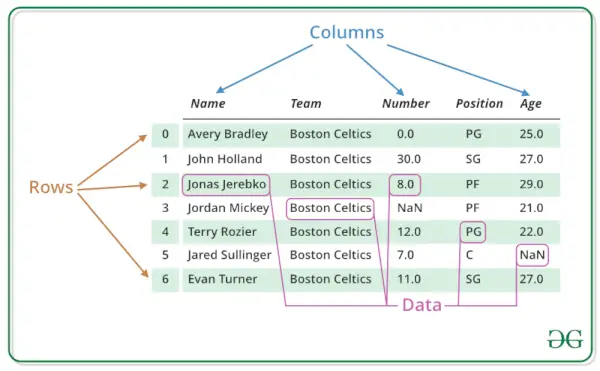
データ フレームは、各列が次の行列である行列として解釈することもできます。 マトリックス さまざまなデータ型にすることができます。 R DataFrame は、データ、行、列という 3 つの主要コンポーネントで構成されます。
R データフレームの構造
以下の画像からわかるように、データ フレームは次のように構造化されています。
データは表形式で表示されるため、操作と理解が容易になります。
R – データフレーム
R プログラミング言語でデータフレームを作成する
R データ フレームを作成するには、次を使用します。 データ.フレーム() 関数を作成し、作成した各ベクトルを引数として関数に渡します。
R
# R program to create dataframe> # creating a data frame> friend.data <-> data.frame> (> > friend_id => c> (1:5),> > friend_name => c> (> 'Sachin'> ,> 'Sourav'> ,> > 'Dravid'> ,> 'Sehwag'> ,> > 'Dhoni'> ),> > stringsAsFactors => FALSE> )> # print the data frame> print> (friend.data)> |
出力:
friend_id friend_name 1 1 Sachin 2 2 Sourav 3 3 Dravid 4 4 Sehwag 5 5 Dhoni
R データフレームの構造を取得する
R データフレームの構造を取得するには、次を使用します。 str() Rの関数。
入れ子になった大きなリストの内部構造も表示できます。基本的な R オブジェクトのワンライナー出力を提供し、オブジェクトとその構成要素についてユーザーに知らせます。
R
# R program to get the> # structure of the data frame> # creating a data frame> friend.data <-> data.frame> (> > friend_id => c> (1:5),> > friend_name => c> (> 'Sachin'> ,> 'Sourav'> ,> > 'Dravid'> ,> 'Sehwag'> ,> > 'Dhoni'> ),> > stringsAsFactors => FALSE> )> # using str()> print> (> str> (friend.data))> |
出力:
'data.frame': 5 obs. of 2 variables: $ friend_id : int 1 2 3 4 5 $ friend_name: chr 'Sachin' 'Sourav' 'Dravid' 'Sehwag' ... NULL
R データフレーム内のデータの概要
R データ フレームでは、統計的な概要とデータの性質は、次の方法を適用することで取得できます。 まとめ() 関数。
これは、さまざまなモデル フィッティング関数の結果の結果概要を生成するために使用される汎用関数です。この関数は、最初の引数のクラスに依存する特定のメソッドを呼び出します。
R
# R program to get the> # summary of the data frame> # creating a data frame> friend.data <-> data.frame> (> > friend_id => c> (1:5),> > friend_name => c> (> 'Sachin'> ,> 'Sourav'> ,> > 'Dravid'> ,> 'Sehwag'> ,> > 'Dhoni'> ),> > stringsAsFactors => FALSE> )> # using summary()> print> (> summary> (friend.data))> |
出力:
friend_id friend_name Min. :1 Length:5 1st Qu.:2 Class :character Median :3 Mode :character Mean :3 3rd Qu.:4 Max. :5
Rのデータフレームからデータを抽出する
R データ フレームからデータを抽出するとは、その行または列にアクセスすることを意味します。列名を使用して、R データ フレームから特定の列を抽出できます。
R
# R program to extract> # data from the data frame> # creating a data frame> friend.data <-> data.frame> (> > friend_id => c> (1:5),> > friend_name => c> (> 'Sachin'> ,> 'Sourav'> ,> > 'Dravid'> ,> 'Sehwag'> ,> > 'Dhoni'> ),> > stringsAsFactors => FALSE> )> # Extracting friend_name column> result <-> data.frame> (friend.data$friend_name)> print> (result)> |
出力:
friend.data.friend_name 1 Sachin 2 Sourav 3 Dravid 4 Sehwag 5 Dhoni
R言語でデータフレームを展開する
R のデータ フレームは、既存の R データ フレームに新しい列と行を追加することで拡張できます。
R
# R program to expand> # the data frame> # creating a data frame> friend.data <-> data.frame> (> > friend_id => c> (1:5),> > friend_name => c> (> 'Sachin'> ,> 'Sourav'> ,> > 'Dravid'> ,> 'Sehwag'> ,> > 'Dhoni'> ),> > stringsAsFactors => FALSE> )> # Expanding data frame> friend.data$location <-> c> (> 'Kolkata'> ,> 'Delhi'> ,> > 'Bangalore'> ,> 'Hyderabad'> ,> > 'Chennai'> )> resultant <- friend.data> # print the modified data frame> print> (resultant)> |
出力:
friend_id friend_name location 1 1 Sachin Kolkata 2 2 Sourav Delhi 3 3 Dravid Bangalore 4 4 Sehwag Hyderabad 5 5 Dhoni Chennai
R では、次のようなデータ フレームに対してさまざまな種類の操作を実行できます。 行と列へのアクセス、データ フレームのサブセットの選択、データ フレームの編集、データ フレーム内の行と列の削除 、など。
を参照してください。 R でのデータフレーム操作 データ フレームに対して実行できるあらゆる種類の操作について知ることができます。
R データ フレーム内のアイテムにアクセスする
単一のメソッドを使用して、データ フレームから任意の要素を選択してアクセスできます。 $> 、括弧 [ ] or> 二重括弧 [[]]> データ フレームから列にアクセスします。
R
# creating a data frame> friend.data <-> data.frame> (> > friend_id => c> (1:5),> > friend_name => c> (> 'Sachin'> ,> 'Sourav'> ,> > 'Dravid'> ,> 'Sehwag'> ,> > 'Dhoni'> ),> > stringsAsFactors => FALSE> )> # Access Items using []> friend.data[1]> # Access Items using [[]]> friend.data[[> 'friend_name'> ]]> # Access Items using $> friend.data$friend_id> |
出力:
friend_id 1 1 2 2 3 3 4 4 5 5 Access Items using [[]] [1] 'Sachin' 'Sourav' 'Dravid' 'Sehwag' 'Dhoni' Access Items using $ [1] 1 2 3 4 5
行と列の量
dim 関数を使用すると、データフレーム内の行と列の数を調べることができます。
R
# creating a data frame> friend.data <-> data.frame> (> > friend_id => c> (1:5),> > friend_name => c> (> 'Sachin'> ,> 'Sourav'> ,> > 'Dravid'> ,> 'Sehwag'> ,> > 'Dhoni'> ),> > stringsAsFactors => FALSE> )> # find out the number of rows and clumns> dim> (friend.data)> |
出力:
[1] 5 2
R データ フレームに行と列を追加する
R DataFrame に行と列を簡単に追加できます。挿入は、新しいデータフレームを必要とせずに、既存のデータフレームを拡張するのに役立ちます。
DataFrame に行と列を追加する方法を見てみましょう。例を挙げて説明します。
R データフレームに行を追加する
データ フレームに行を追加するには、組み込み関数を使用できます。 rbind()。
次の例は、R データ フレームでの rbind() の動作を示しています。
R
# Creating a dataframe representing products in a store> Products <-> data.frame> (> > Product_ID => c> (101, 102, 103),> > Product_Name => c> (> 'T-Shirt'> ,> 'Jeans'> ,> 'Shoes'> ),> > Price => c> (15.99, 29.99, 49.99),> > Stock => c> (50, 30, 25)> )> # Print the existing dataframe> cat> (> 'Existing dataframe (Products):
'> )> print> (Products)> # Adding a new row for a new product> New_Product <-> c> (104,> 'Sunglasses'> , 39.99, 40)> Products <-> rbind> (Products, New_Product)> # Print the updated dataframe after adding the new product> cat> (> '
Updated dataframe after adding a new product:
'> )> print> (Products)> |
出力:
Existing dataframe (Products): Product_ID Product_Name Price Stock 1 101 T-Shirt 15.99 50 2 102 Jeans 29.99 30 3 103 Shoes 49.99 25 Updated dataframe after adding a new product: Product_ID Product_Name Price Stock 1 101 T-Shirt 15.99 50 2 102 Jeans 29.99 30 3 103 Shoes 49.99 25 4 104 Sunglasses 39.99 40
R データ フレームに列を追加する
データ フレームに列を追加するには、組み込み関数を使用できます。 cbind()。
次の例は、R データ フレームでの cbind() の動作を示しています。 。
R
# Existing dataframe representing products in a store> Products <-> data.frame> (> > Product_ID => c> (101, 102, 103),> > Product_Name => c> (> 'T-Shirt'> ,> 'Jeans'> ,> 'Shoes'> ),> > Price => c> (15.99, 29.99, 49.99),> > Stock => c> (50, 30, 25)> )> # Print the existing dataframe> cat> (> 'Existing dataframe (Products):
'> )> print> (Products)> # Adding a new column for 'Discount' to the dataframe> Discount <-> c> (5, 10, 8)> # New column values for discount> Products <-> cbind> (Products, Discount)> # Rename the added column> colnames> (Products)[> ncol> (Products)] <-> 'Discount'> # Renaming the last column> # Print the updated dataframe after adding the new column> cat> (> '
Updated dataframe after adding a new column 'Discount':
'> )> print> (Products)> |
出力:
Existing dataframe (Products): Product_ID Product_Name Price Stock 1 101 T-Shirt 15.99 50 2 102 Jeans 29.99 30 3 103 Shoes 49.99 25 Updated dataframe after adding a new column 'Discount': Product_ID Product_Name Price Stock Discount 1 101 T-Shirt 15.99 50 5 2 102 Jeans 29.99 30 10 3 103 Shoes 49.99 25 8
行と列を削除する
R のデータ フレームは、既存の R データ フレームから列と行を削除します。
R DataFrame の行を削除
R
library> (dplyr)> # Create a data frame> data <-> data.frame> (> > friend_id => c> (1, 2, 3, 4, 5),> > friend_name => c> (> 'Sachin'> ,> 'Sourav'> ,> 'Dravid'> ,> 'Sehwag'> ,> 'Dhoni'> ),> > location => c> (> 'Kolkata'> ,> 'Delhi'> ,> 'Bangalore'> ,> 'Hyderabad'> ,> 'Chennai'> )> )> data> # Remove a row with friend_id = 3> data <-> subset> (data, friend_id != 3)> data> |
出力:
friend_id friend_name location 1 1 Sachin Kolkata 2 2 Sourav Delhi 3 3 Dravid Bangalore 4 4 Sehwag Hyderabad 5 5 Dhoni Chennai # Remove a row with friend_id = 3 friend_id friend_name location 1 1 Sachin Kolkata 2 2 Sourav Delhi 4 4 Sehwag Hyderabad 5 5 Dhoni Chennai
上記のコードでは、最初に というデータ フレームを作成しました。 データ 3 つの列: 友人ID 、 友人の名前 、 そして 位置 。行を削除するには 友人ID 3 に等しい場合は、 サブセット() 関数と指定された条件 フレンド ID != 3 。これにより行が削除されました 友人ID 3に等しい。
R DataFrame の列を削除する
R
library> (dplyr)> # Create a data frame> data <-> data.frame> (> > friend_id => c> (1, 2, 3, 4, 5),> > friend_name => c> (> 'Sachin'> ,> 'Sourav'> ,> 'Dravid'> ,> 'Sehwag'> ,> 'Dhoni'> ),> > location => c> (> 'Kolkata'> ,> 'Delhi'> ,> 'Bangalore'> ,> 'Hyderabad'> ,> 'Chennai'> )> )> data> # Remove the 'location' column> data <-> select> (data, -location)> data> |
出力:
friend_id friend_name location 1 1 Sachin Kolkata 2 2 Sourav Delhi 3 3 Dravid Bangalore 4 4 Sehwag Hyderabad 5 5 Dhoni Chennai>「location」列を削除 friends_id friends_name 1 1 Sachin 2 2 Sourav 3 3 Dravid 4 4 Sehwag 5 5 Dhoni>
削除するには 位置 コラムでは、 選択する() 関数と指定された -位置 。の – 記号は削除したいことを示します 位置 カラム。結果のデータフレーム データ 列は 2 つだけになります。 友人ID そして 友人の名前 。
R でのデータ フレームの結合
R でデータ フレームを結合するには 2 つの方法があります。垂直方向または水平方向に結合できます。
両方のケースを例で見てみましょう。
R データフレームを垂直に結合する
2つのデータフレームを垂直に結合したい場合は、次のように使用できます。 rbind()関数。 この機能は、2 つ以上のデータ フレームの組み合わせに対して機能します。
R
# Creating two sample dataframes> df1 <-> data.frame> (> > Name => c> (> 'Alice'> ,> 'Bob'> ),> > Age => c> (25, 30),> > Score => c> (80, 75)> )> df2 <-> data.frame> (> > Name => c> (> 'Charlie'> ,> 'David'> ),> > Age => c> (28, 35),> > Score => c> (90, 85)> )> # Print the existing dataframes> cat> (> 'Dataframe 1:
'> )> print> (df1)> cat> (> '
Dataframe 2:
'> )> print> (df2)> # Combining the dataframes using rbind()> combined_df <-> rbind> (df1, df2)> # Print the combined dataframe> cat> (> '
Combined Dataframe:
'> )> print> (combined_df)> |
出力:
Dataframe 1: Name Age Score 1 Alice 25 80 2 Bob 30 75 Dataframe 2: Name Age Score 1 Charlie 28 90 2 David 35 85 Combined Dataframe: Name Age Score 1 Alice 25 80 2 Bob 30 75 3 Charlie 28 90 4 David 35 85
R データ フレームを水平方向に結合します。
2つのデータフレームを水平に結合したい場合は、次のように使用できます。 cbind() 関数。 この機能は、2 つ以上のデータ フレームの組み合わせに対して機能します。
R
# Creating two sample dataframes> df1 <-> data.frame> (> > Name => c> (> 'Alice'> ,> 'Bob'> ),> > Age => c> (25, 30),> > Score => c> (80, 75)> )> df2 <-> data.frame> (> > Height => c> (160, 175),> > Weight => c> (55, 70)> )> # Print the existing dataframes> cat> (> 'Dataframe 1:
'> )> print> (df1)> cat> (> '
Dataframe 2:
'> )> print> (df2)> # Combining the dataframes using cbind()> combined_df <-> cbind> (df1, df2)> # Print the combined dataframe> cat> (> '
Combined Dataframe:
'> )> print> (combined_df)> |
出力:
Dataframe 1: Name Age Score 1 Alice 25 80 2 Bob 30 75 Dataframe 2: Height Weight 1 160 55 2 175 70 Combined Dataframe: Name Age Score Height Weight 1 Alice 25 80 160 55 2 Bob 30 75 175 70
こちらもお読みください:
- R – オブジェクト
- R プログラミングのデータ構造
この記事では、 R データフレーム、 作成、アクセス、要約、追加、削除などのすべての基本操作。この記事は、R のデータ フレームに慣れて、プロジェクトで使用できるようにすることを目的としています。
これが R のデータ フレームの概念を理解するのに役立ち、プロジェクトに R データ フレームを簡単に実装できることを願っています。