Java スイング | JList と例
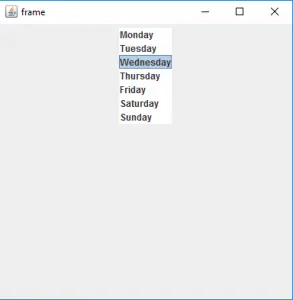
JList は Java Swing パッケージの一部です。 JList は、オブジェクトのセットを表示し、ユーザーが 1 つ以上の項目を選択できるようにするコンポーネントです。 JList は JComponent クラスを継承します。 JList は、 Vector の配列を表示する簡単な方法です。
JList のコンストラクターは次のとおりです。
- JList() : 空の空のリストを作成します。 JList(E [ ] l) : 配列の要素を含む新しいリストを作成します。 JList(ListModel d) : 指定されたリスト モデルを使用して新しいリストを作成します。 JList(Vector l) : ベクトルの要素を使用して新しいリストを作成します。
一般的に使用される方法は次のとおりです。
| 方法 | 説明 |
|---|---|
| getSelectedIndex() | リストの選択された項目のインデックスを返します |
| getSelectedValue() | リストの要素の選択された値を返します |
| setSelectedIndex(int i) | リストの選択されたインデックスを i に設定します |
| setSelectionBackground(カラー c) | リストの背景色を設定します |
| setSelectionForeground(Color c) | リストの前景色を変更します |
| setListData(E [ ] l) | リストの要素を l の要素に変更します。 |
| setVisibleRowCount(int v) | visibleRowCountプロパティを変更します |
| setSelectedValue(オブジェクト a, ブール値 s) | 指定されたオブジェクトをリストから選択します。 |
| setSelectedIndices(int[] i) | 選択範囲を、指定された配列で指定されたインデックスのセットに変更します。 |
| setListData(ベクトル l) | 指定された Vector から読み取り専用の ListModel を構築します。 |
| setLayoutOrientation(int l) | リストの方向を定義します |
| setFixedCellWidth(int w) | リストのセル幅をパラメータとして渡された値に変更します。 |
| setFixedCellHeight(int h) | リストのセルの高さをパラメータとして渡された値に変更します。 |
| isSelectedIndex(int i) | 指定されたインデックスが選択されている場合は true を返し、それ以外の場合は false を返します。 |
| IndexToLocation(int i) | リストの座標系における指定された項目の原点を返します。 |
| getToolTipText(MouseEvent e) | 指定されたイベントに使用されるツールチップ テキストを返します。 |
| getSelectedValuesList() | 選択されたすべての項目のリストを返します。 |
| getSelectedIndices() | 選択されたすべてのインデックスの配列を昇順で返します。 |
| getMinSelectionIndex() | 選択されたセルの最小インデックスを返します。選択範囲が空の場合は -1 を返します。 |
| getMaxSelectionIndex() | 選択されたセルの最大のインデックスを返します。選択範囲が空の場合は -1 を返します。 |
| getListSelectionListeners() | リストのリスナーを返します |
| getLastVisibleIndex() | 現在表示されている最大のリストインデックスを返します。 |
| getDragEnabled() | 自動ドラッグ処理が有効かどうかを返します。 |
| addListSelectionListener(ListSelectionListener l) | listSelectionlistener をリストに追加します |
次のプログラムは JList の使用法を示します。
1. 単純な JList を作成するプログラム
ジャワ
// java Program to create a simple JList> import> java.awt.event.*;> import> java.awt.*;> import> javax.swing.*;> class> solve> extends> JFrame> {> > > //frame> > static> JFrame f;> > > //lists> > static> JList b;> > > //main class> > public> static> void> main(String[] args)> > {> > //create a new frame> > f => new> JFrame(> 'frame'> );> > > //create a object> > solve s=> new> solve();> > > //create a panel> > JPanel p => new> JPanel();> > > //create a new label> > JLabel l=> new> JLabel(> 'select the day of the week'> );> > //String array to store weekdays> > String week[]= {> 'Monday'> ,> 'Tuesday'> ,> 'Wednesday'> ,> > 'Thursday'> ,> 'Friday'> ,> 'Saturday'> ,> 'Sunday'> };> > > //create list> > b=> new> JList(week);> > > //set a selected index> > b.setSelectedIndex(> 2> );> > > //add list to panel> > p.add(b);> > > f.add(p);> > > //set the size of frame> > f.setSize(> 400> ,> 400> );> > > f.show();> > }> > > }> |
出力:
2. リストを作成し、それに itemListener を追加するプログラム (リストを使用して誕生日を選択するプログラム) 。
ジャワ
// java Program to create a list and add itemListener to it> // (program to select your birthday using lists) .> import> javax.swing.event.*;> import> java.awt.*;> import> javax.swing.*;> class> solve> extends> JFrame> implements> ListSelectionListener> {> > > //frame> > static> JFrame f;> > > //lists> > static> JList b,b1,b2;> > > //label> > static> JLabel l1;> > > //main class> > public> static> void> main(String[] args)> > {> > //create a new frame> > f => new> JFrame(> 'frame'> );> > > //create a object> > solve s=> new> solve();> > > //create a panel> > JPanel p => new> JPanel();> > > //create a new label> > JLabel l=> new> JLabel(> 'select your birthday'> );> > l1=> new> JLabel();> > //String array to store weekdays> > String month[]= {> 'January'> ,> 'February'> ,> 'March'> ,> > 'April'> ,> 'May'> ,> 'June'> ,> 'July'> ,> 'August'> ,> > 'September'> ,> 'October'> ,> 'November'> ,> 'December'> };> > > //create a array for months and year> > String date[]=> new> String[> 31> ],year[]=> new> String[> 31> ];> > > //add month number and year to list> > for> (> int> i=> 0> ;i <> 31> ;i++)> > {> > date[i]=> ''> +(> int> )(i+> 1> );> > year[i]=> ''> +(> int> )(> 2018> -i);> > }> > > //create lists> > b=> new> JList(date);> > b1=> new> JList(month);> > b2=> new> JList(year);> > > //set a selected index> > b.setSelectedIndex(> 2> );> > b1.setSelectedIndex(> 1> );> > b2.setSelectedIndex(> 2> );> > > l1.setText(b.getSelectedValue()+> ' '> +b1.getSelectedValue()> > +> ' '> +b2.getSelectedValue());> > > //add item listener> > b.addListSelectionListener(s);> > b1.addListSelectionListener(s);> > b2.addListSelectionListener(s);> > > //add list to panel> > p.add(l);> > p.add(b);> > p.add(b1);> > p.add(b2);> > p.add(l1);> > > f.add(p);> > > //set the size of frame> > f.setSize(> 500> ,> 600> );> > > f.show();> > }> > public> void> valueChanged(ListSelectionEvent e)> > {> > //set the text of the label to the selected value of lists> > l1.setText(b.getSelectedValue()+> ' '> +b1.getSelectedValue()> > +> ' '> +b2.getSelectedValue());> > > }> > > }> |
出力:

注: 上記のプログラムはオンライン コンパイラでは実行できない場合があります。オフライン IDE を使用してください。