Java の Javax.servlet.http.Cookie クラス
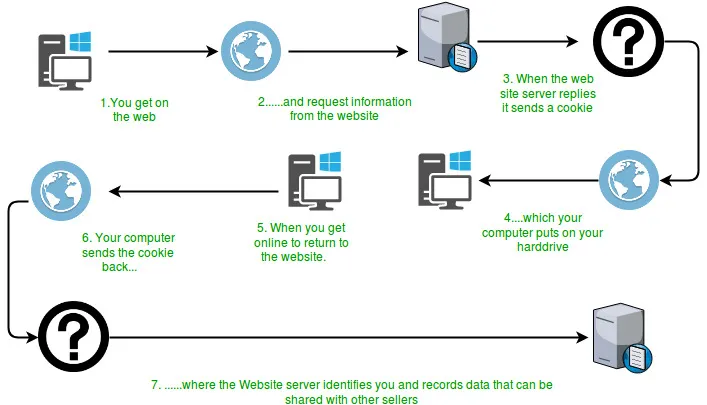
多くの Web サイトは、Cookie と呼ばれる小さなテキスト文字列を使用して、接続間でクライアント側の状態を永続的に保存します。 Cookie はサーバーからクライアントに渡され、リクエストと応答の HTTP ヘッダーに入れられて再び戻されます。サーバーは Cookie を使用して、セッション ID、ショッピング カートの内容、ログイン認証情報、ユーザー設定などを示すことができます。  上の図からわかるように、ユーザーが最初にページをリクエストすると、サーバーはリソースとともに Cookie オブジェクトを送信し、クライアントのマシンに保存されます。このオブジェクトにはリクエストの詳細が含まれる場合があります。その後、ユーザーが同じリソースを再度リクエストすると、サーバーがユーザー エクスペリエンスをさらに向上させるために使用できる保存された Cookie がリクエストとともに送信されます。 クッキーの属性:
Cookie はどのように機能するのでしょうか?
 上の図からわかるように、ユーザーが最初にページをリクエストすると、サーバーはリソースとともに Cookie オブジェクトを送信し、クライアントのマシンに保存されます。このオブジェクトにはリクエストの詳細が含まれる場合があります。その後、ユーザーが同じリソースを再度リクエストすると、サーバーがユーザー エクスペリエンスをさらに向上させるために使用できる保存された Cookie がリクエストとともに送信されます。 クッキーの属性:
 - まず、サーブレットは test_cookie という名前の Cookie を設定します。プログラム内の他の行では、ドメインの最大有効期間値などの Cookie の属性を設定します。
- 次に、サーブレットは request.getCookies を使用して、受信したすべての Cookie を検索し、それらの名前とその他の対応する属性を表示します。
- 最初のリクエストのように Cookie が見つからない場合は、ページへの初めての訪問であることを示す簡単な表示メッセージが表示されます。
Set-Cookie:session-id = 187-4969589-3049309
Set-Cookie: user = geek ;Domain =.foo.example.com
Set-Cookie: user = geek; Path =/ restricted
Set-Cookie: user = geek; expires = Wed 21-Feb-2017 15:23:00 IST
Set-Cookie: user = 'geek'; Max-Age = 3600コンストラクタ : Creates a cookie with specified name-value pair.
Syntax : public Cookie(String name String value) Parameters : name : name of the cookie value : value associated with this cookieメソッド:
Syntax : public void setDomain(String pattern) Parameters : pattern : string representing the domain in which this cookie is visible.
Syntax : public String getDomain()
Syntax : public void setComment(String purpose) Parameters : purpose : string representing the purpose of this cookie.
Syntax : public String getComment()
Syntax : public void setMaxAge(long time) Parameters : time : time in seconds before this cookie expires
Syntax : public String getMaxAge()
Syntax : public void setPath(String path) Parameters : path : path where this cookie is returned
Syntax : public String getMaxAge()
Syntax : public void setSecure(boolean secure) Parameters: secure - If true the cookie can only be sent over a secure protocol like https. If false it can be sent over any protocol.
Syntax : public boolean getSecure()
Syntax : public String getName()
Syntax : public void setValue(String newValue) Parameters : newValue - a String specifying the new value
Syntax : public String getValue()
Syntax : public int getVersion()
Syntax : public void setVersion(int v) Parameters : v - 0 for original Netscape specification; 1 for RFC 2965/2109
Syntax : public Cookie clone()Below is a Java implementation of a simple servlet program which stores a cookie in the browser when user first requests for it and then for further requests it displays the cookies stored. Java
// Java program to illustrate methods // of Cookie class import java.io.IOException ; import java.io.PrintWriter ; import java.util.List ; import javax.servlet.ServletException ; import javax.servlet.annotation.WebServlet ; import javax.servlet.http.Cookie ; import javax.servlet.http.HttpServlet ; import javax.servlet.http.HttpServletRequest ; import javax.servlet.http.HttpServletResponse ; /** * Servlet implementation class cookieTest */ @WebServlet ( '/cookieTest' ) public class cookieTest extends HttpServlet { private static final long serialVersionUID = 1L ; /** * @see HttpServlet#HttpServlet() */ public cookieTest () { super (); // TODO Auto-generated constructor stub } /** * @see HttpServlet#doGet(HttpServletRequest request HttpServletResponse * response) */ protected void doGet ( HttpServletRequest request HttpServletResponse response ) throws ServletException IOException { response . setContentType ( 'text/html' ); // Create a new cookie with the name test cookie // and value 123 Cookie cookie = new Cookie ( 'test_cookie' '123' ); // setComment() method cookie . setComment ( 'Just for testing' ); // setDomain() method // cookie.setDomain('domain'); // setMaxAge() method cookie . setMaxAge ( 3600 ); // setPath() method cookie . setPath ( '/articles' ); // setSecure() method cookie . setSecure ( false ); // setValue() method cookie . setValue ( '321' ); // setVersion() method cookie . setVersion ( 0 ); response . addCookie ( cookie ); PrintWriter pw = response . getWriter (); pw . print ( ' ' ); Cookie ck [] = request . getCookies (); if ( ck == null ) { pw . print ( ' This is first time the page is requested.
' ); pw . print ( ' And therefore no cookies found
' ); } else { pw . print ( ' Welcome Again...Cookies found
' ); for ( int i = 0 ; i < ck . length ; i ++ ) { // getName() method pw . print ( ' Name :'
+ ck [ i ] . getName () + ' ' ); // getValue() method pw . print ( ' Value :'
+ ck [ i ] . getValue () + ' ' ); // getDomain() method pw . print ( ' Domain :'
+ ck [ i ] . getDomain () + ' ' ); // getPath() method pw . print ( ' Name :'
+ ck [ i ] . getPath () + ' ' ); // getMaxAge() method pw . print ( ' Max Age :'
+ ck [ i ] . getMaxAge () + ' ' ); // getComment() method pw . print ( ' Comment :'
+ ck [ i ] . getComment () + ' ' ); // getSecure() method pw . print ( ' Name :'
+ ck [ i ] . getSecure () + ' ' ); // getVersion() method pw . print ( ' Version :'
+ ck [ i ] . getVersion () + ' ' ); } pw . print ( ' ' ); } pw . close (); } /** * @see HttpServlet#doPost(HttpServletRequest request HttpServletResponse * response) */ protected void doPost ( HttpServletRequest request HttpServletResponse response ) throws ServletException IOException { doGet ( request response ); } }
出力: 次の出力は Web ブラウザからのものです。 最初のリクエストの場合: This is first time the page is requested. And therefore no cookies found.2 番目のリクエストの場合:
Welcome Again...Cookies found Name :test_cookie Value :321 Domain :null Name :null Max Age :-1 Comment :null Name :false Version :0
上記のプログラムを実行するにはどうすればよいでしょうか?
まず、Apache Tomcat などのサーバーがインストールされており、Eclipse などの使用しているツールで構成されていることを確認します。使用しているサーバー ディレクトリの完全なアドレスを入力して、サーバー上またはローカル ブラウザ上で上記のプログラムを実行するだけです。 CookieTest サーブレットは、次の 3 つのタスクを実行するサーブレットです。あなたにおすすめ


トップ記事