Java の Java.io.PipedOutputStream クラス
Java の Java.io.PipedInputStream クラス
パイプ IO では、JVM で同時に実行されている 2 つのスレッド間のリンクが提供されます。したがって、パイプはソースまたは宛先の両方として使用されます。
- PipedInputStream は PipedOutputStream ともパイプされます。したがって、データは PipedOutputStream を使用して書き込むことも、PipedInputStream を使用して書き込むこともできます。ただし、両方のスレッドを同時に使用すると、スレッドにデッドロックが発生します。
- PipedOutputStream はパイプの終わりを送信しています。データは PipedOutputStream に書き込まれます。データを読み取っていた PipedInputStream がなくなった場合、パイプは壊れていると言われます。
宣言:
 public class PipedOutputStream
  extends OutputStream
     コンストラクタ:
- PipedOutputStream() : 接続されていない PipedOutputStream を作成します。
- PipedOutputStream(PipedOutputStream inStream) : PipedOutputStream を作成します。
PipedInputStream - 'inStream' に接続されています。
方法:
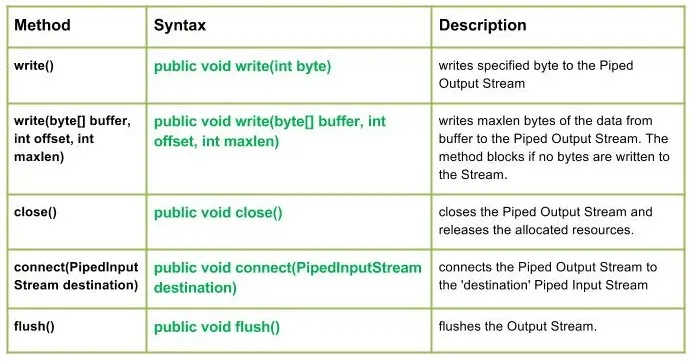
write() : java.io.PipedOutputStream.write(int バイト) 指定されたバイトをパイプ出力ストリームに書き込みます。
構文:
public void write(int byte)
Parameters :
byte : byte to be written
Return : void
Exception :
-> IOException : if in case IO error occurs.write(byte[] バッファ int offset int maxlen) : java.io.PipedOutputStream.write(byte[] バッファ int offset int maxlen) maxlen バイトのデータをバッファからパイプ出力ストリームに書き込みます。ストリームにバイトが書き込まれない場合、メソッドはブロックされます。
構文:
public void write(byte[] buffer int offset int maxlen)
Parameters :
buffer : data of the buffer
offset : starting in the destination array - 'buffer'.
maxlen : maximum length of array to be read
Return : void
Exception :
-> IOException : if in case IO error occurs. Java出力:
Use of write(buffer offset maxlen) : J A V A
- close() : java.io.PipedOutputStream.close() パイプ出力ストリームを閉じ、割り当てられたリソースを解放します。
構文:
 public void close()
    Parameters :
 --------------
    Return :
 void
    Exception :
 ->      IOException :     if in case IO error occurs.
- connect(PipedInputStream 宛先) : java.io.PipedOutputStream.connect(PipedInputStream 宛先) パイプされた出力ストリームを「宛先」のパイプされた入力ストリームに接続します。「宛先」が他のストリームを持つパイプの場合、IO 例外がスローされます
構文:
 public void connect(PipedInputStream destination)
    Parameters :
 destination : the Piped Input Stream to be connected to
    Return :
 void
    Exception :
 ->      IOException :     if in case IO error occurs.
- flash() : java.io.PipedOutputStream.flush() 出力ストリームをフラッシュします。
構文:
public void flush()
Parameters :
------------
Return :
void
Exception :
-> IOException : if in case IO error occurs.
PipedOutputStream クラスのメソッドの動作を示す Java コード:
Java出力:
Use of flush() method :
G E E K S
Closing the Output stream
クイズの作成