C# でテキスト ファイルを読み書きするにはどうすればよいですか?
プログラムを終了すると、それに関連するすべてのデータが削除されます。したがって、データをどこかに保存する必要があります。ファイルは、データを永続的に保存および共有するために使用されます。 C# を使用すると、テキスト ファイルに保存されたデータを取得および操作できます。
テキスト ファイルの読み取り: C# の file クラスは、テキスト ファイルを読み取るための 2 つの静的メソッドを定義します。 File.ReadAllText() そして File.ReadAllLines() 。
- File.ReadAllText() は、ファイル全体を一度に読み取り、文字列を返します。この文字列を変数に保存し、それを使用して内容を画面に表示する必要があります。
- File.ReadAllLines() は、一度に 1 行ずつファイルを読み取り、その行を文字列形式で返します。各行を格納するには文字列の配列が必要です。同じ文字列配列を使用してファイルの内容を表示します。
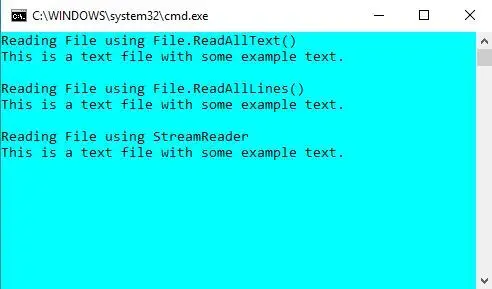
ファイルを読み取る別の方法として、StreamReader オブジェクトを使用する方法があります。 StreamReader も一度に 1 行を読み取り、文字列を返します。ファイルを読み取る上記のすべての方法は、以下のコード例に示されています。
// C# program to illustrate how> // to read a file in C#> using> System;> using> System.IO;> > class> Program {> > static> void> Main(> string> [] args)> > {> > // Store the path of the textfile in your system> > string> file => @'M:DocumentsTextfile.txt'> ;> > > Console.WriteLine(> 'Reading File using File.ReadAllText()'> );> > > // To read the entire file at once> > if> (File.Exists(file)) {> > // Read all the content in one string> > // and display the string> > string> str = File.ReadAllText(file);> > Console.WriteLine(str);> > }> > Console.WriteLine();> > > Console.WriteLine(> 'Reading File using File.ReadAllLines()'> );> > > // To read a text file line by line> > if> (File.Exists(file)) {> > // Store each line in array of strings> > string> [] lines = File.ReadAllLines(file);> > > foreach> (> string> ln> in> lines)> > Console.WriteLine(ln);> > }> > Console.WriteLine();> > > Console.WriteLine(> 'Reading File using StreamReader'> );> > > // By using StreamReader> > if> (File.Exists(file)) {> > // Reads file line by line> > StreamReader Textfile => new> StreamReader(file);> > string> line;> > > while> ((line = Textfile.ReadLine()) !=> null> ) {> > Console.WriteLine(line);> > }> > > Textfile.Close();> > > Console.ReadKey();> > }> > Console.WriteLine();> > }> }> |
このプログラムを実行するには、次のコマンドを使用してファイルを保存します。 .cs 拡張子があり、それを使用して実行できます csc ファイル名.cs cmd 上のコマンド。または、Visual Studio を使用することもできます。ここには、次のような名前のテキスト ファイルがあります。 テキストファイル.txt 出力に内容が表示されます。
出力:
テキスト ファイルの書き込み: C# の File クラスは、テキスト ファイルを書き込むための 2 つの静的メソッドを定義します。 File.WriteAllText() そして File.WriteAllLines() 。
- File.WriteAllText() はファイル全体を一度に書き込みます。ファイルのパスと書き込む必要があるテキストの 2 つの引数を取ります。
- File.WriteAllLines() は、一度に 1 行ずつファイルを書き込みます。ファイルのパスと、書き込む必要があるテキスト (文字列配列) の 2 つの引数を取ります。
ファイルに書き込む別の方法として、StreamWriter オブジェクトを使用する方法があります。 StreamWriter も一度に 1 行ずつ書き込みます。 3 つの書き込み方法はいずれも、ファイルが存在しない場合は新しいファイルを作成しますが、指定した場所にファイルがすでに存在する場合は上書きされます。テキスト ファイルに書き込む上記のすべての方法を、以下のコード例に示します。
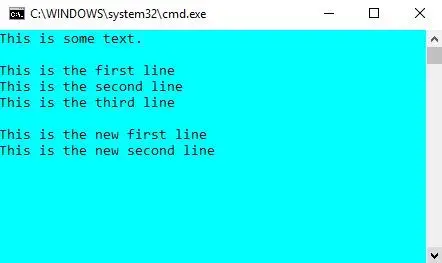
// C# program to illustrate how> // to write a file in C#> using> System;> using> System.IO;> > class> Program {> > static> void> Main(> string> [] args)> > {> > // Store the path of the textfile in your system> > string> file => @'M:DocumentsTextfile.txt'> ;> > > // To write all of the text to the file> > string> text => 'This is some text.'> ;> > File.WriteAllText(file, text);> > > // To display current contents of the file> > Console.WriteLine(File.ReadAllText(file));> > Console.WriteLine();> > > // To write text to file line by line> > string> [] textLines1 = {> 'This is the first line'> ,> > 'This is the second line'> ,> > 'This is the third line'> };> > > File.WriteAllLines(file, textLines1);> > > // To display current contents of the file> > Console.WriteLine(File.ReadAllText(file));> > > // To write to a file using StreamWriter> > // Writes line by line> > string> [] textLines2 = {> 'This is the new first line'> ,> > 'This is the new second line'> };> > > using> (StreamWriter writer => new> StreamWriter(file))> > {> > foreach> (> string> ln> in> textLines2)> > {> > writer.WriteLine(ln);> > }> > }> > // To display current contents of the file> > Console.WriteLine(File.ReadAllText(file));> > > Console.ReadKey();> > }> }> |
このプログラムを実行するには、次のコマンドを使用してファイルを保存します。 .cs 拡張子があり、それを使用して実行できます csc ファイル名.cs cmd 上のコマンド。または、Visual Studio を使用することもできます。
出力:
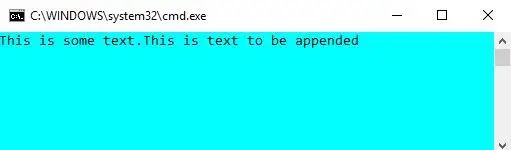
既存のファイルに保存されているデータを上書きせずに、既存のファイルにテキストを追加する場合は、System.IO の File クラスが提供する append メソッドを使用できます。
using> System;> using> System.IO;> > class> Program {> > static> void> Main(> string> [] args)> > {> > // Store the path of the textfile in your system> > string> file => @'M:DocumentsTextfile.txt'> ;> > > // To write all of the text to the file> > string> text1 => 'This is some text.'> ;> > File.WriteAllText(file, text1);> > > // To append text to a file> > string> text2 => 'This is text to be appended'> ;> > File.AppendAllText(file, text2);> > > // To display current contents of the file> > Console.WriteLine(File.ReadAllText(file));> > Console.ReadKey();> > }> }> |
出力: