Sada Python | rozdíl()
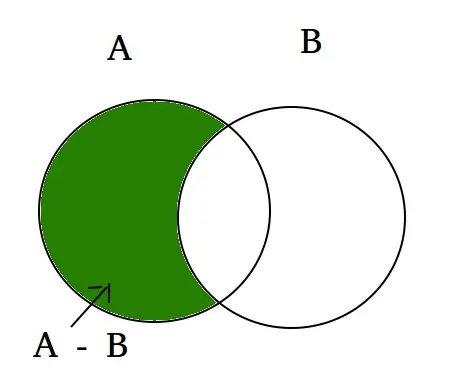
Rozdíl mezi dvěma sadami v Pythonu se rovná rozdílu mezi počtem prvků ve dvou sadách. Funkce Rozdíl() vrací množinu, která je rozdílem mezi dvěma množinami. Zkusme zjistit, jaký bude rozdíl mezi dvěma množinami A a B. Potom (množina A – množina B) budou prvky přítomné v množině A, ale ne v B a (množina B – množina A) budou prvky přítomné v sadě B, ale ne v sadě A.
Příklad:
set A = {10, 20, 30, 40, 80} set B = {100, 30, 80, 40, 60} set A - set B = {10, 20} set B - set A = {100, 60} Explanation: A - B is equal to the elements present in A but not in B B - A is equal to the elements present in B but not in A Podívejme se na Vennův diagram následující funkce rozdílové množiny.  Syntax:
set_A.difference(set_B) for (A - B) set_B.difference(set_A) for (B - A)
V tomto programu se pokusíme zjistit rozdíl mezi dvěma sadami set_A a set_B, a to jak:
Python3
# Python code to get the difference between two sets> # using difference() between set A and set B> # Driver Code> A> => {> 10> ,> 20> ,> 30> ,> 40> ,> 80> }> B> => {> 100> ,> 30> ,> 80> ,> 40> ,> 60> }> print> (A.difference(B))> print> (B.difference(A))> |
Výstup:
{10, 20} {100, 60} Můžeme také použít operátor – k nalezení rozdílu mezi dvěma množinami.
Python3
# Python code to get the difference between two sets> # using difference() between set A and set B> # Driver Code> A> => {> 10> ,> 20> ,> 30> ,> 40> ,> 80> }> B> => {> 100> ,> 30> ,> 80> ,> 40> ,> 60> }> print> (A> -> B)> print> (B> -> A)> |
Výstup:
{10, 20} {100, 60} Pokud máme stejné množiny, vrátí nulovou množinu.
Python3
# Python code to get the difference between two sets> # using difference() between set A and set B> # Driver Code> A> => {> 10> ,> 20> ,> 30> ,> 40> ,> 80> }> B> => {> 10> ,> 20> ,> 30> ,> 40> ,> 80> ,> 100> }> print> (A> -> B)> |
Výstup:
set()