Třída Javax.servlet.http.Cookie v jazyce Java
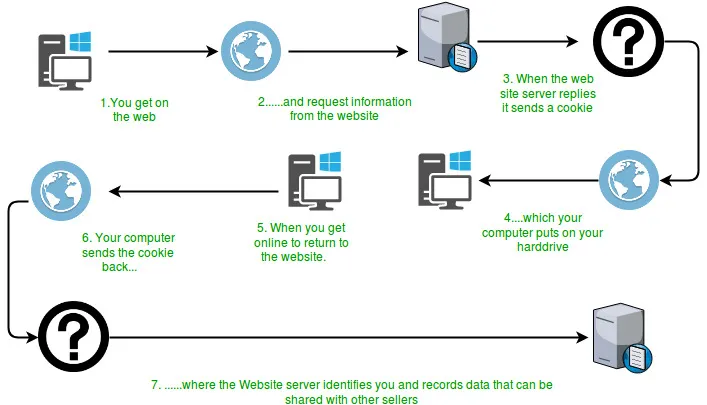
Mnoho webových stránek používá malé řetězce textu známé jako soubory cookie k ukládání trvalého stavu na straně klienta mezi připojeními. Cookies jsou předávány ze serveru na klienta a zpět v HTTP hlavičkách požadavků a odpovědí. Soubory cookie může server použít k označení ID relace obsahu nákupního košíku přihlašovacích údajů uživatelských preferencí a dalších.  Jak je vidět z výše uvedeného diagramu, když uživatel poprvé požádá o stránku, server spolu se zdrojem odešle objekt cookie, který má být uložen na klientském počítači. Tento objekt může obsahovat podrobnosti o požadavku. Nyní později, pokud uživatel znovu požádá o stejný zdroj, odešle spolu s požadavkem uložený soubor cookie, který mohou servery použít k dalšímu vylepšení uživatelské zkušenosti. Atributy cookie:
Jak soubory cookie fungují?
 Jak je vidět z výše uvedeného diagramu, když uživatel poprvé požádá o stránku, server spolu se zdrojem odešle objekt cookie, který má být uložen na klientském počítači. Tento objekt může obsahovat podrobnosti o požadavku. Nyní později, pokud uživatel znovu požádá o stejný zdroj, odešle spolu s požadavkem uložený soubor cookie, který mohou servery použít k dalšímu vylepšení uživatelské zkušenosti. Atributy cookie:
 - Nejprve servlet nastaví cookie s názvem test_cookie. Další řádky v programu nastavují atributy souboru cookie, jako je maximální hodnota domény věku atd.
- Za druhé, servlet používá request.getCookies k nalezení všech příchozích cookies a zobrazení jejich názvů a dalších odpovídajících atributů.
- Pokud nejsou nalezeny žádné soubory cookie, jako je tomu u prvního požadavku, zobrazí se jednoduchá zpráva na displeji, která sděluje, že se jedná o první návštěvu stránky.
Set-Cookie:session-id = 187-4969589-3049309
Set-Cookie: user = geek ;Domain =.foo.example.com
Set-Cookie: user = geek; Path =/ restricted
Set-Cookie: user = geek; expires = Wed 21-Feb-2017 15:23:00 IST
Set-Cookie: user = 'geek'; Max-Age = 3600Konstruktér : Creates a cookie with specified name-value pair.
Syntax : public Cookie(String name String value) Parameters : name : name of the cookie value : value associated with this cookiemetody:
Syntax : public void setDomain(String pattern) Parameters : pattern : string representing the domain in which this cookie is visible.
Syntax : public String getDomain()
Syntax : public void setComment(String purpose) Parameters : purpose : string representing the purpose of this cookie.
Syntax : public String getComment()
Syntax : public void setMaxAge(long time) Parameters : time : time in seconds before this cookie expires
Syntax : public String getMaxAge()
Syntax : public void setPath(String path) Parameters : path : path where this cookie is returned
Syntax : public String getMaxAge()
Syntax : public void setSecure(boolean secure) Parameters: secure - If true the cookie can only be sent over a secure protocol like https. If false it can be sent over any protocol.
Syntax : public boolean getSecure()
Syntax : public String getName()
Syntax : public void setValue(String newValue) Parameters : newValue - a String specifying the new value
Syntax : public String getValue()
Syntax : public int getVersion()
Syntax : public void setVersion(int v) Parameters : v - 0 for original Netscape specification; 1 for RFC 2965/2109
Syntax : public Cookie clone()Below is a Java implementation of a simple servlet program which stores a cookie in the browser when user first requests for it and then for further requests it displays the cookies stored. Java
// Java program to illustrate methods // of Cookie class import java.io.IOException ; import java.io.PrintWriter ; import java.util.List ; import javax.servlet.ServletException ; import javax.servlet.annotation.WebServlet ; import javax.servlet.http.Cookie ; import javax.servlet.http.HttpServlet ; import javax.servlet.http.HttpServletRequest ; import javax.servlet.http.HttpServletResponse ; /** * Servlet implementation class cookieTest */ @WebServlet ( '/cookieTest' ) public class cookieTest extends HttpServlet { private static final long serialVersionUID = 1L ; /** * @see HttpServlet#HttpServlet() */ public cookieTest () { super (); // TODO Auto-generated constructor stub } /** * @see HttpServlet#doGet(HttpServletRequest request HttpServletResponse * response) */ protected void doGet ( HttpServletRequest request HttpServletResponse response ) throws ServletException IOException { response . setContentType ( 'text/html' ); // Create a new cookie with the name test cookie // and value 123 Cookie cookie = new Cookie ( 'test_cookie' '123' ); // setComment() method cookie . setComment ( 'Just for testing' ); // setDomain() method // cookie.setDomain('domain'); // setMaxAge() method cookie . setMaxAge ( 3600 ); // setPath() method cookie . setPath ( '/articles' ); // setSecure() method cookie . setSecure ( false ); // setValue() method cookie . setValue ( '321' ); // setVersion() method cookie . setVersion ( 0 ); response . addCookie ( cookie ); PrintWriter pw = response . getWriter (); pw . print ( ' ' ); Cookie ck [] = request . getCookies (); if ( ck == null ) { pw . print ( ' This is first time the page is requested.
' ); pw . print ( ' And therefore no cookies found
' ); } else { pw . print ( ' Welcome Again...Cookies found
' ); for ( int i = 0 ; i < ck . length ; i ++ ) { // getName() method pw . print ( ' Name :'
+ ck [ i ] . getName () + ' ' ); // getValue() method pw . print ( ' Value :'
+ ck [ i ] . getValue () + ' ' ); // getDomain() method pw . print ( ' Domain :'
+ ck [ i ] . getDomain () + ' ' ); // getPath() method pw . print ( ' Name :'
+ ck [ i ] . getPath () + ' ' ); // getMaxAge() method pw . print ( ' Max Age :'
+ ck [ i ] . getMaxAge () + ' ' ); // getComment() method pw . print ( ' Comment :'
+ ck [ i ] . getComment () + ' ' ); // getSecure() method pw . print ( ' Name :'
+ ck [ i ] . getSecure () + ' ' ); // getVersion() method pw . print ( ' Version :'
+ ck [ i ] . getVersion () + ' ' ); } pw . print ( ' ' ); } pw . close (); } /** * @see HttpServlet#doPost(HttpServletRequest request HttpServletResponse * response) */ protected void doPost ( HttpServletRequest request HttpServletResponse response ) throws ServletException IOException { doGet ( request response ); } }
VÝSTUP: Následující výstup je z webového prohlížeče - Pro první žádost: This is first time the page is requested. And therefore no cookies found.Pro druhou žádost:
Welcome Again...Cookies found Name :test_cookie Value :321 Domain :null Name :null Max Age :-1 Comment :null Name :false Version :0
Jak spustit výše uvedený program?
Nejprve se ujistěte, že máte nainstalovaný nějaký server jako Apache Tomcat a je nakonfigurován pomocí nástroje, který používáte, jako je Eclipse. Jednoduše spusťte výše uvedený program na serveru nebo v místním prohlížeči zadáním úplné adresy adresáře serveru, který používáte. CookieTest servlet servlet, který provádí tři úkoly:Mohlo By Se Vám Líbit


Nejlepší Články