برنامج Opencv Python لكشف الوجه
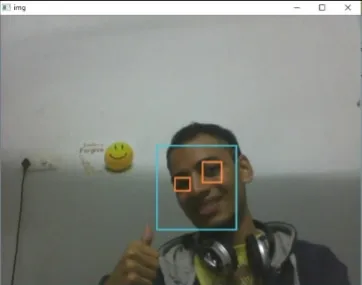
الهدف من البرنامج المقدم هو اكتشاف الكائن محل الاهتمام (الوجه) في الوقت الفعلي ومتابعة تتبع نفس الكائن. وهذا مثال بسيط لكيفية اكتشاف الوجه في بايثون. يمكنك محاولة استخدام عينات تدريبية لأي كائن آخر من اختيارك ليتم اكتشافه عن طريق تدريب المصنف على الكائنات المطلوبة. فيما يلي خطوات تنزيل المتطلبات أدناه.
خطوات:
- قم بتنزيل إصدار Python 2.7.x numpy وإصدار Opencv 2.7.x. تحقق مما إذا كان نظام Windows لديك متوافقًا مع الإصدار 32 بت أو 64 بت وقم بالتثبيت وفقًا لذلك.
- تأكد من تشغيل numpy في python ثم حاول تثبيت opencv.
- ضع ملفات haarcascade_eye.xml & haarcascade_frontalface_default.xml في نفس المجلد (الروابط الواردة في الكود أدناه).
تطبيق
Python # OpenCV program to detect face in real time # import libraries of python OpenCV # where its functionality resides import cv2 # load the required trained XML classifiers # https://github.com/opencv/opencv/tree/master # data/haarcascades/haarcascade_frontalface_default.xml # Trained XML classifiers describes some features of some # object we want to detect a cascade function is trained # from a lot of positive(faces) and negative(non-faces) # images. face_cascade = cv2 . CascadeClassifier ( 'haarcascade_frontalface_default.xml' ) # https://github.com/opencv/opencv/tree/master # /data/haarcascades/haarcascade_eye.xml # Trained XML file for detecting eyes eye_cascade = cv2 . CascadeClassifier ( 'haarcascade_eye.xml' ) # capture frames from a camera cap = cv2 . VideoCapture ( 0 ) # loop runs if capturing has been initialized. while 1 : # reads frames from a camera ret img = cap . read () # convert to gray scale of each frames gray = cv2 . cvtColor ( img cv2 . COLOR_BGR2GRAY ) # Detects faces of different sizes in the input image faces = face_cascade . detectMultiScale ( gray 1.3 5 ) for ( x y w h ) in faces : # To draw a rectangle in a face cv2 . rectangle ( img ( x y )( x + w y + h )( 255 255 0 ) 2 ) roi_gray = gray [ y : y + h x : x + w ] roi_color = img [ y : y + h x : x + w ] # Detects eyes of different sizes in the input image eyes = eye_cascade . detectMultiScale ( roi_gray ) #To draw a rectangle in eyes for ( ex ey ew eh ) in eyes : cv2 . rectangle ( roi_color ( ex ey )( ex + ew ey + eh )( 0 127 255 ) 2 ) # Display an image in a window cv2 . imshow ( 'img' img ) # Wait for Esc key to stop k = cv2 . waitKey ( 30 ) & 0xff if k == 27 : break # Close the window cap . release () # De-allocate any associated memory usage cv2 . destroyAllWindows ()
الإخراج:
المقالة التالية:
برنامج Opencv C++ لكشف الوجه إنشاء اختبار