فئة Java.io.FilterOutputStream في جافا
java.io.FilterInputStream فئة في جافا
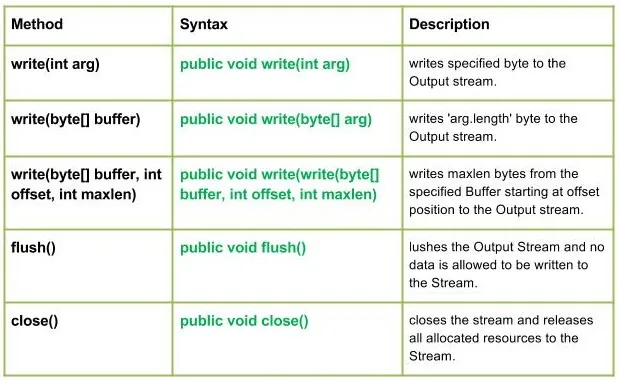
Java.io.FilterOutputStream class هي الطبقة الفائقة لجميع تلك الفئات التي تقوم بتصفية تدفقات الإخراج. تقوم طريقة write() الخاصة بـ FilterOutputStream Class بتصفية البيانات وكتابتها إلى تصفية الدفق الأساسي والتي تتم اعتمادًا على التدفقات.
تصريح :
public class FilterOutputStream extends OutputStream
البنائين :
طُرق:
بناء الجملة :
public void write(int arg) Parameters : arg : Source Bytes Return : void Exception : In case any I/O error occurs.
// Java program illustrating the working of work(int arg) // method import java.io.* ; import java.lang.* ; public class NewClass { public static void main ( String [] args ) throws IOException { // OutputStream FileInputStream & FilterOutputStream // initially null OutputStream geek_out = null ; FilterOutputStream geek_filter = null ; // FileInputStream used here FileInputStream geekinput = null ; char c ; int a ; try { // create output streams geek_out = new FileOutputStream ( 'GEEKS.txt' ); geek_filter = new FilterOutputStream ( geek_out ); // write(int arg) : Used to write 'M' in the file // - 'ABC.txt' geek_filter . write ( 77 ); // Flushes the Output Stream geek_filter . flush (); // Creating Input Stream geekinput = new FileInputStream ( 'GEEKS.txt' ); // read() method of FileInputStream : // reading the bytes and converting next bytes to int a = geekinput . read (); /* Since read() converts bytes to int so we convert int to char for our program output*/ c = ( char ) a ; // print character System . out . println ( 'Character written by' + ' FilterOutputStream : ' + c ); } catch ( IOException except ) { // if any I/O error occurs System . out . print ( 'Write Not working properly' ); } finally { // releases any system resources associated with // the stream if ( geek_out != null ) geek_out . close (); if ( geek_filter != null ) geek_filter . close (); } } }
في البرنامج الذي استخدمته GEEKS.txt file سيقوم البرنامج بإنشاء ملف جديد بالاسم الوارد في الكود والكتابة فيه.
الإخراج :
Character written by FilterOutputStream : M
بناء الجملة :
public void write(byte[] arg) Parameters : buffer : Source Buffer to be written to the Output Stream Return : void Exception : In case any I/O error occurs.
// Java program illustrating the working of work(byte // buffer) method import java.io.* ; import java.lang.* ; public class NewClass { public static void main ( String [] args ) throws IOException { // OutputStream FileInputStream & FilterOutputStream // initially null OutputStream geek_out = null ; FilterOutputStream geek_filter = null ; // FileInputStream used here FileInputStream geekinput = null ; byte [] buffer = { 77 79 72 73 84 }; char c ; int a ; try { // create output streams geek_out = new FileOutputStream ( 'ABC.txt' ); geek_filter = new FilterOutputStream ( geek_out ); // writes buffer to the output stream geek_filter . write ( buffer ); // forces byte contents to written out to the stream geek_filter . flush (); // create input streams geekinput = new FileInputStream ( 'ABC.txt' ); while (( a = geekinput . read ()) !=- 1 ) { // converts integer to the character c = ( char ) a ; // prints System . out . print ( c ); } } catch ( IOException except ) { // if any I/O error occurs System . out . print ( 'Write Not working properly' ); } finally { // releases any system resources associated // with the stream if ( geek_out != null ) geek_out . close (); if ( geek_filter != null ) geek_filter . close (); } } }
في البرنامج لدي استخدام GEEKS.txt file سيقوم البرنامج بإنشاء ملف جديد بالاسم الوارد في الكود والكتابة فيه.
الإخراج :
MOHIT
بناء الجملة :
public void write(write(byte[] buffer int offset int maxlen) Parameters : buffer : Source Buffer to be written to the Output Stream Return : buffer : Source Buffer to be written offset : Starting offset maxlen : max no. of bytes to be written to the Output Stream Exception : In case any I/O error occurs.
بناء الجملة :
public void flush() Parameters : ------ Return : void Exception : In case any I/O error occurs.
بناء الجملة :
public void close() Parameters : ------ Return : void Exception : In case any I/O error occurs.
برنامج جافا يوضح: الكتابة (بايت [] المخزن المؤقت إنت إزاحة إنت ماكسلين) أساليب فلوش () إغلاق ()
// Java program illustrating the working of // write(byte[] buffer int offset int maxlen) // flush() close() method import java.io.* ; import java.lang.* ; public class NewClass { public static void main ( String [] args ) throws IOException { // OutputStream FileInputStream & FilterOutputStream // initially null OutputStream geek_out = null ; FilterOutputStream geek_filter = null ; // FileInputStream used here FileInputStream geekinput = null ; byte [] buffer = { 65 66 77 79 72 73 84 }; char c ; int a ; try { // create output streams geek_out = new FileOutputStream ( 'ABC.txt' ); geek_filter = new FilterOutputStream ( geek_out ); // write(byte[] buffer int offset int maxlen) : // writes buffer to the output stream // Here offset = 2 so it won't read first two bytes // then maxlen = 5 so it will print max of 5 characters geek_filter . write ( buffer 2 5 ); // forces byte contents to written out to the stream geek_filter . flush (); // create input streams geekinput = new FileInputStream ( 'ABC.txt' ); while (( a = geekinput . read ()) !=- 1 ) { // converts integer to the character c = ( char ) a ; // prints System . out . print ( c ); } } catch ( IOException except ) { // if any I/O error occurs System . out . print ( 'Write Not working properly' ); } finally { // releases any system resources associated // with the stream if ( geek_out != null ) geek_out . close (); if ( geek_filter != null ) geek_filter . close (); } } }
ملحوظة :
في البرنامج لدي استخدام GEEKS.txt file سيقوم البرنامج بإنشاء ملف جديد بالاسم الوارد في الكود والكتابة فيه.
الإخراج :
MOHIT


مقالات العلوي