Як читати та писати текстовий файл у C#?
Припинення роботи програми призводить до видалення всіх пов’язаних із нею даних. Тому нам потрібно десь зберігати дані. Файли використовуються для постійного зберігання та обміну даними. C# можна використовувати для отримання та обробки даних, що зберігаються в текстових файлах.
Читання текстового файлу: Клас файлу в C# визначає два статичні методи для читання текстового файлу, а саме File.ReadAllText() і File.ReadAllLines() .
- File.ReadAllText() зчитує весь файл одразу й повертає рядок. Нам потрібно зберегти цей рядок у змінній і використовувати його для відображення вмісту на екрані.
- File.ReadAllLines() читає файл по одному рядку за раз і повертає цей рядок у форматі рядка. Для зберігання кожного рядка нам потрібен масив рядків. Ми відображаємо вміст файлу за допомогою того самого масиву рядків.
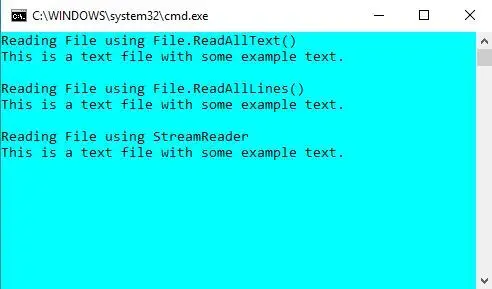
Є ще один спосіб прочитати файл за допомогою об’єкта StreamReader. StreamReader також читає один рядок за раз і повертає рядок. Усі згадані вище способи читання файлу проілюстровано у прикладі коду, наведеному нижче.
// C# program to illustrate how> // to read a file in C#> using> System;> using> System.IO;> > class> Program {> > static> void> Main(> string> [] args)> > {> > // Store the path of the textfile in your system> > string> file => @'M:DocumentsTextfile.txt'> ;> > > Console.WriteLine(> 'Reading File using File.ReadAllText()'> );> > > // To read the entire file at once> > if> (File.Exists(file)) {> > // Read all the content in one string> > // and display the string> > string> str = File.ReadAllText(file);> > Console.WriteLine(str);> > }> > Console.WriteLine();> > > Console.WriteLine(> 'Reading File using File.ReadAllLines()'> );> > > // To read a text file line by line> > if> (File.Exists(file)) {> > // Store each line in array of strings> > string> [] lines = File.ReadAllLines(file);> > > foreach> (> string> ln> in> lines)> > Console.WriteLine(ln);> > }> > Console.WriteLine();> > > Console.WriteLine(> 'Reading File using StreamReader'> );> > > // By using StreamReader> > if> (File.Exists(file)) {> > // Reads file line by line> > StreamReader Textfile => new> StreamReader(file);> > string> line;> > > while> ((line = Textfile.ReadLine()) !=> null> ) {> > Console.WriteLine(line);> > }> > > Textfile.Close();> > > Console.ReadKey();> > }> > Console.WriteLine();> > }> }> |
Щоб запустити цю програму, збережіть файл за допомогою .cs розширення, а потім можна виконати за допомогою csc ім'я файлу.cs команда на cmd. Або ви можете використовувати Visual Studio. Тут у нас є текстовий файл з назвою as Textfile.txt які мають вміст, показаний у вихідних даних.
Вихід:
Написання текстового файлу: Клас File у C# визначає два статичні методи для написання текстового файлу, а саме File.WriteAllText() і File.WriteAllLines() .
- File.WriteAllText() записує весь файл одразу. Він приймає два аргументи: шлях до файлу та текст, який потрібно записати.
- File.WriteAllLines() записує файл по одному рядку за раз. Він приймає два аргументи: шлях до файлу та текст, який потрібно записати, який є масивом рядків.
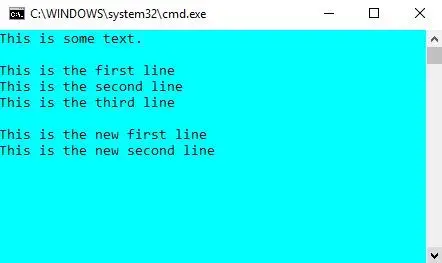
Є інший спосіб запису у файл, і це за допомогою об’єкта StreamWriter. StreamWriter також записує по одному рядку. Усі три методи запису створюють новий файл, якщо файл не існує, але якщо файл уже присутній у вказаному місці, він перезаписується. Усі згадані вище способи запису в текстовий файл проілюстровано в наведеному нижче прикладі коду.
// C# program to illustrate how> // to write a file in C#> using> System;> using> System.IO;> > class> Program {> > static> void> Main(> string> [] args)> > {> > // Store the path of the textfile in your system> > string> file => @'M:DocumentsTextfile.txt'> ;> > > // To write all of the text to the file> > string> text => 'This is some text.'> ;> > File.WriteAllText(file, text);> > > // To display current contents of the file> > Console.WriteLine(File.ReadAllText(file));> > Console.WriteLine();> > > // To write text to file line by line> > string> [] textLines1 = {> 'This is the first line'> ,> > 'This is the second line'> ,> > 'This is the third line'> };> > > File.WriteAllLines(file, textLines1);> > > // To display current contents of the file> > Console.WriteLine(File.ReadAllText(file));> > > // To write to a file using StreamWriter> > // Writes line by line> > string> [] textLines2 = {> 'This is the new first line'> ,> > 'This is the new second line'> };> > > using> (StreamWriter writer => new> StreamWriter(file))> > {> > foreach> (> string> ln> in> textLines2)> > {> > writer.WriteLine(ln);> > }> > }> > // To display current contents of the file> > Console.WriteLine(File.ReadAllText(file));> > > Console.ReadKey();> > }> }> |
Щоб запустити цю програму, збережіть файл за допомогою .cs розширення, а потім можна виконати за допомогою csc ім'я файлу.cs команда на cmd. Або ви можете використовувати Visual Studio.
Вихід:
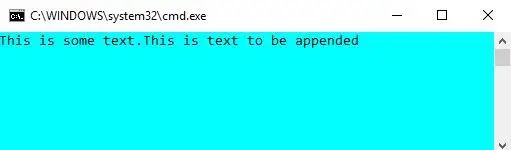
Якщо ви бажаєте додати більше тексту до наявного файлу, не перезаписуючи дані, які вже зберігаються в ньому, ви можете скористатися методами додавання, наданими класом File у System.IO.
using> System;> using> System.IO;> > class> Program {> > static> void> Main(> string> [] args)> > {> > // Store the path of the textfile in your system> > string> file => @'M:DocumentsTextfile.txt'> ;> > > // To write all of the text to the file> > string> text1 => 'This is some text.'> ;> > File.WriteAllText(file, text1);> > > // To append text to a file> > string> text2 => 'This is text to be appended'> ;> > File.AppendAllText(file, text2);> > > // To display current contents of the file> > Console.WriteLine(File.ReadAllText(file));> > Console.ReadKey();> > }> }> |
Вихід: