Program Opencv Python za zaznavanje obrazov
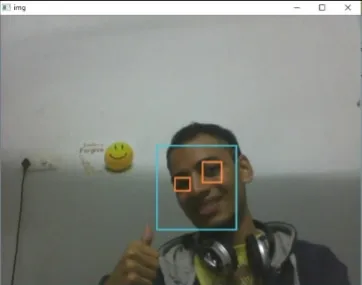
Cilj danega programa je zaznavanje predmeta zanimanja (obraz) v realnem času in nadaljnje sledenje istemu predmetu. To je preprost primer, kako zaznati obraz v Pythonu. Lahko poskusite uporabiti učne vzorce katerega koli drugega predmeta po vaši izbiri, ki ga želite zaznati, tako da učite klasifikator na zahtevanih objektih. Tukaj so spodnji koraki za prenos zahtev.
Koraki:
- Prenesite različico Python 2.7.x numpy in različico Opencv 2.7.x. Preverite, ali je vaš 32-bitni ali 64-bitni Windows združljiv, in ga ustrezno namestite.
- Prepričajte se, da se numpy izvaja v vašem pythonu, nato poskusite namestiti opencv.
- Datoteki haarcascade_eye.xml in haarcascade_frontalface_default.xml postavite v isto mapo (povezave so podane v spodnji kodi).
Izvedba
Python # OpenCV program to detect face in real time # import libraries of python OpenCV # where its functionality resides import cv2 # load the required trained XML classifiers # https://github.com/opencv/opencv/tree/master # data/haarcascades/haarcascade_frontalface_default.xml # Trained XML classifiers describes some features of some # object we want to detect a cascade function is trained # from a lot of positive(faces) and negative(non-faces) # images. face_cascade = cv2 . CascadeClassifier ( 'haarcascade_frontalface_default.xml' ) # https://github.com/opencv/opencv/tree/master # /data/haarcascades/haarcascade_eye.xml # Trained XML file for detecting eyes eye_cascade = cv2 . CascadeClassifier ( 'haarcascade_eye.xml' ) # capture frames from a camera cap = cv2 . VideoCapture ( 0 ) # loop runs if capturing has been initialized. while 1 : # reads frames from a camera ret img = cap . read () # convert to gray scale of each frames gray = cv2 . cvtColor ( img cv2 . COLOR_BGR2GRAY ) # Detects faces of different sizes in the input image faces = face_cascade . detectMultiScale ( gray 1.3 5 ) for ( x y w h ) in faces : # To draw a rectangle in a face cv2 . rectangle ( img ( x y )( x + w y + h )( 255 255 0 ) 2 ) roi_gray = gray [ y : y + h x : x + w ] roi_color = img [ y : y + h x : x + w ] # Detects eyes of different sizes in the input image eyes = eye_cascade . detectMultiScale ( roi_gray ) #To draw a rectangle in eyes for ( ex ey ew eh ) in eyes : cv2 . rectangle ( roi_color ( ex ey )( ex + ew ey + eh )( 0 127 255 ) 2 ) # Display an image in a window cv2 . imshow ( 'img' img ) # Wait for Esc key to stop k = cv2 . waitKey ( 30 ) & 0xff if k == 27 : break # Close the window cap . release () # De-allocate any associated memory usage cv2 . destroyAllWindows ()
Izhod:
Naslednji članek:
Program Opencv C++ za zaznavanje obrazov Ustvari kviz