Programul Opencv Python pentru detectarea feței
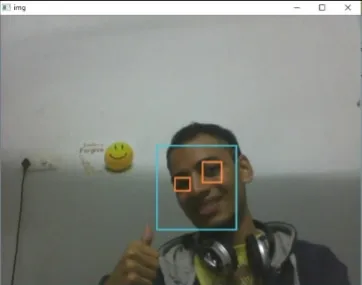
Obiectivul programului dat este de a detecta obiectul de interes (fața) în timp real și de a urmări același obiect. Acesta este un exemplu simplu de detectare a feței în Python. Puteți încerca să utilizați mostre de antrenament ale oricărui alt obiect la alegere pentru a fi detectat prin antrenarea clasificatorului pe obiectele necesare. Iată pașii pentru a descărca cerințele de mai jos.
Pași:
- Descărcați versiunea Python 2.7.x numpy și versiunea Opencv 2.7.x. Verificați dacă Windows pe 32 de biți sau pe 64 de biți este compatibil și instalați corespunzător.
- Asigurați-vă că numpy rulează în python, apoi încercați să instalați opencv.
- Puneți fișierele haarcascade_eye.xml și haarcascade_frontalface_default.xml în același folder (linkurile prezentate în codul de mai jos).
Implementarea
Python # OpenCV program to detect face in real time # import libraries of python OpenCV # where its functionality resides import cv2 # load the required trained XML classifiers # https://github.com/opencv/opencv/tree/master # data/haarcascades/haarcascade_frontalface_default.xml # Trained XML classifiers describes some features of some # object we want to detect a cascade function is trained # from a lot of positive(faces) and negative(non-faces) # images. face_cascade = cv2 . CascadeClassifier ( 'haarcascade_frontalface_default.xml' ) # https://github.com/opencv/opencv/tree/master # /data/haarcascades/haarcascade_eye.xml # Trained XML file for detecting eyes eye_cascade = cv2 . CascadeClassifier ( 'haarcascade_eye.xml' ) # capture frames from a camera cap = cv2 . VideoCapture ( 0 ) # loop runs if capturing has been initialized. while 1 : # reads frames from a camera ret img = cap . read () # convert to gray scale of each frames gray = cv2 . cvtColor ( img cv2 . COLOR_BGR2GRAY ) # Detects faces of different sizes in the input image faces = face_cascade . detectMultiScale ( gray 1.3 5 ) for ( x y w h ) in faces : # To draw a rectangle in a face cv2 . rectangle ( img ( x y )( x + w y + h )( 255 255 0 ) 2 ) roi_gray = gray [ y : y + h x : x + w ] roi_color = img [ y : y + h x : x + w ] # Detects eyes of different sizes in the input image eyes = eye_cascade . detectMultiScale ( roi_gray ) #To draw a rectangle in eyes for ( ex ey ew eh ) in eyes : cv2 . rectangle ( roi_color ( ex ey )( ex + ew ey + eh )( 0 127 255 ) 2 ) # Display an image in a window cv2 . imshow ( 'img' img ) # Wait for Esc key to stop k = cv2 . waitKey ( 30 ) & 0xff if k == 27 : break # Close the window cap . release () # De-allocate any associated memory usage cv2 . destroyAllWindows ()
Ieșire:
Articolul următor:
Program Opencv C++ pentru detectarea feței Creați un test