Clasa Java.lang.Number în Java
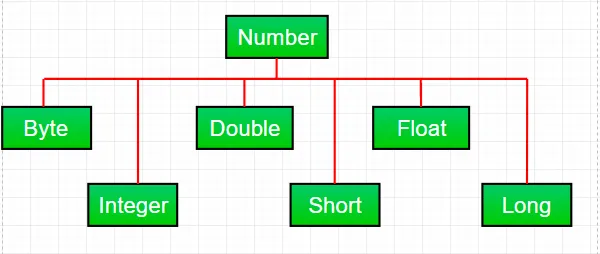
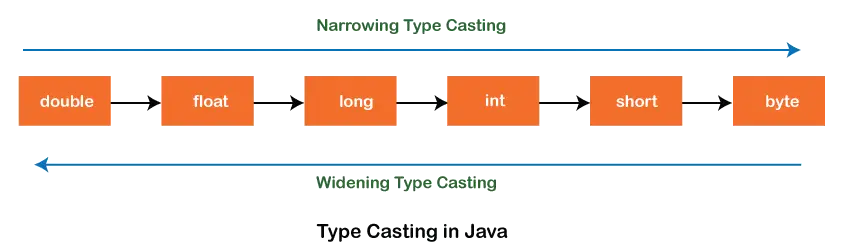
De cele mai multe ori, când lucrăm cu numere în java, folosim tipuri de date primitive . Dar Java oferă și diverse numere învelitoare subclasele din clasa abstractă Numărul prezent în java.lang pachet. Există în principal şase subclase din clasa Number. Aceste subclase definesc unele metode utile care sunt utilizate frecvent în timpul lucrului cu numere.
Aceste clase „înfășoară” tipul de date primitiv într-un obiect corespunzător. Adesea, împachetarea este făcută de compilator. Dacă utilizați o primitivă unde este așteptat un obiect, compilatorul introduce primitivul în clasa sa wrapper pentru dvs. În mod similar, dacă utilizați un obiect Number când se așteaptă o primitivă, compilatorul deblochează obiectul pentru dvs. Acest lucru se mai numește și Autoboxing și Unboxing.
De ce să folosiți un obiect de clasă Number peste date primitive?
- Sunt foarte utile constantele definite de clasa de numere, cum ar fi MIN_VALUE și MAX_VALUE, care furnizează limitele superioare și inferioare ale tipului de date.
- Obiectul clasei numere poate fi folosit ca argument al unei metode care așteaptă un obiect (utilizat adesea la manipularea colecțiilor de numere).
- Metodele de clasă pot fi utilizate pentru conversia valorilor în și din alte tipuri primitive pentru conversia în și din șiruri de caractere și pentru conversia între sisteme de numere (binar zecimal octal hexazecimal).
Metode comune tuturor subclaselor de Număr:
Syntax : byte byteValue() short shortValue() int intValue() long longValue() float floatValue() double doubleValue() Parameters : ---- Returns : the numeric value represented by this object after conversion to specified type
//Java program to demonstrate xxxValue() method public class Test { public static void main ( String [] args ) { // Creating a Double Class object with value '6.9685' Double d = new Double ( '6.9685' ); // Converting this Double(Number) object to // different primitive data types byte b = d . byteValue (); short s = d . shortValue (); int i = d . intValue (); long l = d . longValue (); float f = d . floatValue (); double d1 = d . doubleValue (); System . out . println ( 'value of d after converting it to byte : ' + b ); System . out . println ( 'value of d after converting it to short : ' + s ); System . out . println ( 'value of d after converting it to int : ' + i ); System . out . println ( 'value of d after converting it to long : ' + l ); System . out . println ( 'value of d after converting it to float : ' + f ); System . out . println ( 'value of d after converting it to double : ' + d1 ); } }
Ieșire:
value of d after converting it to byte : 6 value of d after converting it to short : 6 value of d after converting it to int : 6 value of d after converting it to long : 6 value of d after converting it to float : 6.9685 value of d after converting it to double : 6.9685
Nota : În timpul conversiei, poate apărea o posibilă pierdere de precizie. De exemplu, după cum putem vedea că fracțiunea part('.9685') a fost omisă în timpul conversiei de la Double object la tipul de date int.
Syntax : public int compareTo( NumberSubClass referenceName ) Parameters : referenceName - any NumberSubClass type value Returns : the value 0 if the Number is equal to the argument. the value 1 if the Number is less than the argument. the value -1 if the Number is greater than the argument.
//Java program to demonstrate compareTo() method public class Test { public static void main ( String [] args ) { // creating an Integer Class object with value '10' Integer i = new Integer ( '10' ); // comparing value of i System . out . println ( i . compareTo ( 7 )); System . out . println ( i . compareTo ( 11 )); System . out . println ( i . compareTo ( 10 )); } }
Ieșire:
1 -1 0
Syntax : public boolean equals(Object obj) Parameters : obj - any object Returns : The method returns true if the argument is not null and is an object of the same type and with the same numeric value otherwise false.
//Java program to demonstrate equals() method public class Test { public static void main ( String [] args ) { // creating a Short Class object with value '15' Short s = new Short ( '15' ); // creating a Short Class object with value '10' Short x = 10 ; // creating an Integer Class object with value '15' Integer y = 15 ; // creating another Short Class object with value '15' Short z = 15 ; //comparing s with other objects System . out . println ( s . equals ( x )); System . out . println ( s . equals ( y )); System . out . println ( s . equals ( z )); } }
Ieșire:
false false true
Syntax : static int parseInt(String s int radix) Parameters : s - any String representation of decimal radix - any radix value Returns : the integer value represented by the argument in decimal. Throws : NumberFormatException : if the string does not contain a parsable integer.
//Java program to demonstrate Integer.parseInt() method public class Test { public static void main ( String [] args ) { // parsing different strings int z = Integer . parseInt ( '654' 8 ); int a = Integer . parseInt ( '-FF' 16 ); long l = Long . parseLong ( '2158611234' 10 ); System . out . println ( z ); System . out . println ( a ); System . out . println ( l ); // run-time NumberFormatException will occur here // 'Geeks' is not a parsable string int x = Integer . parseInt ( 'Geeks' 8 ); // run-time NumberFormatException will occur here // (for octal(8)allowed digits are [0-7]) int y = Integer . parseInt ( '99' 8 ); } }
Ieșire:
428 -255 2158611234 Exception in thread 'main' java.lang.NumberFormatException: For input string: 'Geeks' at java.lang.NumberFormatException.forInputString(NumberFormatException.java:65) at java.lang.Integer.parseInt(Integer.java:580) at Test.main(Test.java:17)
Syntax : static int parseInt(String s) Parameters : s - any String representation of decimal Returns : the integer value represented by the argument in decimal. Throws : NumberFormatException : if the string does not contain a parsable integer.
//Java program to demonstrate Integer.parseInt() method public class Test { public static void main ( String [] args ) { // parsing different strings int z = Integer . parseInt ( '654' ); long l = Long . parseLong ( '2158611234' ); System . out . println ( z ); System . out . println ( l ); // run-time NumberFormatException will occur here // 'Geeks' is not a parsable string int x = Integer . parseInt ( 'Geeks' ); // run-time NumberFormatException will occur here // (for decimal(10)allowed digits are [0-9]) int a = Integer . parseInt ( '-FF' ); } }
Ieșire:
654 2158611234 Exception in thread 'main' java.lang.NumberFormatException: For input string: 'Geeks' at java.lang.NumberFormatException.forInputString(NumberFormatException.java:65) at java.lang.Integer.parseInt(Integer.java:580) at java.lang.Integer.parseInt(Integer.java:615) at Test.main(Test.java:15)
Syntax : String toString() String toString(int i) Parameters : String toString() - no parameter String toString(int i) - i: any integer value Returns : String toString() - returns a String object representing the value of the Number object on which it is invoked. String toString(int i) - returns a decimal String object representing the specified integer(i)Java
//Java program to demonstrate Integer.toString() //and Integer.toString(int i) method public class Test { public static void main ( String [] args ) { // demonstrating toString() method Integer x = 12 ; System . out . println ( x . toString ()); // demonstrating toString(int i) method System . out . println ( Integer . toString ( 12 )); System . out . println ( Integer . toBinaryString ( 152 )); System . out . println ( Integer . toHexString ( 152 )); System . out . println ( Integer . toOctalString ( 152 )); } }
Ieșire:
12 12 10011000 98 230
Syntax : Integer valueOf(int i) Integer valueOf(String s) Integer valueOf(String s int radix) Parameters : i - any integer value s - any String representation of decimal radix - any radix value Returns : valueOf(int i) : an Integer object holding the valuerepresented by the int argument. valueOf(String s) : an Integer object holding value represented by the string argument. valueOf(String s int radix) : an Integer object holding the value represented by the string argument with base radix. Throws : valueOf(String s) - NumberFormatException : if the string does not contain a parsable integer. valueOf(String s int radix) - NumberFormatException : if the string does not contain a parsable integer.
// Java program to demonstrate valueOf() method public class Test { public static void main ( String [] args ) { // demonstrating valueOf(int i) method System . out . println ( 'Demonstrating valueOf(int i) method' ); Integer i = Integer . valueOf ( 50 ); Double d = Double . valueOf ( 9.36 ); System . out . println ( i ); System . out . println ( d ); // demonstrating valueOf(String s) method System . out . println ( 'Demonstrating valueOf(String s) method' ); Integer n = Integer . valueOf ( '333' ); Integer m = Integer . valueOf ( '-255' ); System . out . println ( n ); System . out . println ( m ); // demonstrating valueOf(String sint radix) method System . out . println ( 'Demonstrating (String sint radix) method' ); Integer y = Integer . valueOf ( '333' 8 ); Integer x = Integer . valueOf ( '-255' 16 ); Long l = Long . valueOf ( '51688245' 16 ); System . out . println ( y ); System . out . println ( x ); System . out . println ( l ); // run-time NumberFormatException will occur in below cases Integer a = Integer . valueOf ( 'Geeks' ); Integer b = Integer . valueOf ( 'Geeks' 16 ); } }
Ieșire:
Demonstrating valueOf(int i) method 50 9.36 Demonstrating valueOf(String s) method 333 -255 Demonstrating (String sint radix) method 219 -597 1365803589 Exception in thread 'main' java.lang.NumberFormatException: For input string: 'Geeks' at java.lang.NumberFormatException.forInputString(NumberFormatException.java:65) at java.lang.Integer.parseInt(Integer.java:580) at java.lang.Integer.valueOf(Integer.java:766) at Test.main(Test.java:28)
Întrebare practică:
Care este rezultatul codului java dat?
public class Test { public static void main ( String [] args ) { Integer i = Integer . parseInt ( 'Kona' 27 ); System . out . println ( i ); } }
Opțiuni:
A) NumberFormatException at run-time B) NumberFormatException at compile-time C) 411787
Raspuns:
C) 411787
Explicatie:
Deoarece radix are 27, caracterele permise într-un literal String sunt [0-9][A-Q](pentru 10 până la 26). Deci, valoarea sa va fi calculată după cum urmează:
=> a*(27^0) + n*(27^1) + o*(27^2) + k*(27^3)
=> 10*1 + 23*27 + 24*27*27 + 20*27*27*27
=> 10 + 621 + 17496 + 393660
=> 411787
S-Ar Putea Să Vă Placă


Top Articole