Análise XML em Python
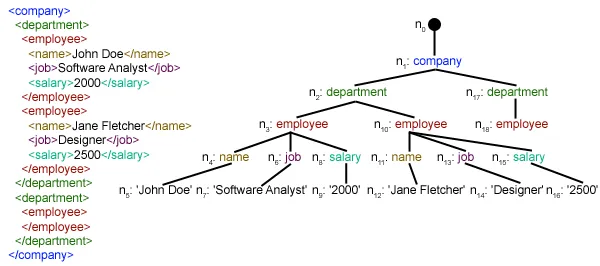
Este artigo se concentra em como analisar um determinado arquivo XML e extrair dele alguns dados úteis de forma estruturada. XML: XML significa eXtensible Markup Language. Ele foi projetado para armazenar e transportar dados. Ele foi projetado para ser legível por humanos e por máquinas. É por isso que os objetivos de design do XML enfatizam a simplicidade, a generalidade e a usabilidade na Internet. O arquivo XML a ser analisado neste tutorial é na verdade um feed RSS. RSS: RSS (Rich Site Summary, muitas vezes chamado de Really Simple Syndication) usa uma família de formatos de feed da web padrão para publicar informações atualizadas com frequência, como entradas de blogs, manchetes de notícias, áudio e vídeo. RSS é texto simples formatado em XML.
- O formato RSS em si é relativamente fácil de ler tanto por processos automatizados quanto por humanos.
- O RSS processado neste tutorial é o feed RSS das principais notícias de um site de notícias popular. Você pode conferir aqui . Nosso objetivo é processar esse feed RSS (ou arquivo XML) e salvá-lo em algum outro formato para uso futuro.
#Python code to illustrate parsing of XML files # importing the required modules import csv import requests import xml.etree.ElementTree as ET def loadRSS (): # url of rss feed url = 'http://www.hindustantimes.com/rss/topnews/rssfeed.xml' # creating HTTP response object from given url resp = requests . get ( url ) # saving the xml file with open ( 'topnewsfeed.xml' 'wb' ) as f : f . write ( resp . content ) def parseXML ( xmlfile ): # create element tree object tree = ET . parse ( xmlfile ) # get root element root = tree . getroot () # create empty list for news items newsitems = [] # iterate news items for item in root . findall ( './channel/item' ): # empty news dictionary news = {} # iterate child elements of item for child in item : # special checking for namespace object content:media if child . tag == '{https://video.search.yahoo.com/mrss' : news [ 'media' ] = child . attrib [ 'url' ] else : news [ child . tag ] = child . text . encode ( 'utf8' ) # append news dictionary to news items list newsitems . append ( news ) # return news items list return newsitems def savetoCSV ( newsitems filename ): # specifying the fields for csv file fields = [ 'guid' 'title' 'pubDate' 'description' 'link' 'media' ] # writing to csv file with open ( filename 'w' ) as csvfile : # creating a csv dict writer object writer = csv . DictWriter ( csvfile fieldnames = fields ) # writing headers (field names) writer . writeheader () # writing data rows writer . writerows ( newsitems ) def main (): # load rss from web to update existing xml file loadRSS () # parse xml file newsitems = parseXML ( 'topnewsfeed.xml' ) # store news items in a csv file savetoCSV ( newsitems 'topnews.csv' ) if __name__ == '__main__' : # calling main function main ()
Above code will: - Carregue o feed RSS do URL especificado e salve-o como um arquivo XML.
- Analise o arquivo XML para salvar as notícias como uma lista de dicionários onde cada dicionário é uma única notícia.
- Salve as notícias em um arquivo CSV.
- Você pode dar uma olhada em mais feeds RSS do site de notícias usado no exemplo acima. Você pode tentar criar uma versão estendida do exemplo acima analisando também outros feeds RSS.
- Você é fã de críquete? Então esse O feed rss deve ser do seu interesse! Você pode analisar este arquivo XML para obter informações sobre as partidas de críquete ao vivo e usá-lo para criar um notificador de desktop!
def loadRSS(): # url of rss feed url = 'http://www.hindustantimes.com/rss/topnews/rssfeed.xml' # creating HTTP response object from given url resp = requests.get(url) # saving the xml file with open('topnewsfeed.xml' 'wb') as f: f.write(resp.content) Here we first created a HTTP response object by sending an HTTP request to the URL of the RSS feed. The content of response now contains the XML file data which we save as topnewsfeed.xml em nosso diretório local. Para obter mais informações sobre como funciona o módulo de solicitações, siga este artigo: Solicitações GET e POST usando Python  Aqui estamos usando xml.etree.ElementTree (chame-o de ET em resumo). Element Tree tem duas classes para essa finalidade - ElementoÁrvore representa todo o documento XML como uma árvore e Elemento representa um único nó nesta árvore. As interações com todo o documento (leitura e gravação de/para arquivos) geralmente são feitas no ElementoÁrvore nível. As interações com um único elemento XML e seus subelementos são feitas no Elemento nível. Ok, então vamos passar pelo analisarXML() function now:
 tree = ET.parse(xmlfile)Here we create an ElementoÁrvore objeto analisando o passado arquivoxml.
root = tree.getroot()enraizar() função retorna a raiz de árvore como um Elemento object.
for item in root.findall('./channel/item'): Now once you have taken a look at the structure of your XML file you will notice that we are interested only in item elemento. ./canal/item é na verdade XPath sintaxe (XPath é uma linguagem para endereçar partes de um documento XML). Aqui queremos encontrar todos item netos de canal filhos do raiz (denotado por '.') elemento. Você pode ler mais sobre a sintaxe XPath suportada aqui . for item in root.findall('./channel/item'): # empty news dictionary news = {} # iterate child elements of item for child in item: # special checking for namespace object content:media if child.tag == '{https://video.search.yahoo.com/mrss': news['media'] = child.attrib['url'] else: news[child.tag] = child.text.encode('utf8') # append news dictionary to news items list newsitems.append(news) Now we know that we are iterating through item elementos onde cada item elemento contém uma notícia. Então criamos um vazio notícias dictionary in which we will store all data available about news item. To iterate though each child element of an element we simply iterate through it like this: for child in item:Now notice a sample item element here:
 We will have to handle namespace tags separately as they get expanded to their original value when parsed. So we do something like this:
 if child.tag == '{https://video.search.yahoo.com/mrss': news['media'] = child.attrib['url'] filho.attrib é um dicionário de todos os atributos relacionados a um elemento. Aqui estamos interessados url atributo de mídia: conteúdo namespace tag. Now for all other children we simply do: news[child.tag] = child.text.encode('utf8') filho.tag contém o nome do elemento filho. filho.texto stores all the text inside that child element. So finally a sample item element is converted to a dictionary and looks like this: {'description': 'Ignis has a tough competition already from Hyun.... 'guid': 'http://www.hindustantimes.com/autos/maruti-ignis-launch.... 'link': 'http://www.hindustantimes.com/autos/maruti-ignis-launch.... 'media': 'http://www.hindustantimes.com/rf/image_size_630x354/HT/... 'pubDate': 'Thu 12 Jan 2017 12:33:04 GMT ' 'title': 'Maruti Ignis launches on Jan 13: Five cars that threa..... } Then we simply append this dict element to the list notícias . Finalmente esta lista é retornada.  Como você pode ver, os dados do arquivo XML hierárquico foram convertidos em um arquivo CSV simples para que todas as notícias sejam armazenadas em forma de tabela. Isso também torna mais fácil estender o banco de dados. Também é possível usar dados do tipo JSON diretamente em seus aplicativos! Esta é a melhor alternativa para extrair dados de sites que não fornecem uma API pública, mas fornecem alguns feeds RSS. Todo o código e arquivos usados no artigo acima podem ser encontrados aqui . O que vem a seguir?
 Você Pode Gostar


Principais Artigos