Classe Java.lang.Number em Java
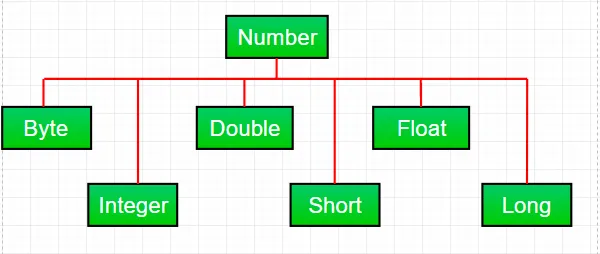
Na maioria das vezes, ao trabalhar com números em java, usamos tipos de dados primitivos . Mas Java também fornece vários números invólucro subclasses sob o número da classe abstrata presente em java.lang pacote. Existem principalmente seis subclasses na classe Number. Essas subclasses definem alguns métodos úteis que são usados com frequência ao lidar com números.
Essas classes 'envolvem' o tipo de dados primitivo em um objeto correspondente. Freqüentemente, o empacotamento é feito pelo compilador. Se você usar um primitivo onde um objeto é esperado, o compilador encaixota o primitivo em sua classe wrapper para você. Da mesma forma, se você usar um objeto Number quando um primitivo for esperado, o compilador descompacta o objeto para você. Isso também é chamado de Autoboxing e Unboxing.
Por que usar um objeto da classe Number em vez de dados primitivos?
- Constantes definidas pela classe numérica, como MIN_VALUE e MAX_VALUE, que fornecem os limites superior e inferior do tipo de dados, são muito úteis.
- O objeto da classe Number pode ser usado como argumento de um método que espera um objeto (geralmente usado ao manipular coleções de números).
- Os métodos de classe podem ser usados para converter valores de e para outros tipos primitivos, para converter de e para strings e para converter entre sistemas numéricos (decimal octal hexadecimal binário).
Métodos comuns a todas as subclasses de Number:
Syntax : byte byteValue() short shortValue() int intValue() long longValue() float floatValue() double doubleValue() Parameters : ---- Returns : the numeric value represented by this object after conversion to specified type
//Java program to demonstrate xxxValue() method public class Test { public static void main ( String [] args ) { // Creating a Double Class object with value '6.9685' Double d = new Double ( '6.9685' ); // Converting this Double(Number) object to // different primitive data types byte b = d . byteValue (); short s = d . shortValue (); int i = d . intValue (); long l = d . longValue (); float f = d . floatValue (); double d1 = d . doubleValue (); System . out . println ( 'value of d after converting it to byte : ' + b ); System . out . println ( 'value of d after converting it to short : ' + s ); System . out . println ( 'value of d after converting it to int : ' + i ); System . out . println ( 'value of d after converting it to long : ' + l ); System . out . println ( 'value of d after converting it to float : ' + f ); System . out . println ( 'value of d after converting it to double : ' + d1 ); } }
Saída:
value of d after converting it to byte : 6 value of d after converting it to short : 6 value of d after converting it to int : 6 value of d after converting it to long : 6 value of d after converting it to float : 6.9685 value of d after converting it to double : 6.9685
Observação : Durante a conversão pode ocorrer possível perda de precisão. Por exemplo, como podemos ver que a fração part('.9685') foi deixada de fora durante a conversão do objeto Double para o tipo de dados int.
Syntax : public int compareTo( NumberSubClass referenceName ) Parameters : referenceName - any NumberSubClass type value Returns : the value 0 if the Number is equal to the argument. the value 1 if the Number is less than the argument. the value -1 if the Number is greater than the argument.
//Java program to demonstrate compareTo() method public class Test { public static void main ( String [] args ) { // creating an Integer Class object with value '10' Integer i = new Integer ( '10' ); // comparing value of i System . out . println ( i . compareTo ( 7 )); System . out . println ( i . compareTo ( 11 )); System . out . println ( i . compareTo ( 10 )); } }
Saída:
1 -1 0
Syntax : public boolean equals(Object obj) Parameters : obj - any object Returns : The method returns true if the argument is not null and is an object of the same type and with the same numeric value otherwise false.
//Java program to demonstrate equals() method public class Test { public static void main ( String [] args ) { // creating a Short Class object with value '15' Short s = new Short ( '15' ); // creating a Short Class object with value '10' Short x = 10 ; // creating an Integer Class object with value '15' Integer y = 15 ; // creating another Short Class object with value '15' Short z = 15 ; //comparing s with other objects System . out . println ( s . equals ( x )); System . out . println ( s . equals ( y )); System . out . println ( s . equals ( z )); } }
Saída:
false false true
Syntax : static int parseInt(String s int radix) Parameters : s - any String representation of decimal radix - any radix value Returns : the integer value represented by the argument in decimal. Throws : NumberFormatException : if the string does not contain a parsable integer.
//Java program to demonstrate Integer.parseInt() method public class Test { public static void main ( String [] args ) { // parsing different strings int z = Integer . parseInt ( '654' 8 ); int a = Integer . parseInt ( '-FF' 16 ); long l = Long . parseLong ( '2158611234' 10 ); System . out . println ( z ); System . out . println ( a ); System . out . println ( l ); // run-time NumberFormatException will occur here // 'Geeks' is not a parsable string int x = Integer . parseInt ( 'Geeks' 8 ); // run-time NumberFormatException will occur here // (for octal(8)allowed digits are [0-7]) int y = Integer . parseInt ( '99' 8 ); } }
Saída:
428 -255 2158611234 Exception in thread 'main' java.lang.NumberFormatException: For input string: 'Geeks' at java.lang.NumberFormatException.forInputString(NumberFormatException.java:65) at java.lang.Integer.parseInt(Integer.java:580) at Test.main(Test.java:17)
Syntax : static int parseInt(String s) Parameters : s - any String representation of decimal Returns : the integer value represented by the argument in decimal. Throws : NumberFormatException : if the string does not contain a parsable integer.
//Java program to demonstrate Integer.parseInt() method public class Test { public static void main ( String [] args ) { // parsing different strings int z = Integer . parseInt ( '654' ); long l = Long . parseLong ( '2158611234' ); System . out . println ( z ); System . out . println ( l ); // run-time NumberFormatException will occur here // 'Geeks' is not a parsable string int x = Integer . parseInt ( 'Geeks' ); // run-time NumberFormatException will occur here // (for decimal(10)allowed digits are [0-9]) int a = Integer . parseInt ( '-FF' ); } }
Saída:
654 2158611234 Exception in thread 'main' java.lang.NumberFormatException: For input string: 'Geeks' at java.lang.NumberFormatException.forInputString(NumberFormatException.java:65) at java.lang.Integer.parseInt(Integer.java:580) at java.lang.Integer.parseInt(Integer.java:615) at Test.main(Test.java:15)
Syntax : String toString() String toString(int i) Parameters : String toString() - no parameter String toString(int i) - i: any integer value Returns : String toString() - returns a String object representing the value of the Number object on which it is invoked. String toString(int i) - returns a decimal String object representing the specified integer(i)Java
//Java program to demonstrate Integer.toString() //and Integer.toString(int i) method public class Test { public static void main ( String [] args ) { // demonstrating toString() method Integer x = 12 ; System . out . println ( x . toString ()); // demonstrating toString(int i) method System . out . println ( Integer . toString ( 12 )); System . out . println ( Integer . toBinaryString ( 152 )); System . out . println ( Integer . toHexString ( 152 )); System . out . println ( Integer . toOctalString ( 152 )); } }
Saída:
12 12 10011000 98 230
Syntax : Integer valueOf(int i) Integer valueOf(String s) Integer valueOf(String s int radix) Parameters : i - any integer value s - any String representation of decimal radix - any radix value Returns : valueOf(int i) : an Integer object holding the valuerepresented by the int argument. valueOf(String s) : an Integer object holding value represented by the string argument. valueOf(String s int radix) : an Integer object holding the value represented by the string argument with base radix. Throws : valueOf(String s) - NumberFormatException : if the string does not contain a parsable integer. valueOf(String s int radix) - NumberFormatException : if the string does not contain a parsable integer.
// Java program to demonstrate valueOf() method public class Test { public static void main ( String [] args ) { // demonstrating valueOf(int i) method System . out . println ( 'Demonstrating valueOf(int i) method' ); Integer i = Integer . valueOf ( 50 ); Double d = Double . valueOf ( 9.36 ); System . out . println ( i ); System . out . println ( d ); // demonstrating valueOf(String s) method System . out . println ( 'Demonstrating valueOf(String s) method' ); Integer n = Integer . valueOf ( '333' ); Integer m = Integer . valueOf ( '-255' ); System . out . println ( n ); System . out . println ( m ); // demonstrating valueOf(String sint radix) method System . out . println ( 'Demonstrating (String sint radix) method' ); Integer y = Integer . valueOf ( '333' 8 ); Integer x = Integer . valueOf ( '-255' 16 ); Long l = Long . valueOf ( '51688245' 16 ); System . out . println ( y ); System . out . println ( x ); System . out . println ( l ); // run-time NumberFormatException will occur in below cases Integer a = Integer . valueOf ( 'Geeks' ); Integer b = Integer . valueOf ( 'Geeks' 16 ); } }
Saída:
Demonstrating valueOf(int i) method 50 9.36 Demonstrating valueOf(String s) method 333 -255 Demonstrating (String sint radix) method 219 -597 1365803589 Exception in thread 'main' java.lang.NumberFormatException: For input string: 'Geeks' at java.lang.NumberFormatException.forInputString(NumberFormatException.java:65) at java.lang.Integer.parseInt(Integer.java:580) at java.lang.Integer.valueOf(Integer.java:766) at Test.main(Test.java:28)
Pergunta prática:
Qual é a saída do código Java fornecido?
public class Test { public static void main ( String [] args ) { Integer i = Integer . parseInt ( 'Kona' 27 ); System . out . println ( i ); } }
Opções:
A) NumberFormatException at run-time B) NumberFormatException at compile-time C) 411787
Responder :
C) 411787
Explicação:
Como a base é 27, os caracteres permitidos em uma String literal são [0-9][A-Q](para 10 a 26).Portanto, seu valor será calculado da seguinte forma:
=> a*(27^0) + n*(27^1) + o*(27^2) + k*(27^3)
=> 10*1 + 23*27 + 24*27*27 + 20*27*27*27
=> 10 + 621 + 17496 + 393660
=> 411787
Você Pode Gostar

Principais Artigos




Categoria
Artigos Interessantes