Classe Java.io.PipedOutputStream em Java
Classe Java.io.PipedInputStream em Java
Tubos em IO fornece um link entre dois threads em execução na JVM ao mesmo tempo. Portanto, Pipes são usados como origem ou destino.
- PipedInputStream também é canalizado com PipedOutputStream. Portanto, os dados podem ser gravados usando PipedOutputStream e podem ser gravados usando PipedInputStream. Mas usar os dois threads ao mesmo tempo criará um impasse para os threads.
- PipedOutputStream está enviando o final do pipe. Os dados são gravados no PipedOutputStream. Diz-se que o pipe está quebrado se o PipedInputStream que estava lendo os dados não existir mais.
Declaração:
 public class PipedOutputStream
  extends OutputStream
     Construtor:
- PipedOutputStream(): cria um PipedOutputStream que não está conectado.
- PipedOutputStream(PipedOutputStream inStream): cria um PipedOutputStream que
está conectado a PipedInputStream - 'inStream'.
Métodos:
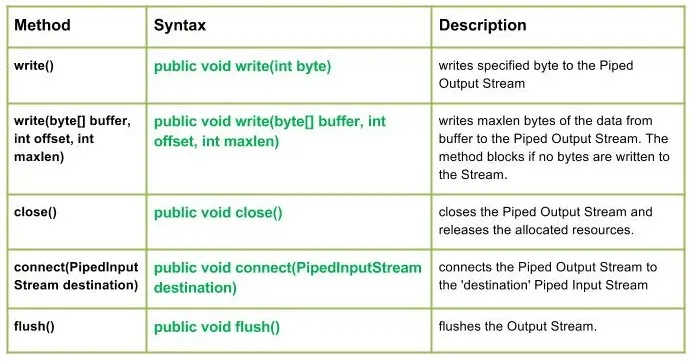
write(): java.io.PipedOutputStream.write(int byte) grava um byte especificado no fluxo de saída canalizado.
Sintaxe:
public void write(int byte)
Parameters :
byte : byte to be written
Return : void
Exception :
-> IOException : if in case IO error occurs.write (byte [] buffer int offset int maxlen): java.io.PipedOutputStream.write (byte [] buffer int offset int maxlen) grava maxlen bytes dos dados do buffer no fluxo de saída canalizado. O método é bloqueado se nenhum byte for gravado no Stream.
Sintaxe:
public void write(byte[] buffer int offset int maxlen)
Parameters :
buffer : data of the buffer
offset : starting in the destination array - 'buffer'.
maxlen : maximum length of array to be read
Return : void
Exception :
-> IOException : if in case IO error occurs. JavaSaída:
Use of write(buffer offset maxlen) : J A V A
- fechar(): java.io.PipedOutputStream.close() fecha o fluxo de saída canalizado e libera os recursos alocados.
Sintaxe:
 public void close()
    Parameters :
 --------------
    Return :
 void
    Exception :
 ->      IOException :     if in case IO error occurs.
- connect (destino PipedInputStream): java.io.PipedOutputStream.connect (destino PipedInputStream conecta o fluxo de saída canalizado ao fluxo de entrada canalizado de 'destino' e no caso de 'destino' ser canalizado com algum outro fluxo, a exceção IO é lançada
Sintaxe:
 public void connect(PipedInputStream destination)
    Parameters :
 destination : the Piped Input Stream to be connected to
    Return :
 void
    Exception :
 ->      IOException :     if in case IO error occurs.
- flush(): java.io.PipedOutputStream.flush() libera o fluxo de saída.
Sintaxe:
public void flush()
Parameters :
------------
Return :
void
Exception :
-> IOException : if in case IO error occurs.
Código Java ilustrando o funcionamento dos métodos da classe PipedOutputStream:
JavaSaída:
Use of flush() method :
G E E K S
Closing the Output stream
Criar questionário