Różne sposoby deklarowania i inicjowania tablicy 2-D w Javie
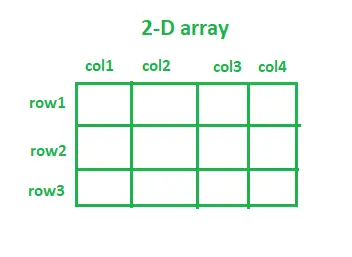
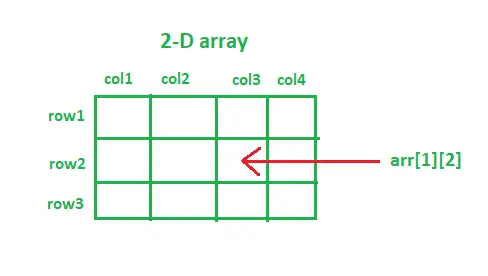
Tablica wielowymiarowa. Najczęściej używanymi tablicami wielowymiarowymi są tablice 2-D i 3-D. Można powiedzieć, że każda tablica o wyższym wymiarze jest w zasadzie tablicą tablic. Bardzo częstym przykładem tablicy 2D jest szachownica. Szachownica to siatka zawierająca 64 kwadraty 1×1. W podobny sposób można wizualizować tablicę 2D. W tablicy 2D każdy element jest powiązany z numerem wiersza i numerem kolumny. Dostęp do dowolnego elementu tablicy 2D jest podobny do uzyskiwania dostępu do rekordu pliku Excel przy użyciu zarówno numeru wiersza, jak i numeru kolumny. Tablice 2D są przydatne podczas gry w kółko i krzyżyk, szachy, a nawet podczas przechowywania pikseli obrazu.
Deklarowanie tablicy 2-D w Javie:
Dowolną tablicę dwuwymiarową można zadeklarować w następujący sposób:
Składnia:
typ_danych nazwa_tablicy[][]; (LUB) typ_danych[][] nazwa_tablicy;
- typ_danych: Ponieważ Java jest językiem o typie statycznym (tj. oczekuje, że zmienne zostaną zadeklarowane, zanim będzie można im przypisać wartości). Zatem określenie typu danych decyduje o tym, jaki typ elementów będzie akceptowany. np. aby przechowywać tylko wartości całkowite, typ danych zostanie zadeklarowany jako int. nazwa_tablicy: Jest to nazwa nadana tablicy 2-D. np. przedmioty, studenci, owoce, wydział itp.
Notatka: Możemy zapisać [ ][ ] po typie_danych lub [ ][ ] po nazwie_tablicy podczas deklarowania tablicy 2D.
Jawa
// java program showing declaration of arrays> import> java.io.*;> > class> GFG {> > public> static> void> main(String[] args)> > {> > > int> [][] integer2DArray;> // 2D integer array> > String[][] string2DArray;> // 2D String array> > double> [][] double2DArray;> // 2D double array> > boolean> [][] boolean2DArray;> // 2D boolean array> > float> [][] float2DArray;> // 2D float array> > double> [][] double2DArray;> // 2D double array> > }> }> |
Różne podejścia do inicjalizacji tablicy 2-D w Javie:
typ_danych[][] nazwa_tablicy = nowy typ_danych[no_of_rows][no_of_columns];
Całkowita liczba elementów w dowolnej tablicy 2D będzie równa (no_of_rows) * (no_of_columns).
- no_of_rows: Liczba wierszy w tablicy. np. no_of_rows = 3, wówczas tablica będzie miała trzy wiersze. no_of_columns: Liczba kolumn w tablicy. np. no_of_columns = 4, wówczas tablica będzie miała cztery kolumny.
Powyższa składnia inicjalizacji tablicy przypisze wartości domyślne do wszystkich elementów tablicy zgodnie z określonym typem danych.
Poniżej znajduje się implementacja różnych podejść do inicjowania tablic 2D:
Podejście 1:
Jawa
// java program to initialize a 2D array> import> java.io.*;> > class> GFG {> > public> static> void> main(String[] args)> > {> > // Declaration along with initialization> > // 2D integer array with 5 rows and 3 columns> > // integer array elements are initialized with 0> > int> [][] integer2DArray => new> int> [> 5> ][> 3> ];> > System.out.println(> > 'Default value of int array element: '> > + integer2DArray[> 0> ][> 0> ]);> > > // 2D String array with 4 rows and 4 columns> > // String array elements are initialized with null> > String[][] string2DArray => new> String[> 4> ][> 4> ];> > System.out.println(> > 'Default value of String array element: '> > + string2DArray[> 0> ][> 0> ]);> > > // 2D boolean array with 3 rows and 5 columns> > // boolean array elements are initialized with false> > boolean> [][] boolean2DArray => new> boolean> [> 4> ][> 4> ];> > System.out.println(> > 'Default value of boolean array element: '> > + boolean2DArray[> 0> ][> 0> ]);> > > // 2D char array with 10 rows and 10 columns> > // char array elements are initialized with> > // 'u0000'(null character)> > char> [][] char2DArray => new> char> [> 10> ][> 10> ];> > System.out.println(> > 'Default value of char array element: '> > + char2DArray[> 0> ][> 0> ]);> > > // First declaration and then initialization> > int> [][] arr;> // declaration> > > // System.out.println('arr[0][0]: '+ arr[0][0]);> > // The above line will throw an error, as we have> > // only declared the 2D array, but not initialized> > // it.> > arr => new> int> [> 5> ][> 3> ];> // initialization> > System.out.println(> 'arr[0][0]: '> + arr[> 0> ][> 0> ]);> > }> }> |
Notatka: Kiedy inicjujesz tablicę 2D, musisz zawsze określić pierwszy wymiar (liczbę wierszy), ale podanie drugiego wymiaru (liczby kolumn) można pominąć.
W poniższym fragmencie kodu nie określiliśmy liczby kolumn. Jednak kompilator Java jest na tyle inteligentny, że może manipulować rozmiarem, sprawdzając liczbę elementów w kolumnach.
Jawa
import> java.io.*;> > class> GFG {> > public> static> void> main(String[] args)> > {> > // The line below will throw an error, as the first> > // dimension(no. of rows) is not specified> > int> [][] arr => new> int> [][> 3> ];> > > // The line below will execute without any error, as> > // the first dimension(no. of rows) is specified> > int> [][] arr => new> int> [> 2> ][];> > }> }> |
Dostęp do dowolnego elementu tablicy 2D można uzyskać za pomocą numerów wierszy i kolumn.
Podejście 2:
W poniższym fragmencie kodu nie określiliśmy liczby wierszy i kolumn. Jednak kompilator Java jest na tyle inteligentny, że może manipulować rozmiarem, sprawdzając liczbę elementów w wierszach i kolumnach.
Jawa
import> java.io.*;> > class> GFG {> > public> static> void> main(String[] args)> > {> > String[][] subjects = {> > {> 'Data Structures & Algorithms'> ,> > 'Programming & Logic'> ,> 'Software Engineering'> ,> > 'Theory of Computation'> },> // row 1> > > {> 'Thermodynamics'> ,> 'Metallurgy'> ,> > 'Machine Drawing'> ,> > 'Fluid Mechanics'> },> // row2> > > {> 'Signals and Systems'> ,> 'Digital Electronics'> ,> > 'Power Electronics'> }> // row3> > };> > > System.out.println(> > 'Fundamental Subject in Computer Engineering: '> > + subjects[> 0> ][> 0> ]);> > System.out.println(> > 'Fundamental Subject in Mechanical Engineering: '> > + subjects[> 1> ][> 3> ]);> > System.out.println(> > 'Fundamental Subject in Electronics Engineering: '> > + subjects[> 2> ][> 1> ]);> > }> }> |
Wyjście
Fundamental Subject in Computer Engineering: Data Structures & Algorithms Fundamental Subject in Mechanical Engineering: Fluid Mechanics Fundamental Subject in Electronics Engineering: Digital Electronics
Podejście 3:
Co więcej, możemy inicjować każdy element tablicy osobno. Spójrz na fragment kodu poniżej:
Jawa
import> java.io.*;> import> java.util.*;> > class> GFG {> > public> static> void> main(String[] args)> > {> > int> [][] scores => new> int> [> 2> ][> 2> ];> > // Initializing array element at position[0][0],> > // i.e. 0th row and 0th column> > scores[> 0> ][> 0> ] => 15> ;> > // Initializing array element at position[0][1],> > // i.e. 0th row and 1st column> > scores[> 0> ][> 1> ] => 23> ;> > // Initializing array element at position[1][0],> > // i.e. 1st row and 0th column> > scores[> 1> ][> 0> ] => 30> ;> > // Initializing array element at position[1][1],> > // i.e. 1st row and 1st column> > scores[> 1> ][> 1> ] => 21> ;> > > // printing the array elements individually> > System.out.println(> 'scores[0][0] = '> > + scores[> 0> ][> 0> ]);> > System.out.println(> 'scores[0][1] = '> > + scores[> 0> ][> 1> ]);> > System.out.println(> 'scores[1][0] = '> > + scores[> 1> ][> 0> ]);> > System.out.println(> 'scores[1][1] = '> > + scores[> 1> ][> 1> ]);> > // printing 2D array using Arrays.deepToString() method> > System.out.println(> > 'Printing 2D array using Arrays.deepToString() method: '> );> > System.out.println(Arrays.deepToString(scores));> > }> }> |
Wyjście
scores[0][0] = 15 scores[0][1] = 23 scores[1][0] = 30 scores[1][1] = 21 Printing 2D array using Arrays.deepToString() method: [[15, 23], [30, 21]]
Podejście 4
Użycie powyższego podejścia do inicjalizacji tablicy byłoby żmudnym zadaniem, jeśli rozmiar tablicy 2D jest zbyt duży. Skutecznym sposobem jest użycie pętli for do inicjowania elementów tablicy w przypadku dużej tablicy 2D.
Jawa
import> java.io.*;> > class> GFG {> > public> static> void> main(String[] args)> > {> > int> rows => 80> , columns => 5> ;> > int> [][] marks => new> int> [rows][columns];> > > // initializing the array elements using for loop> > for> (> int> i => 0> ; i for (int j = 0; j marks[i][j] = i + j; } } // printing the first three rows of marks array System.out.println('First three rows are: '); for (int i = 0; i <3; i++) { for (int j = 0; j System.out.printf(marks[i][j] + ' '); } System.out.println(); } } }> |
Wyjście
First three rows are: 0 1 2 3 4 1 2 3 4 5 2 3 4 5 6
Notatka: Możemy użyć arr. funkcja długości do znalezienia rozmiaru wierszy (pierwszy wymiar) i funkcja arr[0].length do znalezienia rozmiaru kolumn (drugi wymiar).
Podejście 5: (Tablice postrzępione)
Może zaistnieć pewien scenariusz, w którym chcesz, aby każdy wiersz miał inną liczbę kolumn. Ten typ tablicy nazywany jest tablicą postrzępioną.
Jawa
import> java.io.*;> > class> GFG {> > public> static> void> main(String[] args)> > {> > // declaring a 2D array with 2 rows> > int> jagged[][] => new> int> [> 2> ][];> > > // not specifying the 2nd dimension,> > // and making it as jagged array> > // first row has 2 columns> > jagged[> 0> ] => new> int> [> 2> ];> > // second row has 4 columns> > jagged[> 1> ] => new> int> [> 4> ];> > // Initializing the array> > int> count => 0> ;> > for> (> int> i => 0> ; i // remember to use jagged[i].length instead of // jagged[0].length, since every row has // different number of columns for (int j = 0; j jagged[i][j] = count++; } } // printing the values of 2D Jagged array System.out.println('The values of 2D jagged array'); for (int i = 0; i for (int j = 0; j System.out.printf(jagged[i][j] + ' '); System.out.println(); } } }> |
Wyjście
The values of 2D jagged array 0 1 2 3 4 5
Program dodający dwie tablice 2D:
Jawa
import> java.io.*;> import> java.util.*;> > class> GFG {> > public> static> void> main(String[] args)> > {> > int> [][] arr1 = { {> 1> ,> 2> ,> 3> }, {> 4> ,> 5> ,> 6> } };> > int> [][] arr2 = { {> 4> ,> 5> ,> 6> }, {> 1> ,> 3> ,> 2> } };> > int> [][] sum => new> int> [> 2> ][> 3> ];> > > // adding two 2D arrays element-wise> > for> (> int> i => 0> ; i for (int j = 0; j 0].length; j++) { sum[i][j] = arr1[i][j] + arr2[i][j]; } } System.out.println('Resultant 2D array: '); for (int i = 0; i System.out.println(Arrays.toString(sum[i])); } } }> |
Wyjście
Resultant 2D array: [5, 7, 9] [5, 8, 8]