Programme OpenGL pour une animation simple (Révolution) en C
OpenGL est une API multiplateforme multilingue pour le rendu de graphiques vectoriels 2D et 3D. En utilisant cela, nous pouvons créer de nombreux designs ainsi que des animations. Ci-dessous l'animation simple réalisée à l'aide de OpenGL .
Approche :
Pour rendre une image animée, nous devons comprendre la procédure de fonctionnement d'une fonction utilisée pour afficher, c'est-à-dire glClear(GL_COLOR_BUFFER_BIT) . Sa tâche est d'effacer l'écran avec la valeur par défaut après un certain temps (normalement après 1/30 sec ou 1/60 sec). Ainsi, si un changement de coordonnées se produit, il semblera bouger car l'œil humain ne peut distinguer que les images séparées de 1/16 de seconde (persistance de la vision).
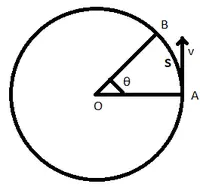
Maintenant, les coordonnées du cercle sont X = r*cos(?) et Y = r*sin(?) ou pour l'ellipse X = rx*cos(?) et Y = ry*cos(?) où rx et ry sont des rayons dans les directions X et Y et ? est l'angle.
Si nous varions ? de 0 à 2*pi (360 degrés) avec une très petite augmentation (disons de 1 degré) et dessinez un point sur cette coordonnée, nous pouvons créer un cercle ou une ellipse complet. Nous pouvons également créer un demi-cercle ou n'importe quel arc de cercle ou ellipse en faisant varier la valeur de début et de fin de ? (angle).
Ces concepts sont utilisés pour dessiner l'animation suivante :
- 7 parties horizontales d'ellipse et 3 ellipses complètes verticales ainsi qu'1 cercle extérieur et une ellipse extérieure permettent de visualiser une orbite dessinée en ajustant la ? ainsi que le rayon.
- Une ligne verticale est tracée pour réaliser la figure. Ensuite, pour le faire bouger, une autre boucle est donnée où la valeur de j change très légèrement pour rendre le mouvement plus fluide.
- Puisque nous devions faire en sorte que tous les points bougent dans le même type de mouvement pour garder la figure ensemble, donc l'équation du mouvement est Glyx2i(x/2 - 600*cos(j) du/2 - 100*sin(j)) est donné à l'intérieur de chaque intérieur pour la boucle afin qu'il puisse s'appliquer à tous les points en même temps.
Pour travailler sur le système d'exploitation Ubuntu :
gcc filename.c -lGL -lGLU -lglut -lm where filename.c is the name of the file with which this program is saved.
Ci-dessous l'implémentation en C.
// C Program to illustrate // OpenGL animation for revolution #include #include #include // global declaration int x y ; float i j ; // Initialization function void myInit ( void ) { // Reset background color with black (since all three argument is 0.0) glClearColor ( 0.0 0.0 0.0 1.0 ); // Set picture color to green (in RGB model) // as only argument corresponding to G (Green) is 1.0 and rest are 0.0 glColor3f ( 0.0 1.0 0.0 ); // Set width of point to one unit glPointSize ( 1.0 ); glMatrixMode ( GL_PROJECTION ); glLoadIdentity (); // Set window size in X- and Y- direction gluOrtho2D ( -780 780 -420 420 ); } // Function to display animation void display ( void ) { // Outer loop to make figure moving // loop variable j iterated up to 10000 // indicating that figure will be in motion for large amount of time // around 10000/6.29 = 1590 time it will revolve // j is incremented by small value to make motion smoother for ( j = 0 ; j < 10000 ; j += 0.01 ) { glClear ( GL_COLOR_BUFFER_BIT ); glBegin ( GL_POINTS ); // Iterate i up to 2*pi i.e. 360 degree // plot point with slight increment in angle // so it will look like a continuous figure // Loop is to draw outer circle for ( i = 0 ; i < 6.29 ; i += 0.001 ) { x = 200 * cos ( i ); y = 200 * sin ( i ); glVertex2i ( x y ); // For every loop 2nd glVertex function is // to make smaller figure in motion glVertex2i ( x / 2 - 600 * cos ( j ) y / 2 - 100 * sin ( j )); } // 7 loops to draw parallel latitude for ( i = 1.17 ; i < 1.97 ; i += 0.001 ) { x = 400 * cos ( i ); y = -150 + 300 * sin ( i ); glVertex2i ( x y ); glVertex2i ( x / 2 - 600 * cos ( j ) y / 2 - 100 * sin ( j )); } for ( i = 1.07 ; i < 2.07 ; i += 0.001 ) { x = 400 * cos ( i ); y = -200 + 300 * sin ( i ); glVertex2i ( x y ); glVertex2i ( x / 2 - 600 * cos ( j ) y / 2 - 100 * sin ( j )); } for ( i = 1.05 ; i < 2.09 ; i += 0.001 ) { x = 400 * cos ( i ); y = -250 + 300 * sin ( i ); glVertex2i ( x y ); glVertex2i ( x / 2 - 600 * cos ( j ) y / 2 - 100 * sin ( j )); } for ( i = 1.06 ; i < 2.08 ; i += 0.001 ) { x = 400 * cos ( i ); y = -300 + 300 * sin ( i ); glVertex2i ( x y ); glVertex2i ( x / 2 - 600 * cos ( j ) y / 2 - 100 * sin ( j )); } for ( i = 1.10 ; i < 2.04 ; i += 0.001 ) { x = 400 * cos ( i ); y = -350 + 300 * sin ( i ); glVertex2i ( x y ); glVertex2i ( x / 2 - 600 * cos ( j ) y / 2 - 100 * sin ( j )); } for ( i = 1.16 ; i < 1.98 ; i += 0.001 ) { x = 400 * cos ( i ); y = -400 + 300 * sin ( i ); glVertex2i ( x y ); glVertex2i ( x / 2 - 600 * cos ( j ) y / 2 - 100 * sin ( j )); } for ( i = 1.27 ; i < 1.87 ; i += 0.001 ) { x = 400 * cos ( i ); y = -450 + 300 * sin ( i ); glVertex2i ( x y ); glVertex2i ( x / 2 - 600 * cos ( j ) y / 2 - 100 * sin ( j )); } // Loop is to draw vertical line for ( i = 200 ; i >=- 200 ; i -- ) { glVertex2i ( 0 i ); glVertex2i ( -600 * cos ( j ) i / 2 - 100 * sin ( j )); } // 3 loops to draw vertical ellipse (similar to longitude) for ( i = 0 ; i < 6.29 ; i += 0.001 ) { x = 70 * cos ( i ); y = 200 * sin ( i ); glVertex2i ( x y ); glVertex2i ( x / 2 - 600 * cos ( j ) y / 2 - 100 * sin ( j )); } for ( i = 0 ; i < 6.29 ; i += 0.001 ) { x = 120 * cos ( i ); y = 200 * sin ( i ); glVertex2i ( x y ); glVertex2i ( x / 2 - 600 * cos ( j ) y / 2 - 100 * sin ( j )); } for ( i = 0 ; i < 6.29 ; i += 0.001 ) { x = 160 * cos ( i ); y = 200 * sin ( i ); glVertex2i ( x y ); glVertex2i ( x / 2 - 600 * cos ( j ) y / 2 - 100 * sin ( j )); } // Loop to make orbit of revolution for ( i = 0 ; i < 6.29 ; i += 0.001 ) { x = 600 * cos ( i ); y = 100 * sin ( i ); glVertex2i ( x y ); } glEnd (); glFlush (); } } // Driver Program int main ( int argc char ** argv ) { glutInit ( & argc argv ); // Display mode which is of RGB (Red Green Blue) type glutInitDisplayMode ( GLUT_SINGLE | GLUT_RGB ); // Declares window size glutInitWindowSize ( 1360 768 ); // Declares window position which is (0 0) // means lower left corner will indicate position (0 0) glutInitWindowPosition ( 0 0 ); // Name to window glutCreateWindow ( 'Revolution' ); // Call to myInit() myInit (); glutDisplayFunc ( display ); glutMainLoop (); }