Basisprincipes van NumPy-arrays

NumPy staat voor Numerieke Python. Het is een Python-bibliotheek die wordt gebruikt voor het werken met een array. In Python gebruiken we de lijst voor de array, maar deze is traag te verwerken. NumPy-array is een krachtig N-dimensionaal array-object en wordt gebruikt in lineaire algebra, Fourier-transformatie en mogelijkheden voor willekeurige getallen. Het biedt veel sneller een array-object dan traditionele Python-lijsten.
Soorten array:
- Eéndimensionale array
- Multidimensionale array
Eéndimensionale array:
Een eendimensionale array is een soort lineaire array.
Eéndimensionale array
Voorbeeld:
Python3 # importing numpy module import numpy as np # creating list list = [1, 2, 3, 4] # creating numpy array sample_array = np.array(list) print('List in python : ', list) print('Numpy Array in python :', sample_array)
Uitgang:
List in python : [1, 2, 3, 4] Numpy Array in python : [1 2 3 4]
Controleer het gegevenstype voor lijst en array:
Python3 print(type(list_1)) print(type(sample_array))
Uitgang:
Multidimensionale array:
Gegevens in multidimensionale arrays worden in tabelvorm opgeslagen.
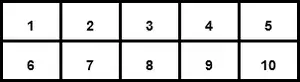
Tweedimensionale array
Voorbeeld:
Python3 # importing numpy module import numpy as np # creating list list_1 = [1, 2, 3, 4] list_2 = [5, 6, 7, 8] list_3 = [9, 10, 11, 12] # creating numpy array sample_array = np.array([list_1, list_2, list_3]) print('Numpy multi dimensional array in python
', sample_array) Uitgang:
Numpy multi dimensional array in python [[ 1 2 3 4] [ 5 6 7 8] [ 9 10 11 12]]
Opmerking: gebruik [ ] operatoren binnen numpy.array() voor multidimensionaal
Anatomie van een array:
1. As: De as van een array beschrijft de volgorde van indexering in de array.
As 0 = eendimensionaal
As 1 = Tweedimensionaal
As 2 = Driedimensionaal
2. Vorm: Het aantal elementen samen met elke as. Het komt uit een tupel.
Voorbeeld:
Python3 # importing numpy module import numpy as np # creating list list_1 = [1, 2, 3, 4] list_2 = [5, 6, 7, 8] list_3 = [9, 10, 11, 12] # creating numpy array sample_array = np.array([list_1, list_2, list_3]) print('Numpy array :') print(sample_array) # print shape of the array print('Shape of the array :', sample_array.shape) Uitgang:
Numpy array : [[ 1 2 3 4] [ 5 6 7 8] [ 9 10 11 12]] Shape of the array : (3, 4)
Voorbeeld:
Python3 import numpy as np sample_array = np.array([[0, 4, 2], [3, 4, 5], [23, 4, 5], [2, 34, 5], [5, 6, 7]]) print('shape of the array :', sample_array.shape) Uitgang:
shape of the array : (5, 3)
3. Rang: De rangorde van een array is eenvoudigweg het aantal assen (of dimensies) dat het heeft.
De eendimensionale array heeft rang 1.
Rang 1
De tweedimensionale array heeft rang 2.
Rang 2
4. Gegevenstype-objecten (dtype): Gegevenstype-objecten (dtype) zijn een exemplaar van numpy.dtype klas. Het beschrijft hoe de bytes in het geheugenblok met een vaste grootte dat overeenkomt met een array-item moeten worden geïnterpreteerd.
Voorbeeld:
Python3 # Import module import numpy as np # Creating the array sample_array_1 = np.array([[0, 4, 2]]) sample_array_2 = np.array([0.2, 0.4, 2.4]) # display data type print('Data type of the array 1 :', sample_array_1.dtype) print('Data type of array 2 :', sample_array_2.dtype) Uitgang:
Data type of the array 1 : int32 Data type of array 2 : float64
Een andere manier om Numpy Array te maken:
1. numpy.array() : Het Numpy-arrayobject in Numpy heet ndarray. We kunnen ndarray maken met behulp van numpy.array() functie.
Syntaxis: numpy.array(parameter)
Voorbeeld:
Python3 # import module import numpy as np #creating a array arr = np.array([3,4,5,5]) print('Array :',arr) Uitgang:
Array : [3 4 5 5]
2. numpy.fromiter() : De functie fromiter() maakt een nieuwe eendimensionale array van een itereerbaar object.
Syntaxis: numpy.fromiter(itereerbaar, dtype, aantal=-1)
Voorbeeld 1:
Python3 #Import numpy module import numpy as np # iterable iterable = (a*a for a in range(8)) arr = np.fromiter(iterable, float) print('fromiter() array :',arr) Uitgang:
fromiter() array: [ 0. 1. 4. 9. 16. 25. 36. 49.]
Voorbeeld 2:
Python3 import numpy as np var = 'Geekforgeeks' arr = np.fromiter(var, dtype = 'U2') print('fromiter() array :', arr) Uitgang:
fromiter() array: [‘G’ ‘e’ ‘e’ ‘k’ ‘f’ ‘o’ ‘r’ ‘g’ ‘e’ ‘e’ ‘k’ ‘s’]
3. numpy.arange() : Dit is een ingebouwde NumPy-functie die gelijkmatig verdeelde waarden binnen een bepaald interval retourneert.
Syntaxis: numpy.arange([start, ]stop, [stap, ]dtype=Geen)
Voorbeeld:
Python3 import numpy as np np.arange(1, 20 , 2, dtype = np.float32)
Uitgang:
array([ 1., 3., 5., 7., 9., 11., 13., 15., 17., 19.], dtype=float32)
4. numpy.linspace() : Deze functie retourneert gelijkmatig verdeelde getallen over een opgegeven waarde tussen twee limieten.
Syntaxis: numpy.linspace(start, stop, num=50, endpoint=True, retstep=False, dtype=None, axis=0)
Voorbeeld 1:
Python3 import numpy as np np.linspace(3.5, 10, 3)
Uitgang:
array([ 3.5 , 6.75, 10. ])
Voorbeeld 2:
Python3 import numpy as np np.linspace(3.5, 10, 3, dtype = np.int32)
Uitgang:
array([ 3, 6, 10])
5. numpy.leeg() : Deze functie creëert een nieuwe array met een bepaalde vorm en type, zonder de waarde te initialiseren.
Syntaxis: numpy.empty(vorm, dtype=float, order=’C’)
Voorbeeld:
Python3 import numpy as np np.empty([4, 3], dtype = np.int32, order = 'f')
Uitgang:
array([[ 1, 5, 9], [ 2, 6, 10], [ 3, 7, 11], [ 4, 8, 12]])
6. numpy.ones(): Deze functie wordt gebruikt om een nieuwe array met een bepaalde vorm en type te verkrijgen, gevuld met ones(1).
Syntaxis: numpy.ones(vorm, dtype=Geen, volgorde=’C’)
Voorbeeld:
Python3 import numpy as np np.ones([4, 3], dtype = np.int32, order = 'f')
Uitgang:
array([[1, 1, 1], [1, 1, 1], [1, 1, 1], [1, 1, 1]])
7. numpy.zeros() : Deze functie wordt gebruikt om een nieuwe array met een bepaalde vorm en type te verkrijgen, gevuld met nullen (0).
Syntaxis: numpy.ones(vorm, dtype=Geen)
Voorbeeld:
Python3 import numpy as np np.zeros([4, 3], dtype = np.int32, order = 'f')
Uitgang:
array([[0, 0, 0], [0, 0, 0], [0, 0, 0], [0, 0, 0]])