Opencv Python programa, skirta veido aptikimui
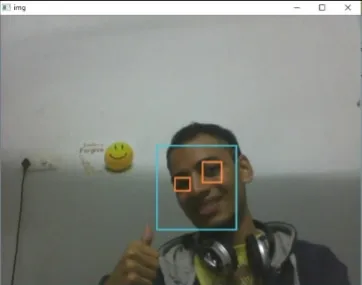
Pateiktos programos tikslas yra aptikti dominantį objektą (veidą) realiu laiku ir nuolat sekti tą patį objektą. Tai paprastas pavyzdys, kaip aptikti veidą Python. Galite pabandyti naudoti bet kurio kito pasirinkto objekto mokomuosius pavyzdžius, kad būtų galima aptikti apmokydami klasifikatorių apie reikiamus objektus. Toliau nurodyti veiksmai, kaip atsisiųsti reikalavimus.
Veiksmai:
- Atsisiųskite Python 2.7.x versiją numpy ir Opencv 2.7.x versiją. Patikrinkite, ar jūsų 32 bitų arba 64 bitų Windows suderinamas, ir atitinkamai įdiekite.
- Įsitikinkite, kad jūsų python veikia numpy, tada pabandykite įdiegti opencv.
- Įdėkite haarcascade_eye.xml ir haarcascade_frontalface_default.xml failus į tą patį aplanką (nuorodos pateiktos toliau pateiktame kode).
Įgyvendinimas
Python # OpenCV program to detect face in real time # import libraries of python OpenCV # where its functionality resides import cv2 # load the required trained XML classifiers # https://github.com/opencv/opencv/tree/master # data/haarcascades/haarcascade_frontalface_default.xml # Trained XML classifiers describes some features of some # object we want to detect a cascade function is trained # from a lot of positive(faces) and negative(non-faces) # images. face_cascade = cv2 . CascadeClassifier ( 'haarcascade_frontalface_default.xml' ) # https://github.com/opencv/opencv/tree/master # /data/haarcascades/haarcascade_eye.xml # Trained XML file for detecting eyes eye_cascade = cv2 . CascadeClassifier ( 'haarcascade_eye.xml' ) # capture frames from a camera cap = cv2 . VideoCapture ( 0 ) # loop runs if capturing has been initialized. while 1 : # reads frames from a camera ret img = cap . read () # convert to gray scale of each frames gray = cv2 . cvtColor ( img cv2 . COLOR_BGR2GRAY ) # Detects faces of different sizes in the input image faces = face_cascade . detectMultiScale ( gray 1.3 5 ) for ( x y w h ) in faces : # To draw a rectangle in a face cv2 . rectangle ( img ( x y )( x + w y + h )( 255 255 0 ) 2 ) roi_gray = gray [ y : y + h x : x + w ] roi_color = img [ y : y + h x : x + w ] # Detects eyes of different sizes in the input image eyes = eye_cascade . detectMultiScale ( roi_gray ) #To draw a rectangle in eyes for ( ex ey ew eh ) in eyes : cv2 . rectangle ( roi_color ( ex ey )( ex + ew ey + eh )( 0 127 255 ) 2 ) # Display an image in a window cv2 . imshow ( 'img' img ) # Wait for Esc key to stop k = cv2 . waitKey ( 30 ) & 0xff if k == 27 : break # Close the window cap . release () # De-allocate any associated memory usage cv2 . destroyAllWindows ()
Išvestis:
Kitas straipsnis:
Opencv C++ programa veido aptikimui Sukurti viktoriną