Python 중첩 사전
Python의 사전은 실제 세계의 사전과 유사하게 작동합니다. 사전의 키는 고유해야 하며 문자열, 정수, 튜플과 같은 불변 데이터 유형이어야 하지만 키 값은 반복될 수 있고 모든 유형이 될 수 있습니다.
중첩 사전의 Python이란 무엇입니까?
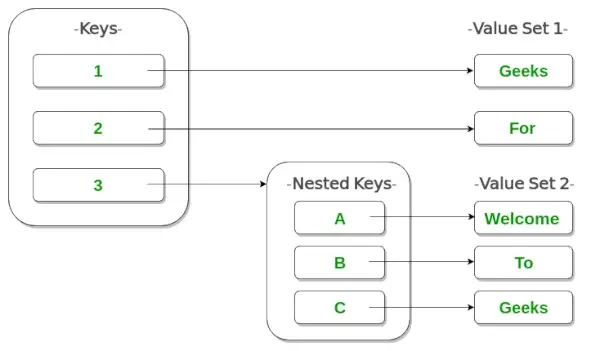
중첩 사전 사전을 다른 사전 안에 넣는 것을 의미합니다. 중첩은 프로그램에서 모델링할 수 있는 정보의 종류가 크게 확장되므로 매우 유용합니다.
nested_dict = {'dict1': {'key_A': 'value_A'}, 'dict2': {'key_B': 'value_B'}} 예
파이썬3
# As shown in image> # Creating a Nested Dictionary> Dict> => {> 1> :> 'Geeks'> ,> 2> :> 'For'> ,> 3> : {> 'A'> :> 'Welcome'> ,> 'B'> :> 'To'> ,> 'C'> :> 'Geeks'> }}> |
이미지를 활용한 일러스트레이션
중첩된 사전 만들기
Python에서는 중괄호 안에 쉼표로 구분된 사전을 배치하여 중첩 사전을 만들 수 있습니다.
파이썬3
# Empty nested dictionary> Dict> => {> 'Dict1'> : { },> > 'Dict2'> : { }}> print> (> 'Nested dictionary 1-'> )> print> (> Dict> )> # Nested dictionary having same keys> Dict> => {> 'Dict1'> : {> 'name'> :> 'Ali'> ,> 'age'> :> '19'> },> > 'Dict2'> : {> 'name'> :> 'Bob'> ,> 'age'> :> '25'> }}> print> (> '
Nested dictionary 2-'> )> print> (> Dict> )> # Nested dictionary of mixed dictionary keys> Dict> => {> 'Dict1'> : {> 1> :> 'G'> ,> 2> :> 'F'> ,> 3> :> 'G'> },> > 'Dict2'> : {> 'Name'> :> 'Geeks'> ,> 1> : [> 1> ,> 2> ]} }> print> (> '
Nested dictionary 3-'> )> print> (> Dict> )> |
산출:
Nested dictionary 1- {'Dict1': {}, 'Dict2': {}} Nested dictionary 2- {'Dict1': {'name': 'Ali', 'age': '19'}, 'Dict2': {'name': 'Bob', 'age': '25'}} Nested dictionary 3- {'Dict1': {1: 'G', 2: 'F', 3: 'G'}, 'Dict2': {1: [1, 2], 'Name': 'Geeks'}} 중첩된 사전에 요소 추가
중첩된 사전에 요소를 추가하는 작업은 여러 가지 방법으로 수행할 수 있습니다. Nested 사전에 사전을 추가하는 한 가지 방법은 값을 하나씩 추가하는 것입니다(Nested_dict[dict][key] = 'value'). 또 다른 방법은 전체 사전을 한 번에 추가하는 것입니다(Nested_dict[dict] = { 'key': 'value'}).
파이썬3
Dict> => { }> print> (> 'Initial nested dictionary:-'> )> print> (> Dict> )> Dict> [> 'Dict1'> ]> => {}> # Adding elements one at a time> Dict> [> 'Dict1'> ][> 'name'> ]> => 'Bob'> Dict> [> 'Dict1'> ][> 'age'> ]> => 21> print> (> '
After adding dictionary Dict1'> )> print> (> Dict> )> # Adding whole dictionary> Dict> [> 'Dict2'> ]> => {> 'name'> :> 'Cara'> ,> 'age'> :> 25> }> print> (> '
After adding dictionary Dict1'> )> print> (> Dict> )> |
산출:
Initial nested dictionary:- {} After adding dictionary Dict1 {'Dict1': {'age': 21, 'name': 'Bob'}} After adding dictionary Dict1 {'Dict1': {'age': 21, 'name': 'Bob'}, 'Dict2': {'age': 25, 'name': 'Cara'}} 중첩된 사전의 요소에 액세스
중첩된 사전의 키 값에 액세스하려면 인덱싱 [] 구문을 사용하세요.
파이썬3
# Nested dictionary having same keys> Dict> => {> 'Dict1'> : {> 'name'> :> 'Ali'> ,> 'age'> :> '19'> },> > 'Dict2'> : {> 'name'> :> 'Bob'> ,> 'age'> :> '25'> }}> # Prints value corresponding to key 'name' in Dict1> print> (> Dict> [> 'Dict1'> ][> 'name'> ])> # Prints value corresponding to key 'age' in Dict2> print> (> Dict> [> 'Dict2'> ][> 'age'> ])> |
산출:
Ali 25
중첩된 사전에서 사전 삭제
중첩된 사전에서 사전 삭제는 Python del 키워드를 사용하거나 다음을 사용하여 수행할 수 있습니다. 팝() 함수 .
파이썬3
Dict> => {> 'Dict1'> : {> 'name'> :> 'Ali'> ,> 'age'> :> 19> },> > 'Dict2'> : {> 'name'> :> 'Bob'> ,> 'age'> :> 21> }}> print> (> 'Initial nested dictionary:-'> )> print> (> Dict> )> # Deleting dictionary using del keyword> print> (> '
Deleting Dict2:-'> )> del> Dict> [> 'Dict2'> ]> print> (> Dict> )> # Deleting dictionary using pop function> print> (> '
Deleting Dict1:-'> )> Dict> .pop(> 'Dict1'> )> print> (> Dict> )> |
산출:
Initial nested dictionary:- {'Dict2': {'name': 'Bob', 'age': 21}, 'Dict1': {'name': 'Ali', 'age': 19}} Deleting Dict2:- {'Dict1': {'name': 'Ali', 'age': 19}} Deleting Dict1:- {}