Java의 Java.lang.Number 클래스
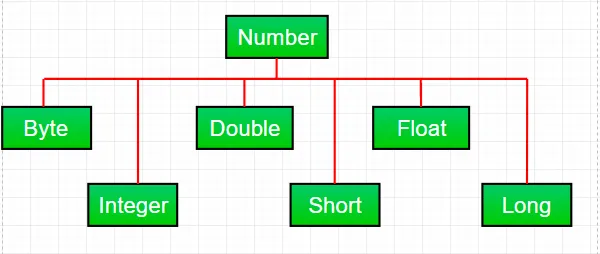
자바에서 숫자를 다루면서 대부분의 시간을 사용합니다. 기본 데이터 유형 . 그러나 Java는 다양한 숫자도 제공합니다. 싸개 추상 클래스 번호 아래의 하위 클래스 java.lang 패키지. 주로 있다 육 Number 클래스 아래의 하위 클래스. 이 하위 클래스는 숫자를 처리하는 동안 자주 사용되는 몇 가지 유용한 메서드를 정의합니다.
이러한 클래스는 해당 객체의 기본 데이터 유형을 '래핑'합니다. 종종 래핑은 컴파일러에 의해 수행됩니다. 객체가 예상되는 곳에 프리미티브를 사용하는 경우 컴파일러는 래퍼 클래스에 프리미티브를 상자에 넣습니다. 마찬가지로 기본 요소가 필요할 때 Number 개체를 사용하면 컴파일러가 개체를 unboxing합니다. 이를 Autoboxing 및 Unboxing이라고도 합니다.
기본 데이터에 Number 클래스 객체를 사용하는 이유는 무엇입니까?
- 데이터 유형의 상한 및 하한을 제공하는 MIN_VALUE 및 MAX_VALUE와 같은 숫자 클래스로 정의된 상수는 매우 유용합니다.
- Number 클래스 객체는 객체를 기대하는 메서드의 인수로 사용될 수 있습니다(종종 숫자 컬렉션을 조작할 때 사용됨).
- 클래스 메소드는 문자열과의 변환 및 숫자 시스템(10진수 8진수 16진수 이진수) 간의 변환을 위해 값을 다른 기본 유형으로 변환하는 데 사용할 수 있습니다.
Number의 모든 하위 클래스에 공통되는 메서드:
Syntax : byte byteValue() short shortValue() int intValue() long longValue() float floatValue() double doubleValue() Parameters : ---- Returns : the numeric value represented by this object after conversion to specified type
//Java program to demonstrate xxxValue() method public class Test { public static void main ( String [] args ) { // Creating a Double Class object with value '6.9685' Double d = new Double ( '6.9685' ); // Converting this Double(Number) object to // different primitive data types byte b = d . byteValue (); short s = d . shortValue (); int i = d . intValue (); long l = d . longValue (); float f = d . floatValue (); double d1 = d . doubleValue (); System . out . println ( 'value of d after converting it to byte : ' + b ); System . out . println ( 'value of d after converting it to short : ' + s ); System . out . println ( 'value of d after converting it to int : ' + i ); System . out . println ( 'value of d after converting it to long : ' + l ); System . out . println ( 'value of d after converting it to float : ' + f ); System . out . println ( 'value of d after converting it to double : ' + d1 ); } }
산출:
value of d after converting it to byte : 6 value of d after converting it to short : 6 value of d after converting it to int : 6 value of d after converting it to long : 6 value of d after converting it to float : 6.9685 value of d after converting it to double : 6.9685
메모 : 변환하는 동안 정밀도 손실이 발생할 수 있습니다. 예를 들어 Double 객체에서 int 데이터 유형으로 변환하는 동안 분수 부분('.9685')이 생략되었음을 알 수 있습니다.
Syntax : public int compareTo( NumberSubClass referenceName ) Parameters : referenceName - any NumberSubClass type value Returns : the value 0 if the Number is equal to the argument. the value 1 if the Number is less than the argument. the value -1 if the Number is greater than the argument.
//Java program to demonstrate compareTo() method public class Test { public static void main ( String [] args ) { // creating an Integer Class object with value '10' Integer i = new Integer ( '10' ); // comparing value of i System . out . println ( i . compareTo ( 7 )); System . out . println ( i . compareTo ( 11 )); System . out . println ( i . compareTo ( 10 )); } }
산출:
1 -1 0
Syntax : public boolean equals(Object obj) Parameters : obj - any object Returns : The method returns true if the argument is not null and is an object of the same type and with the same numeric value otherwise false.
//Java program to demonstrate equals() method public class Test { public static void main ( String [] args ) { // creating a Short Class object with value '15' Short s = new Short ( '15' ); // creating a Short Class object with value '10' Short x = 10 ; // creating an Integer Class object with value '15' Integer y = 15 ; // creating another Short Class object with value '15' Short z = 15 ; //comparing s with other objects System . out . println ( s . equals ( x )); System . out . println ( s . equals ( y )); System . out . println ( s . equals ( z )); } }
산출:
false false true
Syntax : static int parseInt(String s int radix) Parameters : s - any String representation of decimal radix - any radix value Returns : the integer value represented by the argument in decimal. Throws : NumberFormatException : if the string does not contain a parsable integer.
//Java program to demonstrate Integer.parseInt() method public class Test { public static void main ( String [] args ) { // parsing different strings int z = Integer . parseInt ( '654' 8 ); int a = Integer . parseInt ( '-FF' 16 ); long l = Long . parseLong ( '2158611234' 10 ); System . out . println ( z ); System . out . println ( a ); System . out . println ( l ); // run-time NumberFormatException will occur here // 'Geeks' is not a parsable string int x = Integer . parseInt ( 'Geeks' 8 ); // run-time NumberFormatException will occur here // (for octal(8)allowed digits are [0-7]) int y = Integer . parseInt ( '99' 8 ); } }
산출:
428 -255 2158611234 Exception in thread 'main' java.lang.NumberFormatException: For input string: 'Geeks' at java.lang.NumberFormatException.forInputString(NumberFormatException.java:65) at java.lang.Integer.parseInt(Integer.java:580) at Test.main(Test.java:17)
Syntax : static int parseInt(String s) Parameters : s - any String representation of decimal Returns : the integer value represented by the argument in decimal. Throws : NumberFormatException : if the string does not contain a parsable integer.
//Java program to demonstrate Integer.parseInt() method public class Test { public static void main ( String [] args ) { // parsing different strings int z = Integer . parseInt ( '654' ); long l = Long . parseLong ( '2158611234' ); System . out . println ( z ); System . out . println ( l ); // run-time NumberFormatException will occur here // 'Geeks' is not a parsable string int x = Integer . parseInt ( 'Geeks' ); // run-time NumberFormatException will occur here // (for decimal(10)allowed digits are [0-9]) int a = Integer . parseInt ( '-FF' ); } }
산출:
654 2158611234 Exception in thread 'main' java.lang.NumberFormatException: For input string: 'Geeks' at java.lang.NumberFormatException.forInputString(NumberFormatException.java:65) at java.lang.Integer.parseInt(Integer.java:580) at java.lang.Integer.parseInt(Integer.java:615) at Test.main(Test.java:15)
Syntax : String toString() String toString(int i) Parameters : String toString() - no parameter String toString(int i) - i: any integer value Returns : String toString() - returns a String object representing the value of the Number object on which it is invoked. String toString(int i) - returns a decimal String object representing the specified integer(i)Java
//Java program to demonstrate Integer.toString() //and Integer.toString(int i) method public class Test { public static void main ( String [] args ) { // demonstrating toString() method Integer x = 12 ; System . out . println ( x . toString ()); // demonstrating toString(int i) method System . out . println ( Integer . toString ( 12 )); System . out . println ( Integer . toBinaryString ( 152 )); System . out . println ( Integer . toHexString ( 152 )); System . out . println ( Integer . toOctalString ( 152 )); } }
산출:
12 12 10011000 98 230
Syntax : Integer valueOf(int i) Integer valueOf(String s) Integer valueOf(String s int radix) Parameters : i - any integer value s - any String representation of decimal radix - any radix value Returns : valueOf(int i) : an Integer object holding the valuerepresented by the int argument. valueOf(String s) : an Integer object holding value represented by the string argument. valueOf(String s int radix) : an Integer object holding the value represented by the string argument with base radix. Throws : valueOf(String s) - NumberFormatException : if the string does not contain a parsable integer. valueOf(String s int radix) - NumberFormatException : if the string does not contain a parsable integer.
// Java program to demonstrate valueOf() method public class Test { public static void main ( String [] args ) { // demonstrating valueOf(int i) method System . out . println ( 'Demonstrating valueOf(int i) method' ); Integer i = Integer . valueOf ( 50 ); Double d = Double . valueOf ( 9.36 ); System . out . println ( i ); System . out . println ( d ); // demonstrating valueOf(String s) method System . out . println ( 'Demonstrating valueOf(String s) method' ); Integer n = Integer . valueOf ( '333' ); Integer m = Integer . valueOf ( '-255' ); System . out . println ( n ); System . out . println ( m ); // demonstrating valueOf(String sint radix) method System . out . println ( 'Demonstrating (String sint radix) method' ); Integer y = Integer . valueOf ( '333' 8 ); Integer x = Integer . valueOf ( '-255' 16 ); Long l = Long . valueOf ( '51688245' 16 ); System . out . println ( y ); System . out . println ( x ); System . out . println ( l ); // run-time NumberFormatException will occur in below cases Integer a = Integer . valueOf ( 'Geeks' ); Integer b = Integer . valueOf ( 'Geeks' 16 ); } }
산출:
Demonstrating valueOf(int i) method 50 9.36 Demonstrating valueOf(String s) method 333 -255 Demonstrating (String sint radix) method 219 -597 1365803589 Exception in thread 'main' java.lang.NumberFormatException: For input string: 'Geeks' at java.lang.NumberFormatException.forInputString(NumberFormatException.java:65) at java.lang.Integer.parseInt(Integer.java:580) at java.lang.Integer.valueOf(Integer.java:766) at Test.main(Test.java:28)
연습문제:
주어진 Java 코드의 출력은 무엇입니까?
public class Test { public static void main ( String [] args ) { Integer i = Integer . parseInt ( 'Kona' 27 ); System . out . println ( i ); } }
옵션:
A) NumberFormatException at run-time B) NumberFormatException at compile-time C) 411787
답변 :
C) 411787
설명 :
기수는 27이므로 문자열 리터럴에 허용되는 문자는 [0-9][A-Q](10 ~ 26)입니다. 따라서 해당 값은 다음과 같이 계산됩니다.
=> a*(27^0) + n*(27^1) + o*(27^2) + k*(27^3)
=> 10*1 + 23*27 + 24*27*27 + 20*27*27*27
=> 10 + 621 + 17496 + 393660
=> 411787
마음에 드실지도 몰라요


인기 기사