 파이프
파이프 IO에서는 JVM에서 동시에 실행되는 두 스레드 간의 링크를 제공합니다. 따라서 파이프는 소스 또는 대상으로 모두 사용됩니다.
- PipedInputStream은 PipedOutputStream으로도 파이프됩니다. 따라서 PipedOutputStream을 사용하여 데이터를 쓸 수 있고 PipedInputStream을 사용하여 쓸 수 있습니다. 그러나 두 스레드를 동시에 사용하면 스레드에 교착 상태가 발생합니다.
- 연결된 파이프 출력 스트림에 데이터 바이트를 제공하던 스레드가 더 이상 활성 상태가 아닌 경우 파이프가 끊어졌다고 합니다.
선언: public class PipedInputStream extends InputStream
생성자 : | PipedInputStream() : | 연결되지 않은 PipedInputStream을 생성합니다.
| PipedInputStream(int pSize) : | 지정된 파이프 크기로 연결되지 않은 PipedInputStream을 생성합니다.
| PipedInputStream(PipedOutputStream outStream) : | PipedOutputStream - 'outStream'에 연결된 PipedInputStream을 생성합니다.
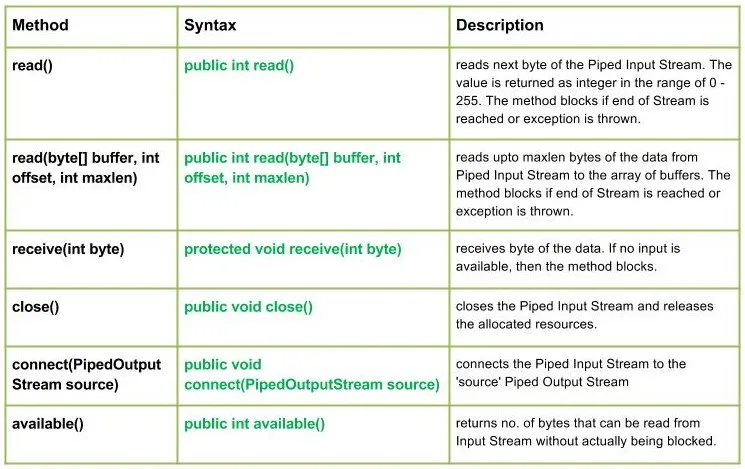
| PipedInputStream(PipedOutputStream outStream int pSize) : | 지정된 파이프 크기로 파이프 출력 스트림에 연결된 파이프 입력 스트림을 생성합니다. 행동 양식: | 정수 읽기(): | Reads the next byte of data from this piped input stream.The value byte is returned as an int in the range 0 to 255. This method blocks until input data is available the end of the stream is detected or an exception is thrown. Java // Java program illustrating the working of read() method import java.io.* ; public class NewClass { public static void main ( String [] args ) throws IOException { PipedInputStream geek_input = new PipedInputStream (); PipedOutputStream geek_output = new PipedOutputStream (); try { // Use of connect() : connecting geek_input with geek_output geek_input . connect ( geek_output ); // Use of read() method : geek_output . write ( 71 ); System . out . println ( 'using read() : ' + ( char ) geek_input . read ()); geek_output . write ( 69 ); System . out . println ( 'using read() : ' + ( char ) geek_input . read ()); geek_output . write ( 75 ); System . out . println ( 'using read() : ' + ( char ) geek_input . read ()); } catch ( IOException except ) { except . printStackTrace (); } } } 출력 : using read() : G using read() : E using read() : K
| read(byte[] 버퍼 int 오프셋 int maxlen) : | java.io.PipedInputStream.read(byte[] buffer int offset int maxlen) 파이프된 입력 스트림에서 최대 maxlen 바이트의 데이터를 버퍼 배열로 읽습니다. Stream의 끝에 도달하거나 예외가 발생하면 메서드가 차단됩니다. 구문: public int read(byte[] buffer int offset int maxlen) Parameters : buffer : the destination buffer into which the data is to be read offset : starting in the destination array - 'buffer'. maxlen : maximum length of array to be read Return : next 'maxlen' bytes of the data as an integer value return -1 is end of stream is reached Exception : -> IOException : if in case IO error occurs. -> NullPointerException : if buffer is null. -> IndexOutOfBoundsException : if offset is -ve or maxlen is -ve or maxlen > buffer.length - offset.
| 수신(int 바이트) : | java.io.PipedInputStream.receive(int 바이트) 데이터의 바이트를 받습니다. 사용 가능한 입력이 없으면 메소드가 차단됩니다. 구문: protected void receive(int byte) Parameters : byte : the bytes of the data received Return : void Exception : -> IOException : if in case IO error occurs or pipe is broken.
| 닫다() : | java.io.PipedInputStream.close() 파이프된 입력 스트림을 닫고 할당된 리소스를 해제합니다. 구문: public void close() Parameters : -------------- Return : void Exception : -> IOException : if in case IO error occurs.
| 연결(PipedOutputStream 소스) : | java.io.PipedInputStream.connect(PipedOutputStream 소스) 파이프 입력 스트림을 '소스' 파이프 출력 스트림에 연결하고 '소스'가 다른 스트림이 있는 파이프인 경우 IO 예외가 발생합니다. 구문: public void connect(PipedOutputStream source) Parameters : source : the Piped Output Stream to be connected to Return : void Exception : -> IOException : if in case IO error occurs.
| 사용 가능() : | java.io.PipedInputStream.available() 아니오를 반환합니다. 실제로 차단되지 않고 입력 스트림에서 읽을 수 있는 바이트 수입니다. 구문: public int available() Parameters : ------------- Return : no. of bytes that can be read from Input Stream without actually being blocked. 0 if the stream is already closed but by invoking close() method Exception : -> IOException : if in case IO error occurs.
PipedInputStream 클래스 메소드의 작동을 설명하는 Java 프로그램: Java // Java program illustrating the working of PipedInputStream // connect() read(byte[] buffer int offset int maxlen) // close() available() import java.io.* ; public class NewClass { public static void main ( String [] args ) throws IOException { PipedInputStream geek_input = new PipedInputStream (); PipedOutputStream geek_output = new PipedOutputStream (); try { // Use of connect() : connecting geek_input with geek_output geek_input . connect ( geek_output ); geek_output . write ( 71 ); geek_output . write ( 69 ); geek_output . write ( 69 ); geek_output . write ( 75 ); geek_output . write ( 83 ); // Use of available() : System . out . println ( 'Use of available() : ' + geek_input . available ()); // Use of read(byte[] buffer int offset int maxlen) : byte [] buffer = new byte [ 5 ] ; // destination 'buffer' geek_input . read ( buffer 0 5 ); String str = new String ( buffer ); System . out . println ( 'Using read(buffer offset maxlen) : ' + str ); // USe of close() method : System . out . println ( 'Closing the stream' ); geek_input . close (); } catch ( IOException except ) { except . printStackTrace (); } } } 산출: Use of available() : 5 Using read(buffer offset maxlen) : GEEKS Closing the stream
Next Article: Java의 Java.io.PipedOutputStream 클래스 퀴즈 만들기


 파이프 IO에서는 JVM에서 동시에 실행되는 두 스레드 간의 링크를 제공합니다. 따라서 파이프는 소스 또는 대상으로 모두 사용됩니다.