R – リスト
のリスト Rプログラミング 順序付けられたオブジェクトのコレクションで構成される汎用オブジェクトです。リストは 一次元の 、 異質な データ構造。
リストには次のリストを指定できます。 ベクトル 、行列のリスト、文字のリスト、 機能 、 等々。
リストはベクトルですが、異種のデータ要素が含まれています。 R のリストは次を使用して作成されます。 list() 関数 。
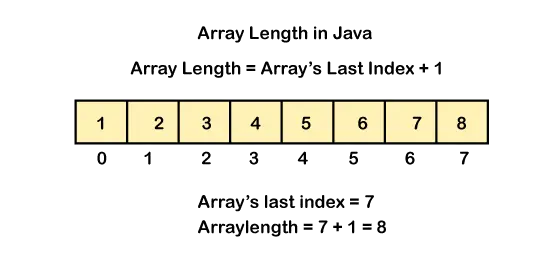
R では、インデックス値を使用して R リストの要素にアクセスできます。 R では、リストのインデックス付けは 0 ではなく 1 から始まります。
リストの作成
R でリストを作成するには、次の関数を使用する必要があります。 リスト() 。
言い換えれば、リストは他のオブジェクトを含む汎用ベクトルです。リストがどのように見えるかを説明するために、ここで例を取り上げます。詳細を含む従業員のリストを作成したいと考えています。したがって、このためには、ID、従業員名、従業員数などの属性が必要になります。
例:
R
# R program to create a List> > # The first attributes is a numeric vector> # containing the employee IDs which is created> # using the command here> empId => c> (1, 2, 3, 4)> > # The second attribute is the employee name> # which is created using this line of code here> # which is the character vector> empName => c> (> 'Debi'> ,> 'Sandeep'> ,> 'Subham'> ,> 'Shiba'> )> > # The third attribute is the number of employees> # which is a single numeric variable.> numberOfEmp = 4> > # We can combine all these three different> # data types into a list> # containing the details of employees> # which can be done using a list command> empList => list> (empId, empName, numberOfEmp)> > print> (empList)> |
出力
[[1]] [1] 1 2 3 4 [[2]] [1] 'Debi' 'Sandeep' 'Subham' 'Shiba' [[3]] [1] 4
命名リストのコンポーネント
名前リスト コンポーネントを使用すると、コンポーネントに簡単にアクセスできるようになります。
例:
R
# Creating a named list> my_named_list <-> list> (name => 'Sudheer'> , age = 25, city => 'Delhi'> )> # Printing the named list> print> (my_named_list)> |
出力
$name [1] 'Sudheer' $age [1] 25 $city [1] 'Delhi'
R リスト コンポーネントへのアクセス
R リストのコンポーネントには 2 つの方法でアクセスできます。
1. 名前でコンポーネントにアクセスします。
リストのすべてのコンポーネントには名前を付けることができ、それらの名前を使用して、dollar コマンドを使用して R リストのコンポーネントにアクセスできます。
例:
R
# R program to access> # components of a list> # Creating a list by naming all its components> empId => c> (1, 2, 3, 4)> empName => c> (> 'Debi'> ,> 'Sandeep'> ,> 'Subham'> ,> 'Shiba'> )> numberOfEmp = 4> empList => list> (> > 'ID'> = empId,> > 'Names'> = empName,> > 'Total Staff'> = numberOfEmp> > )> print> (empList)> # Accessing components by names> cat> (> 'Accessing name components using $ command
'> )> print> (empList$Names)> |
出力
$ID [1] 1 2 3 4 $Names [1] 'Debi' 'Sandeep' 'Subham' 'Shiba' $`Total Staff` [1] 4 Accessing name components using $ command [1] 'Debi' 'Sandeep' 'Subham' 'Shiba'
2. インデックスによってコンポーネントにアクセスします。
インデックスを使用して R リストのコンポーネントにアクセスすることもできます。
R リストの最上位コンポーネントにアクセスするには、ダブル スライス演算子を使用する必要があります。 [[ ]] これは 2 つの角括弧であり、R リストの下位または内部レベルのコンポーネントにアクセスしたい場合は、別の角括弧を使用する必要があります。 [ ] ダブルスライス演算子とともに [[ ]] 。
例:
R
# R program to access> # components of a list> # Creating a list by naming all its components> empId => c> (1, 2, 3, 4)> empName => c> (> 'Debi'> ,> 'Sandeep'> ,> 'Subham'> ,> 'Shiba'> )> numberOfEmp = 4> empList => list> (> > 'ID'> = empId,> > 'Names'> = empName,> > 'Total Staff'> = numberOfEmp> > )> print> (empList)> # Accessing a top level components by indices> cat> (> 'Accessing name components using indices
'> )> print> (empList[[2]])> # Accessing a inner level components by indices> cat> (> 'Accessing Sandeep from name using indices
'> )> print> (empList[[2]][2])> # Accessing another inner level components by indices> cat> (> 'Accessing 4 from ID using indices
'> )> print> (empList[[1]][4])> |
出力
$ID [1] 1 2 3 4 $Names [1] 'Debi' 'Sandeep' 'Subham' 'Shiba' $`Total Staff` [1] 4 Accessing name components using indices [1] 'Debi' 'Sandeep' 'Subham' 'Shiba' Accessing Sandeep from na...
リストのコンポーネントの変更
R リストは、コンポーネントにアクセスし、必要なコンポーネントに置き換えることによって変更することもできます。
例:
R
# R program to edit> # components of a list> # Creating a list by naming all its components> empId => c> (1, 2, 3, 4)> empName => c> (> 'Debi'> ,> 'Sandeep'> ,> 'Subham'> ,> 'Shiba'> )> numberOfEmp = 4> empList => list> (> > 'ID'> = empId,> > 'Names'> = empName,> > 'Total Staff'> = numberOfEmp> )> cat> (> 'Before modifying the list
'> )> print> (empList)> # Modifying the top-level component> empList$`Total Staff` = 5> # Modifying inner level component> empList[[1]][5] = 5> empList[[2]][5] => 'Kamala'> cat> (> 'After modified the list
'> )> print> (empList)> |
出力
Before modifying the list $ID [1] 1 2 3 4 $Names [1] 'Debi' 'Sandeep' 'Subham' 'Shiba' $`Total Staff` [1] 4 After modified the list $ID [1] 1 2 3 4 5 $Names [1] 'Debi' 'Sandeep' 'Subham' ...
リストの連結
連結関数を使用すると、2 つの R リストを連結できます。したがって、2 つのリストを連結したい場合は、連結演算子を使用する必要があります。
構文:
リスト = c(リスト, リスト1)
list = 元のリスト
list1 = 新しいリスト
例:
R
# R program to edit> # components of a list> # Creating a list by naming all its components> empId => c> (1, 2, 3, 4)> empName => c> (> 'Debi'> ,> 'Sandeep'> ,> 'Subham'> ,> 'Shiba'> )> numberOfEmp = 4> empList => list> (> > 'ID'> = empId,> > 'Names'> = empName,> > 'Total Staff'> = numberOfEmp> )> cat> (> 'Before concatenation of the new list
'> )> print> (empList)> # Creating another list> empAge => c> (34, 23, 18, 45)> # Concatenation of list using concatenation operator> empList => c> (empName, empAge)> cat> (> 'After concatenation of the new list
'> )> print> (empList)> |
出力
Before concatenation of the new list $ID [1] 1 2 3 4 $Names [1] 'Debi' 'Sandeep' 'Subham' 'Shiba' $`Total Staff` [1] 4 After concatenation of the new list [1] 'Debi' 'Sandeep' 'Subham' 'S...
リストに項目を追加する
リストの末尾に項目を追加するには、append() 関数を使用します。
R
# creating a list> my_numbers => c> (1,5,6,3)> #adding number at the end of list> append> (my_numbers, 45)> #printing list> my_numbers> |
出力
[1] 1 5 6 3 45 [1] 1 5 6 3
リストのコンポーネントの削除
R リストのコンポーネントを削除するには、まずそれらのコンポーネントにアクセスし、次にそれらのコンポーネントの前にマイナス記号を挿入する必要があります。これは、そのコンポーネントを削除する必要があることを示しています。
例:
R
# R program to access> # components of a list> # Creating a list by naming all its components> empId => c> (1, 2, 3, 4)> empName => c> (> 'Debi'> ,> 'Sandeep'> ,> 'Subham'> ,> 'Shiba'> )> numberOfEmp = 4> empList => list> (> > 'ID'> = empId,> > 'Names'> = empName,> > 'Total Staff'> = numberOfEmp> )> cat> (> 'Before deletion the list is
'> )> print> (empList)> # Deleting a top level components> cat> (> 'After Deleting Total staff components
'> )> print> (empList[-3])> # Deleting a inner level components> cat> (> 'After Deleting sandeep from name
'> )> print> (empList[[2]][-2])> |
出力
Before deletion the list is $ID [1] 1 2 3 4 $Names [1] 'Debi' 'Sandeep' 'Subham' 'Shiba' $`Total Staff` [1] 4 After Deleting Total staff components $ID [1] 1 2 3 4 $Names [1] 'Debi' 'Sand...
リストの結合
すべてのリストを 1 つのリストに配置することで、R リストをマージできます。
R
# Create two lists.> lst1 <-> list> (1,2,3)> lst2 <-> list> (> 'Sun'> ,> 'Mon'> ,> 'Tue'> )> # Merge the two lists.> new_list <-> c> (lst1,lst2)> # Print the merged list.> print> (new_list)> |
出力:
[[1]] [1] 1 [[2]] [1] 2 [[3]] [1] 3 [[4]] [1] 'Sun' [[5]] [1] 'Mon' [[6]] [1] 'Tue'
リストをベクトルに変換する
ここでは、R リストをベクトルに変換します。このために、最初にリストを作成し、次にそのリストをベクトルにリスト解除します。
R
# Create lists.> lst <-> list> (1:5)> print> (lst)> # Convert the lists to vectors.> vec <-> unlist> (lst)> print> (vec)> |
出力
[[1]] [1] 1 2 3 4 5 [1] 1 2 3 4 5
R リストから行列へ
Rプログラミングでmatrix()関数を使用して行列を作成します。使用されるもう 1 つの関数は、リストをベクトルに変換する unlist() 関数です。
R
# Defining list> lst1 <-> list> (> list> (1, 2, 3),> > list> (4, 5, 6))> # Print list> cat> (> 'The list is:
'> )> print> (lst1)> cat> (> 'Class:'> ,> class> (lst1),> '
'> )> # Convert list to matrix> mat <-> matrix> (> unlist> (lst1), nrow = 2, byrow => TRUE> )> # Print matrix> cat> (> '
After conversion to matrix:
'> )> print> (mat)> cat> (> 'Class:'> ,> class> (mat),> '
'> )> |
出力
The list is: [[1]] [[1]][[1]] [1] 1 [[1]][[2]] [1] 2 [[1]][[3]] [1] 3 [[2]] [[2]][[1]] [1] 4 [[2]][[2]] [1] 5 [[2]][[3]] [1] 6 Class: list After conversion to matrix: [,1] [,2] [,3] [1,...
この記事では、 R のリスト、 R 言語でのリストの作成、名前付け、マージ、削除などのリスト操作について説明しました。 R リストは重要な概念なので、省略しないでください。
この記事で R リストとその操作について学習していただければ幸いです。
以下もチェックしてください:
- Rアレイ
- R-タプル
- R – 行列