Python のネストされた辞書
Python の辞書は、現実世界の辞書と同様に機能します。ディクショナリのキーは一意であり、文字列、整数、タプルなどの不変のデータ型である必要がありますが、キー値は繰り返すことができ、任意の型にすることができます。
入れ子辞書の Python とは何ですか?
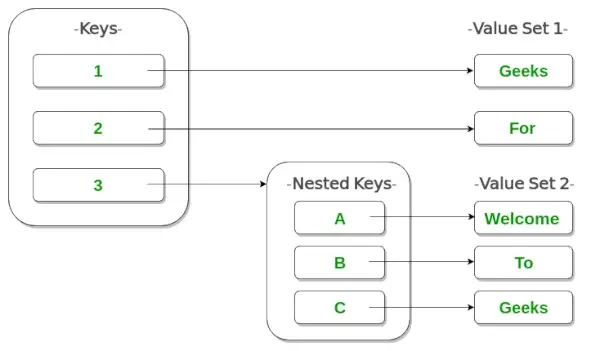
入れ子 辞書 辞書を別の辞書の中に入れることを意味します。ネストは、プログラム内でモデル化できる情報の種類が大幅に拡大されるため、非常に役立ちます。
nested_dict = {'dict1': {'key_A': 'value_A'}, 'dict2': {'key_B': 'value_B'}} 例
Python3
# As shown in image> # Creating a Nested Dictionary> Dict> => {> 1> :> 'Geeks'> ,> 2> :> 'For'> ,> 3> : {> 'A'> :> 'Welcome'> ,> 'B'> :> 'To'> ,> 'C'> :> 'Geeks'> }}> |
画像を使用したイラスト
ネストされた辞書の作成
Python では、カンマ区切りの辞書を中括弧で囲んで配置することで、ネストされた辞書を作成できます。
Python3
# Empty nested dictionary> Dict> => {> 'Dict1'> : { },> > 'Dict2'> : { }}> print> (> 'Nested dictionary 1-'> )> print> (> Dict> )> # Nested dictionary having same keys> Dict> => {> 'Dict1'> : {> 'name'> :> 'Ali'> ,> 'age'> :> '19'> },> > 'Dict2'> : {> 'name'> :> 'Bob'> ,> 'age'> :> '25'> }}> print> (> '
Nested dictionary 2-'> )> print> (> Dict> )> # Nested dictionary of mixed dictionary keys> Dict> => {> 'Dict1'> : {> 1> :> 'G'> ,> 2> :> 'F'> ,> 3> :> 'G'> },> > 'Dict2'> : {> 'Name'> :> 'Geeks'> ,> 1> : [> 1> ,> 2> ]} }> print> (> '
Nested dictionary 3-'> )> print> (> Dict> )> |
出力:
Nested dictionary 1- {'Dict1': {}, 'Dict2': {}} Nested dictionary 2- {'Dict1': {'name': 'Ali', 'age': '19'}, 'Dict2': {'name': 'Bob', 'age': '25'}} Nested dictionary 3- {'Dict1': {1: 'G', 2: 'F', 3: 'G'}, 'Dict2': {1: [1, 2], 'Name': 'Geeks'}} ネストされた辞書への要素の追加
ネストされた辞書への要素の追加は、複数の方法で行うことができます。ネストされた辞書に辞書を追加する 1 つの方法は、値を 1 つずつ追加することです (Nested_dict[dict][key] = ‘value’)。もう 1 つの方法は、辞書全体を一度に追加することです (Nested_dict[dict] = { ‘key’: ‘value’})。
Python3
Dict> => { }> print> (> 'Initial nested dictionary:-'> )> print> (> Dict> )> Dict> [> 'Dict1'> ]> => {}> # Adding elements one at a time> Dict> [> 'Dict1'> ][> 'name'> ]> => 'Bob'> Dict> [> 'Dict1'> ][> 'age'> ]> => 21> print> (> '
After adding dictionary Dict1'> )> print> (> Dict> )> # Adding whole dictionary> Dict> [> 'Dict2'> ]> => {> 'name'> :> 'Cara'> ,> 'age'> :> 25> }> print> (> '
After adding dictionary Dict1'> )> print> (> Dict> )> |
出力:
Initial nested dictionary:- {} After adding dictionary Dict1 {'Dict1': {'age': 21, 'name': 'Bob'}} After adding dictionary Dict1 {'Dict1': {'age': 21, 'name': 'Bob'}, 'Dict2': {'age': 25, 'name': 'Cara'}} ネストされた辞書の要素にアクセスする
ネストされたディクショナリ内のキーの値にアクセスするには、インデックス付け [] 構文を使用します。
Python3
# Nested dictionary having same keys> Dict> => {> 'Dict1'> : {> 'name'> :> 'Ali'> ,> 'age'> :> '19'> },> > 'Dict2'> : {> 'name'> :> 'Bob'> ,> 'age'> :> '25'> }}> # Prints value corresponding to key 'name' in Dict1> print> (> Dict> [> 'Dict1'> ][> 'name'> ])> # Prints value corresponding to key 'age' in Dict2> print> (> Dict> [> 'Dict2'> ][> 'age'> ])> |
出力:
Ali 25
ネストされた辞書からの辞書の削除
ネストされた辞書からの辞書の削除は、Python del キーワードを使用するか、次のいずれかを使用して実行できます。 ポップ()関数 。
Python3
Dict> => {> 'Dict1'> : {> 'name'> :> 'Ali'> ,> 'age'> :> 19> },> > 'Dict2'> : {> 'name'> :> 'Bob'> ,> 'age'> :> 21> }}> print> (> 'Initial nested dictionary:-'> )> print> (> Dict> )> # Deleting dictionary using del keyword> print> (> '
Deleting Dict2:-'> )> del> Dict> [> 'Dict2'> ]> print> (> Dict> )> # Deleting dictionary using pop function> print> (> '
Deleting Dict1:-'> )> Dict> .pop(> 'Dict1'> )> print> (> Dict> )> |
出力:
Initial nested dictionary:- {'Dict2': {'name': 'Bob', 'age': 21}, 'Dict1': {'name': 'Ali', 'age': 19}} Deleting Dict2:- {'Dict1': {'name': 'Ali', 'age': 19}} Deleting Dict1:- {}