Python – マトリックス
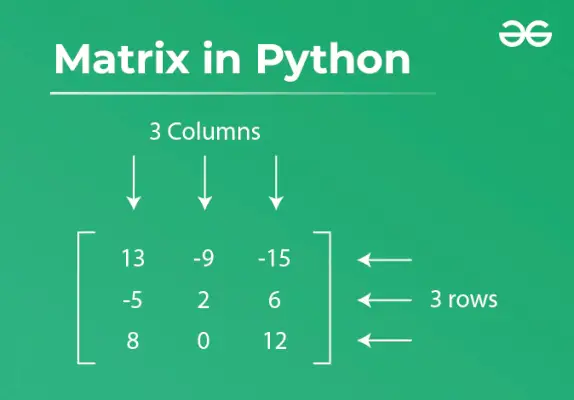
ここでは、このチュートリアル内で Python を使用して行列を形成するさまざまな方法について説明します。また、行列に対して実行できるさまざまな操作についても説明します。また、行列を形成するための外部モジュール Numpy と Python でのその操作についても説明します。
マトリックスとは何ですか?
行列は、行と列の長方形の配列に配置された数値の集合です。工学、物理学、統計、グラフィックスの分野では、行列は画像の回転やその他の種類の変換を表現するために広く使用されています。
この行列は m 行 n 列の行列と呼ばれ、次の記号で示されます。 m×n m 行 n 列がある場合。
Python を使用して単純な行列を作成する
方法 1: リストのリストを使用して行列を作成する
ここでは、リストのリストを使用して行列を作成します。
Python3
matrix> => [[> 1> ,> 2> ,> 3> ,> 4> ],> > [> 5> ,> 6> ,> 7> ,> 8> ],> > [> 9> ,> 10> ,> 11> ,> 12> ]]> print> (> 'Matrix ='> , matrix)> |
出力:
Matrix = [[1, 2, 3, 4], [5, 6, 7, 8], [9, 10, 11, 12]]
方法 2: Python でユーザーから行列入力を取得する
ここでは、ユーザーから多数の行と列を取得し、行列を出力します。
Python3
Row> => int> (> input> (> 'Enter the number of rows:'> ))> Column> => int> (> input> (> 'Enter the number of columns:'> ))> # Initialize matrix> matrix> => []> print> (> 'Enter the entries row wise:'> )> # For user input> # A for loop for row entries> for> row> in> range> (Row):> > a> => []> > # A for loop for column entries> > for> column> in> range> (Column):> > a.append(> int> (> input> ()))> > matrix.append(a)> # For printing the matrix> for> row> in> range> (Row):> > for> column> in> range> (Column):> > print> (matrix[row][column], end> => ' '> )> > print> ()> |
出力:
Enter the number of rows:2 Enter the number of columns:2 Enter the entries row wise: 5 6 7 8 5 6 7 8
時間計算量: O(n*n)
補助スペース: O(n*n)
方法 3: リスト内包表記を使用して行列を作成する
リスト内包表記は、Python でリストを定義および作成するための洗練された方法です。4 行 4 列を出力するために range 関数を使用しています。
Python3
matrix> => [[column> for> column> in> range> (> 4> )]> for> row> in> range> (> 4> )]> print> (matrix)> |
出力:
[[0, 1, 2, 3], [0, 1, 2, 3], [0, 1, 2, 3], [0, 1, 2, 3]]
マトリックスに値を割り当てる
方法 1: マトリックスの個々のセルに値を割り当てる
ここでは、行列内の個々のセル (1 行 1 列 = 11) に値を置換して割り当てています。
Python3
X> => [[> 1> ,> 2> ,> 3> ], [> 4> ,> 5> ,> 6> ], [> 7> ,> 8> ,> 9> ]]> row> => column> => 1> X[row][column]> => 11> print> (X)> |
出力:
[[1, 2, 3], [4, 11 , 6], [7, 8, 9]]
方法 2: マトリックスで負のインデックスを使用して個々のセルに値を割り当てる
ここでは、行列内の個々のセル (-2 行、-1 列 = 21) に値を置換して割り当てています。
Python3
row> => -> 2> column> => -> 1> X[row][column]> => 21> print> (X)> |
出力:
[[1, 2, 3], [4, 5, 21 ], [7, 8, 9]]
マトリックスの値へのアクセス
方法 1: 行列値にアクセスする
ここでは、行と列を渡すことによって行列の要素にアクセスしています。
Python3
print> (> 'Matrix at 1 row and 3 column='> , X[> 0> ][> 2> ])> print> (> 'Matrix at 3 row and 3 column='> , X[> 2> ][> 2> ])> |
出力:
Matrix at 1 row and 3 column= 3 Matrix at 3 row and 3 column= 9
方法 2: 負のインデックスを使用して行列値にアクセスする
ここでは、負のインデックスの行と列を渡すことによって行列の要素にアクセスしています。
Python3
import> numpy as np> X> => [[> 1> ,> 2> ,> 3> ], [> 4> ,> 5> ,> 6> ], [> 7> ,> 8> ,> 9> ]]> print> (X[> -> 1> ][> -> 2> ])> |
出力:
8
Python での行列の数学的演算
例 1: Python の for ループを使用して行列に値を追加する
ここでは、Python の for ループを使用して 2 つの行列を追加しています。
Python3
# Program to add two matrices using nested loop> X> => [[> 1> ,> 2> ,> 3> ],[> 4> ,> 5> ,> 6> ], [> 7> ,> 8> ,> 9> ]]> Y> => [[> 9> ,> 8> ,> 7> ], [> 6> ,> 5> ,> 4> ], [> 3> ,> 2> ,> 1> ]]> result> => [[> 0> ,> 0> ,> 0> ], [> 0> ,> 0> ,> 0> ], [> 0> ,> 0> ,> 0> ]]> # iterate through rows> for> row> in> range> (> len> (X)):> > # iterate through columns> > for> column> in> range> (> len> (X[> 0> ])):> > result[row][column]> => X[row][column]> +> Y[row][column]> for> r> in> result:> > print> (r)> |
出力:
[10, 10, 10] [10, 10, 10] [10, 10, 10]
時間計算量: O(n*n)
補助スペース: O(n*n)
例 2: リスト内包表記を使用した行列への値の加算と減算
リスト内包表記を使用した基本的な加算と減算の実行。
Python3
Add_result> => [[X[row][column]> +> Y[row][column]> > for> column> in> range> (> len> (X[> 0> ]))]> > for> row> in> range> (> len> (X))]> Sub_result> => [[X[row][column]> -> Y[row][column]> > for> column> in> range> (> len> (X[> 0> ]))]> > for> row> in> range> (> len> (X))]> print> (> 'Matrix Addition'> )> for> r> in> Add_result:> > print> (r)> print> (> '
Matrix Subtraction'> )> for> r> in> Sub_result:> > print> (r)> |
出力:
Matrix Addition [10, 10, 10] [10, 10, 10] [10, 10, 10] Matrix Subtraction [-8, -6, -4] [-2, 0, 2] [4, 6, 8]
時間計算量: O(n*n)
補助スペース: O(n*n)
例 3: 2 つの行列を乗算および除算する Python プログラム
Python ループを使用して基本的な乗算と除算を実行します。
Python3
rmatrix> => [[> 0> ,> 0> ,> 0> ], [> 0> ,> 0> ,> 0> ], [> 0> ,> 0> ,> 0> ]]> for> row> in> range> (> len> (X)):> > for> column> in> range> (> len> (X[> 0> ])):> > rmatrix[row][column]> => X[row][column]> *> Y[row][column]> > print> (> 'Matrix Multiplication'> ,)> for> r> in> rmatrix:> > print> (r)> > for> i> in> range> (> len> (X)):> > for> j> in> range> (> len> (X[> 0> ])):> > rmatrix[row][column]> => X[row][column]> /> /> Y[row][column]> print> (> '
Matrix Division'> ,)> for> r> in> rmatrix:> > print> (r)> |
出力:
Matrix Multiplication [9, 16, 21] [24, 25, 24] [21, 16, 9] Matrix Division [0, 0, 0] [0, 1, 1] [2, 4, 9]
時間計算量: O(n*n)
補助スペース: O(n*n)
行列で転置する
例: ループを使用して行列を転置する Python プログラム
行列の転置は、行を列に、列を行に変更することで得られます。つまり、A[][] の転置は、A[i][j] を A[j][i] に変更することで得られます。
Python3
X> => [[> 9> ,> 8> ,> 7> ], [> 6> ,> 5> ,> 4> ], [> 3> ,> 2> ,> 1> ]]> result> => [[> 0> ,> 0> ,> 0> ], [> 0> ,> 0> ,> 0> ], [> 0> ,> 0> ,> 0> ]]> # iterate through rows> for> row> in> range> (> len> (X)):> > # iterate through columns> > for> column> in> range> (> len> (X[> 0> ])):> > result[column][row]> => X[row][column]> for> r> in> result:> > print> (r)> > # # Python Program to Transpose a Matrix using the list comprehension> # rez = [[X[column][row] for column in range(len(X))]> # for row in range(len(X[0]))]> # for row in rez:> # print(row)> |
出力:
[9, 6, 3] [8, 5, 2] [7, 4, 1]
時間計算量: O(n*n)
補助スペース: O(n*n)
Numpyを使った行列
Numpyを使用して行列を作成する
ここでは、numpy.random を使用して Numpy 配列を作成しています。 ランダムモジュール 。
Python3
import> numpy as np> > # 1st argument -->0 から 9 までの数字、>> |