Python の numpy.random.choice()
の助けを借りて 選択() メソッドを使用すると、1 次元配列のランダム サンプルを取得し、numpy 配列のランダム サンプルを返すことができます。
構文: numpy.random.choice(a, size=None, replace=True, p=None)
パラメーター:
1) a – ランダムなサンプルを持つ numpy の 1 次元配列。
2) サイズ – numpy 配列のランダム サンプルの出力形状。
3) 交換 – サンプルが交換の有無に関係なく。
4) p – 確率は a のすべてのサンプルに付加されます。
出力: ランダムなサンプルの numpy 配列を返します。
例1:
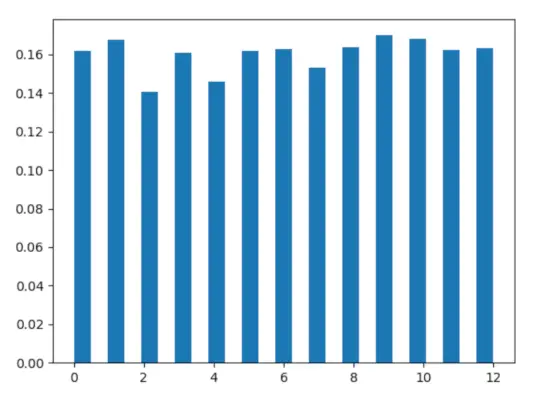
この例では、次を使用してそれを確認できます。 選択() このメソッドを使用すると、numpy 配列のランダムなサンプルを取得できます。このメソッドを使用すると、均一または不均一なサンプルを生成できます。
Python3
# import choice> import> numpy as np> import> matplotlib.pyplot as plt> > # Using choice() method> gfg> => np.random.choice(> 13> ,> 5000> )> > count, bins, ignored> => plt.hist(gfg,> 25> , density> => True> )> plt.show()> |
出力:
例 #2 :
Python3
# import choice> import> numpy as np> import> matplotlib.pyplot as plt> > # Using choice() method> gfg> => np.random.choice(> 5> ,> 1000> , p> => [> 0.2> ,> 0.1> ,> 0.3> ,> 0.4> ,> 0> ])> > count, bins, ignored> => plt.hist(gfg,> 14> , density> => True> )> plt.show()> |
出力: