Node.js fs.writeFileSync() メソッド
fs.writeFileSync() メソッドは同期メソッドです。指定されたファイルが存在しない場合は、新しいファイルを作成します。また、「readline-sync」モジュールは、実行時にユーザー入力を有効にするために使用されます。
Node.js の「fs」モジュールはファイル I/O 操作を実装します。 fs モジュールのメソッドは、同期だけでなく非同期にもできます。非同期関数には、非同期関数の完了を示す最後のパラメータとしてコールバック関数があります。 Node.js 開発者は、同期メソッドよりも非同期メソッドを好みます。これは、非同期メソッドは実行中にプログラムをブロックしないのに対し、後者はブロックするためです。
Node.js ではメイン スレッドのブロックは不正行為であるため、同期関数はデバッグの場合、または他のオプションが利用できない場合にのみ使用する必要があります。
構文:
fs.writeFileSync( file, data, options )
パラメーター: このメソッドは、上で説明し、以下で説明する 3 つのパラメータを受け入れます。
- file: 書き込む必要があるファイルのパスを示す文字列、バッファ、URL、またはファイル説明の整数です。ファイル記述子を使用すると、fs.write() メソッドと同様に動作します。 data: ファイルに書き込まれる文字列、Buffer、TypedArray、または DataView です。 options: 出力に影響を与えるオプションのパラメーターを指定するために使用できる文字列またはオブジェクトです。これには 3 つのオプションのパラメータがあります。
- エンコーディング: ファイルのエンコーディングを指定する文字列です。デフォルト値は「utf8」です。 mode: ファイルモードを指定する整数です。デフォルト値は 0o666 です。 flag: ファイルへの書き込み中に使用されるフラグを指定する文字列です。デフォルト値は「w」です。
以下の例は、 fs.writeFileSync() メソッド Node.jsで。
例 1:
JavaScript
// Node.js program to demonstrate the> // fs.writeFileSync() method> > // Import the filesystem module> const fs = require(> 'fs'> );> > let data => 'This is a file containing a collection'> > +> ' of programming languages.
'> > +> '1. C
2. C++
3. Python'> ;> > fs.writeFileSync(> 'programming.txt'> , data);> console.log(> 'File written successfully
'> );> console.log(> 'The written has the following contents:'> );> console.log(fs.readFileSync(> 'programming.txt'> ,> 'utf8'> ));> |
出力:
File written successfully The written has the following contents: This is a file containing a collection of programming languages. 1. C 2. C++ 3. Python
例 2:
JavaScript
// Node.js program to demonstrate the> // fs.writeFileSync() method> > // Import the filesystem module> const fs = require(> 'fs'> );> > // Writing to the file 5 times> // with the append file mode> for> (let i = 0; i <5; i++) {> > fs.writeFileSync(> 'movies.txt'> ,> > 'Movie '> + i +> '
'> ,> > {> > encoding:> 'utf8'> ,> > flag:> 'a+'> ,> > mode: 0o666> > });> }> > console.log(> 'File written successfully 5 times
'> );> console.log(> 'The written file has the following contents:'> );> console.log(fs.readFileSync(> 'movies.txt'> ,> 'utf8'> ));> |
出力:
File written successfully 5 times The written file has the following contents: Movie 0 Movie 1 Movie 2 Movie 3 Movie 4
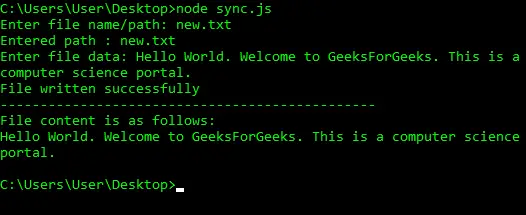
例 3: readline モジュールを使用して、ユーザーからファイル名とファイル データの実行時入力を取得します。
JavaScript
let readline = require(> 'readline-sync'> );> let fs = require(> 'fs'> );> > let path = readline.question(> 'Enter file name/path: '> );> > console.log(> 'Entered path : '> + path);> > let data = readline.question(> 'Enter file data: '> );> > //synchronous functions may throw errors> //which can be handled using try-catch block> try> {> > fs.writeFileSync(path, data, { flag:> 'a+'> });> //'a+' is append mode> > console.log(> 'File written successfully'> );> }> catch> (err) {> > console.error(err);> }> console.log(> '-----------------------------------------------'> );> try> {> > const data = fs.readFileSync(path, { encoding:> 'utf8'> });> > console.log(> 'File content is as follows:'> );> > // Display the file data> > console.log(data);> }> catch> (err) {> > console.log(err);> }> |
出力
例 4: バッファを使用する readline モジュールを使用して、ユーザーからファイル データのランタイム入力を取得します。
JavaScript
let fs = require(> 'fs'> );> let readline = require(> 'readline-sync'> );> let path = readline.question(> 'Enter file name/path: '> );> > console.log(> 'Entered path : '> + path);> > // 1024 specifies the buffer size. We can limit> // the data size by this approach> let buf => new> Buffer.alloc(1024);> buf = readline.question(> 'Enter data:'> );> > > try> {> > fs.writeFileSync(path, buf, { flag:> 'a+'> });> > console.log(> 'File written successfully'> );> }> catch> (err) {> > console.error(err);> }> console.log(> '-----------------------------------------------'> );> try> {> > const data = fs.readFileSync(path, { encoding:> 'utf8'> });> > console.log(> 'File content is as follows:'> );> > // Display the file data> > console.log(data);> }> catch> (err) {> > console.log(err);> }> |
出力

参照: https://nodejs.org/api/fs.html#fs_fs_writefilesync_file_data_options