 パイプ
パイプ in IO は、JVM で同時に実行される 2 つのスレッド間のリンクを提供します。したがって、パイプはソースまたは宛先の両方として使用されます。
- PipedInputStream は PipedOutputStream ともパイプされます。したがって、データは PipedOutputStream を使用して書き込むことも、PipedInputStream を使用して書き込むこともできます。ただし、両方のスレッドを同時に使用すると、スレッドにデッドロックが発生します。
- 接続されたパイプ出力ストリームにデータ バイトを提供していたスレッドが存在しなくなった場合、パイプは壊れていると言われます。
宣言: public class PipedInputStream extends InputStream
コンストラクター: | PipedInputStream() : | 接続されていない PipedInputStream を作成します。
| PipedInputStream(int pSize) : | 指定されたパイプ サイズに接続されていない PipedInputStream を作成します。
| PipedInputStream(PipedOutputStream outStream) : | PipedInputStream を作成し、PipedOutputStream - 'outStream' に接続します。
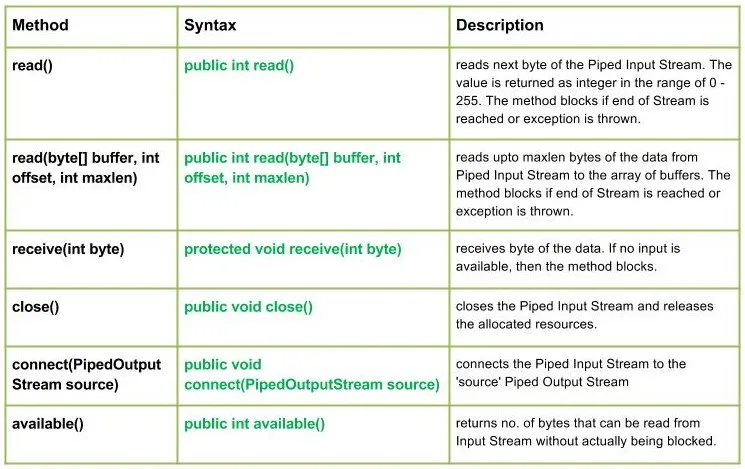
| PipedInputStream(PipedOutputStream outStream int pSize) : | 指定されたパイプ サイズでパイプ出力ストリームに接続されるパイプ入力ストリームを作成します。 方法: | int read(): | Reads the next byte of data from this piped input stream.The value byte is returned as an int in the range 0 to 255. This method blocks until input data is available the end of the stream is detected or an exception is thrown. Java // Java program illustrating the working of read() method import java.io.* ; public class NewClass { public static void main ( String [] args ) throws IOException { PipedInputStream geek_input = new PipedInputStream (); PipedOutputStream geek_output = new PipedOutputStream (); try { // Use of connect() : connecting geek_input with geek_output geek_input . connect ( geek_output ); // Use of read() method : geek_output . write ( 71 ); System . out . println ( 'using read() : ' + ( char ) geek_input . read ()); geek_output . write ( 69 ); System . out . println ( 'using read() : ' + ( char ) geek_input . read ()); geek_output . write ( 75 ); System . out . println ( 'using read() : ' + ( char ) geek_input . read ()); } catch ( IOException except ) { except . printStackTrace (); } } } 出力: using read() : G using read() : E using read() : K
| read(byte[] バッファ int offset int maxlen) : | java.io.PipedInputStream.read(byte[] バッファ int offset int maxlen) 最大 maxlen バイトのデータをパイプ入力ストリームからバッファーの配列に読み取ります。ストリームの終わりに達するか、例外がスローされると、メソッドはブロックされます。 構文: public int read(byte[] buffer int offset int maxlen) Parameters : buffer : the destination buffer into which the data is to be read offset : starting in the destination array - 'buffer'. maxlen : maximum length of array to be read Return : next 'maxlen' bytes of the data as an integer value return -1 is end of stream is reached Exception : -> IOException : if in case IO error occurs. -> NullPointerException : if buffer is null. -> IndexOutOfBoundsException : if offset is -ve or maxlen is -ve or maxlen > buffer.length - offset.
| 受信(整数バイト): | java.io.PipedInputStream.receive(int バイト) データのバイトを受け取ります。利用可能な入力がない場合、メソッドはブロックされます。 構文: protected void receive(int byte) Parameters : byte : the bytes of the data received Return : void Exception : -> IOException : if in case IO error occurs or pipe is broken.
| 近い() : | java.io.PipedInputStream.close() パイプ入力ストリームを閉じ、割り当てられたリソースを解放します。 構文: public void close() Parameters : -------------- Return : void Exception : -> IOException : if in case IO error occurs.
| 接続(PipedOutputStreamソース): | java.io.PipedInputStream.connect(PipedOutputStreamソース) パイプ入力ストリームを「ソース」パイプ出力ストリームに接続します。「ソース」が他のストリームを持つパイプの場合、IO 例外がスローされます 構文: public void connect(PipedOutputStream source) Parameters : source : the Piped Output Stream to be connected to Return : void Exception : -> IOException : if in case IO error occurs.
| 利用可能() : | java.io.PipedInputStream.available() いいえを返します。実際にブロックされることなく入力ストリームから読み取れるバイト数。 構文: public int available() Parameters : ------------- Return : no. of bytes that can be read from Input Stream without actually being blocked. 0 if the stream is already closed but by invoking close() method Exception : -> IOException : if in case IO error occurs.
PipedInputStream クラスのメソッドの動作を説明する Java プログラム: Java // Java program illustrating the working of PipedInputStream // connect() read(byte[] buffer int offset int maxlen) // close() available() import java.io.* ; public class NewClass { public static void main ( String [] args ) throws IOException { PipedInputStream geek_input = new PipedInputStream (); PipedOutputStream geek_output = new PipedOutputStream (); try { // Use of connect() : connecting geek_input with geek_output geek_input . connect ( geek_output ); geek_output . write ( 71 ); geek_output . write ( 69 ); geek_output . write ( 69 ); geek_output . write ( 75 ); geek_output . write ( 83 ); // Use of available() : System . out . println ( 'Use of available() : ' + geek_input . available ()); // Use of read(byte[] buffer int offset int maxlen) : byte [] buffer = new byte [ 5 ] ; // destination 'buffer' geek_input . read ( buffer 0 5 ); String str = new String ( buffer ); System . out . println ( 'Using read(buffer offset maxlen) : ' + str ); // USe of close() method : System . out . println ( 'Closing the stream' ); geek_input . close (); } catch ( IOException except ) { except . printStackTrace (); } } } 出力: Use of available() : 5 Using read(buffer offset maxlen) : GEEKS Closing the stream
Next Article: Java の Java.io.PipedOutputStream クラス クイズの作成


 パイプ in IO は、JVM で同時に実行される 2 つのスレッド間のリンクを提供します。したがって、パイプはソースまたは宛先の両方として使用されます。