Python で Glob() 関数を使用してファイルを再帰的に検索するにはどうすればよいですか?
Glob は、Unix シェルに関連するルールに従って、指定されたパターンに一致する手法を定義するために使用される一般的な用語です。 Linux および Unix システムとシェルも glob をサポートし、関数も提供します glob()> システムライブラリにあります。
Python では、glob モジュールを使用して取得します。 ファイル/パス名 指定されたパターンと一致します。 glob のパターン ルールは、標準の Unix パス展開ルールに従います。また、ベンチマークによれば、ディレクトリ内のパス名を照合するのが他の方法よりも高速であると予測されています。 glob を使用すると、ワイルドカードも使用できます ('*, ?, [ranges])> 正確な文字列検索とは別に、パスの検索をより簡単かつ便利にします。
注記: このモジュールは Python に組み込まれているため、外部からインストールする必要はありません。
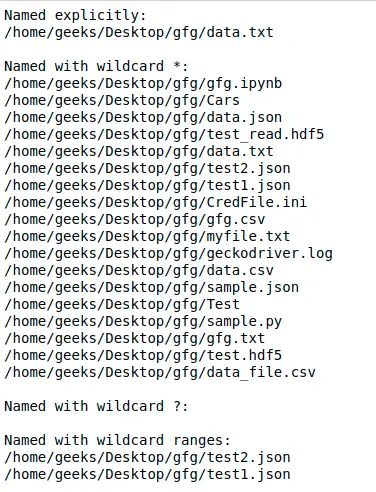
例:
# Python program to demonstrate> # glob using different wildcards> > > import> glob> > > print> (> 'Named explicitly:'> )> for> name> in> glob.glob(> '/home/geeks/Desktop/gfg/data.txt'> ):> > print> (name)> > # Using '*' pattern> print> (> '
Named with wildcard *:'> )> for> name> in> glob.glob(> '/home/geeks/Desktop/gfg/*'> ):> > print> (name)> > # Using '?' pattern> print> (> '
Named with wildcard ?:'> )> for> name> in> glob.glob(> '/home/geeks/Desktop/gfg/data?.txt'> ):> > print> (name)> > # Using [0-9] pattern> print> (> '
Named with wildcard ranges:'> )> for> name> in> glob.glob(> '/home/geeks/Desktop/gfg/*[0-9].*'> ):> > print> (name)> |
出力:
Glob() 関数を使用してファイルを再帰的に検索する
関数を使用できます glob.glob()> または glob.iglob()> glob モジュールから直接、ディレクトリ/ファイルおよびサブディレクトリ/サブファイル内からパスを再帰的に取得します。
構文:
glob.glob(pathname, *, recursive=False)
glob.iglob(pathname, *, recursive=False)
注記: 再帰を設定した場合 True> **> その後にパス区切り文字が続く ('./**/')> 任意のファイルまたはディレクトリと一致します。
例:
# Python program to find files> # recursively using Python> > > import> glob> > > # Returns a list of names in list files.> print> (> 'Using glob.glob()'> )> files> => glob.glob(> '/home/geeks/Desktop/gfg/**/*.txt'> ,> > recursive> => True> )> for> file> in> files:> > print> (> file> )> > > # It returns an iterator which will> # be printed simultaneously.> print> (> '
Using glob.iglob()'> )> for> filename> in> glob.iglob(> '/home/geeks/Desktop/gfg/**/*.txt'> ,> > recursive> => True> ):> > print> (filename)> |
出力:

古いバージョンの Python の場合:
最も簡単な方法は次のとおりです os.walk() これは、ディレクトリ ツリーの再帰的な参照を可能にするために特別に設計および最適化されているためです。または、使用することもできます os.listdir() ディレクトリとサブディレクトリ内のすべてのファイルを取得し、フィルターで除外します。
例を通して見てみましょう -
例:
# Python program to find files> # recursively using Python> > > import> os> > # Using os.walk()> for> dirpath, dirs, files> in> os.walk(> 'src'> ):> > for> filename> in> files:> > fname> => os.path.join(dirpath,filename)> > if> fname.endswith(> '.c'> ):> > print> (fname)> > '''> Or> We can also use fnmatch.filter()> to filter out results.> '''> for> dirpath, dirs, files> in> os.walk(> 'src'> ):> > for> filename> in> fnmatch.> filter> (files,> '*.c'> ):> > print> (os.path.join(dirpath, filename))> > # Using os.listdir()> path> => 'src'> dir_list> => os.listdir(path)> for> filename> in> fnmatch.> filter> (dir_list,> '*.c'> ):> > print> (os.path.join(dirpath, filename))> |
出力:
./src/add.c ./src/subtract.c ./src/sub/mul.c ./src/sub/div.c ./src/add.c ./src/subtract.c ./src/sub/mul.c ./src/sub/div.c ./src/add.c ./src/subtract.c ./src/sub/mul.c ./src/sub/div.c