Itérer le tableau JSON Java
Afin de lire et d'écrire des données JSON en Java, nous utilisons org.json bibliothèque. Le org.json La bibliothèque nous permet d'encoder et de décoder des données JSON en Java. Le org.json class fournit plusieurs classes importantes grâce auxquelles nous pouvons effectuer plusieurs opérations sur ces données JSON. Ces classes sont les suivantes :
- Objet JSON
- Valeur JSON
- JSONArray
- Numéro JSON
- Chaîne JSON
Voici les étapes suivantes pour itérer un tableau JSON en Java :
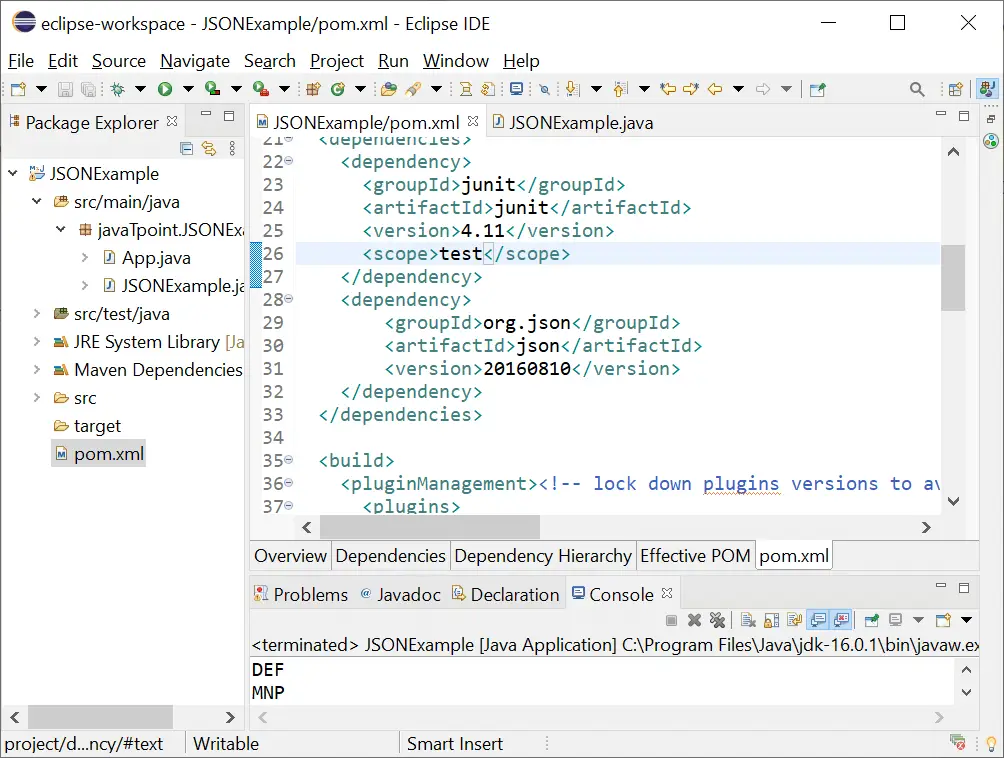
1) Créez un Maven projet et ajouter json dépendance dans POM.xml déposer.
org.json json 20160810
2) Créez une chaîne de données JSON que nous convertissons en objet JSON pour manipuler ses données.
3) Après cela, nous obtenons le tableau JSON à partir de l'objet JSON en utilisant getJSONArray() et stockez-la dans une variable de type JSONArray.
4) Le getJSONArray() La méthode prend le nom du tableau sous forme de chaîne à récupérer à partir de l'objet.
5) Nous utilisons ensuite une boucle for de 0 à JSONArray.length(). La méthode length() renvoie la taille du tableau.
6) Nous stockons chaque enregistrement d'index dans un JSONObject. Afin d'obtenir l'objet JSON d'un index particulier, nous utilisons la méthode getJSONObject() de JSONArray.
7) Pour obtenir la valeur d'un champ spécifié, nous utilisons la méthode get() du JSONObject en passant le nom du champ sous forme de chaîne dans la méthode get().
JSONExemple.java
// import required packages package javaTpoint.JSONExample; //import required classes import org.json.JSONArray; import org.json.JSONObject; // create JSONExample class to iterate JSON Array public class JSONExample{ //main() method start public static void main(String args[]){ // create an string of JSON data String jsonData = '{'locations':[{'lat':'23.053','long':'72.629','location':'ABC','address':'DEF','city':'Ahmedabad','state':'Gujrat','phonenumber':'1234567'},{'lat':'21.013','long':'52.619','location':'XYZ','address':'MNP','city':'Ghaziabad','state':'UP','phonenumber':'212321'}]}'; // convert JSON string into JSON Object using JSONObject() method JSONObject json = new JSONObject(jsonData); // get locations array from the JSON Object and store it into JSONArray JSONArray jsonArray = json.getJSONArray('locations'); // Iterate jsonArray using for loop for (int i = 0; i <jsonarray.length(); i++) { store each object in jsonobject explrobject="jsonArray.getJSONObject(i);" get field value from using get() method system.out.println(explrobject.get('address')); } < pre> <p> <strong>Output:</strong> </p> <img src="//techcodeview.com/img/java-tutorial/10/iterate-json-array-java-2.webp" alt="Iterate JSON Array Java"> <p> <strong>JSONExample2.java</strong> </p> <pre> //import package package javaTpoint.JSONExample; // import require classes import java.io.FileWriter; import java.io.IOException; import org.json.simple.JSONArray; import org.json.simple.JSONObject; // create class JSONExample1 public class JSONExample1 { // main() method start public static void main(String[] args) { // create instance of JSONObject JSONObject jsonObject = new JSONObject(); // use put() method for inserting the data into JSON object jsonObject.put('name', 'Abhishek Sharma'); jsonObject.put('department','B.E'); jsonObject.put('branch', 'C.S.E'); jsonObject.put('year', 3); //create JSON Array and store record into JSONObject JSONArray list1 = new JSONArray(); list1.add('Julia'); list1.add('Paul'); list1.add('Emma'); jsonObject.put('Names', list1); JSONArray list2 = new JSONArray(); list2.add('BCA'); list2.add('B.Tech'); list2.add('MCA'); jsonObject.put('Course', list2); JSONArray list3 = new JSONArray(); list3.add('3'); list3.add('4'); list3.add('2'); jsonObject.put('Year', list3); // create instance of the FileWriter class by passing the path of the file in the constructor try (FileWriter file = new FileWriter('D:\newfile.json')) { // use write() method to add JSONObject into file file.write(jsonObject.toJSONString()); file.flush(); } catch (IOException e) { e.printStackTrace(); } // get locations array from the JSON Object and store it into JSONArray JSONArray jsonArray = (JSONArray) jsonObject.get('Names'); // Iterate jsonArray using for loop for (int i = 0; i <jsonarray.size(); i++) { get field value from json array system.out.println(jsonarray.get(i)); } < pre> <p> <strong>Output:</strong> </p> <img src="//techcodeview.com/img/java-tutorial/10/iterate-json-array-java-3.webp" alt="Iterate JSON Array Java"> <hr></jsonarray.size();></pre></jsonarray.length();>