Analisi XML in Python
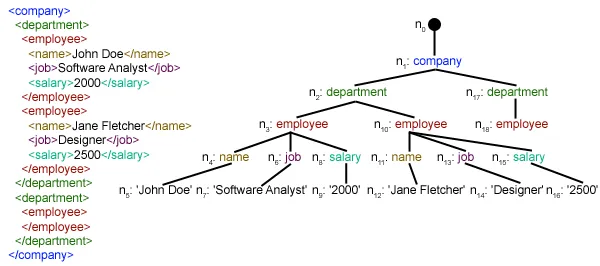
Questo articolo si concentra su come analizzare un determinato file XML ed estrarne alcuni dati utili in modo strutturato. XML: XML sta per eXtensible Markup Language. È stato progettato per archiviare e trasportare dati. È stato progettato per essere leggibile sia dall'uomo che dalle macchine. Ecco perché gli obiettivi di progettazione di XML enfatizzano la semplicità, la generalità e l'usabilità su Internet. Il file XML da analizzare in questo tutorial è in realtà un feed RSS. RSS: RSS (Rich Site Summary, spesso chiamato Really Simple Syndication) utilizza una famiglia di formati di feed Web standard per pubblicare informazioni aggiornate di frequente, come voci di blog, titoli di notizie, audio e video. RSS è testo semplice formattato XML.
- Il formato RSS stesso è relativamente facile da leggere sia da parte dei processi automatizzati che da parte degli esseri umani.
- L'RSS elaborato in questo tutorial è il feed RSS delle notizie principali da un popolare sito Web di notizie. Puoi verificarlo Qui . Il nostro obiettivo è elaborare questo feed RSS (o file XML) e salvarlo in un altro formato per un uso futuro.
#Python code to illustrate parsing of XML files # importing the required modules import csv import requests import xml.etree.ElementTree as ET def loadRSS (): # url of rss feed url = 'http://www.hindustantimes.com/rss/topnews/rssfeed.xml' # creating HTTP response object from given url resp = requests . get ( url ) # saving the xml file with open ( 'topnewsfeed.xml' 'wb' ) as f : f . write ( resp . content ) def parseXML ( xmlfile ): # create element tree object tree = ET . parse ( xmlfile ) # get root element root = tree . getroot () # create empty list for news items newsitems = [] # iterate news items for item in root . findall ( './channel/item' ): # empty news dictionary news = {} # iterate child elements of item for child in item : # special checking for namespace object content:media if child . tag == '{https://video.search.yahoo.com/mrss' : news [ 'media' ] = child . attrib [ 'url' ] else : news [ child . tag ] = child . text . encode ( 'utf8' ) # append news dictionary to news items list newsitems . append ( news ) # return news items list return newsitems def savetoCSV ( newsitems filename ): # specifying the fields for csv file fields = [ 'guid' 'title' 'pubDate' 'description' 'link' 'media' ] # writing to csv file with open ( filename 'w' ) as csvfile : # creating a csv dict writer object writer = csv . DictWriter ( csvfile fieldnames = fields ) # writing headers (field names) writer . writeheader () # writing data rows writer . writerows ( newsitems ) def main (): # load rss from web to update existing xml file loadRSS () # parse xml file newsitems = parseXML ( 'topnewsfeed.xml' ) # store news items in a csv file savetoCSV ( newsitems 'topnews.csv' ) if __name__ == '__main__' : # calling main function main ()
Above code will: - Carica il feed RSS dall'URL specificato e salvalo come file XML.
- Analizza il file XML per salvare le notizie come un elenco di dizionari in cui ogni dizionario è una singola notizia.
- Salva le notizie in un file CSV.
- Puoi dare un'occhiata a più feed RSS del sito di notizie utilizzato nell'esempio sopra. Puoi provare a creare una versione estesa dell'esempio precedente analizzando anche altri feed RSS.
- Sei un fan del cricket? Poi Questo il feed RSS deve essere di tuo interesse! Puoi analizzare questo file XML per ottenere informazioni sulle partite di cricket dal vivo e utilizzarlo per creare un notificatore desktop!
def loadRSS(): # url of rss feed url = 'http://www.hindustantimes.com/rss/topnews/rssfeed.xml' # creating HTTP response object from given url resp = requests.get(url) # saving the xml file with open('topnewsfeed.xml' 'wb') as f: f.write(resp.content) Here we first created a HTTP response object by sending an HTTP request to the URL of the RSS feed. The content of response now contains the XML file data which we save as topnewsfeed.xml nella nostra directory locale. Per ulteriori informazioni su come funziona il modulo richieste, segui questo articolo: Richieste GET e POST utilizzando Python  Qui stiamo usando xml.etree.ElementTree (chiamatelo ET in breve) modulo. Element Tree ha due classi per questo scopo: ElementoAlbero rappresenta l'intero documento XML come un albero e Elemento rappresenta un singolo nodo in questo albero. Le interazioni con l'intero documento (lettura e scrittura su/da file) vengono solitamente eseguite sul file ElementoAlbero livello. Le interazioni con un singolo elemento XML e i suoi sottoelementi vengono eseguite su Elemento livello. Ok, allora esaminiamo il analizzareXML() function now:
 tree = ET.parse(xmlfile)Here we create an ElementoAlbero oggetto analizzando il passato xmlfile.
root = tree.getroot()getrooted() la funzione restituisce la radice di albero come un Elemento object.
for item in root.findall('./channel/item'): Now once you have taken a look at the structure of your XML file you will notice that we are interested only in articolo elemento. ./canale/oggetto è in realtà XPath sintassi (XPath è un linguaggio per indirizzare parti di un documento XML). Qui vogliamo trovare tutto articolo nipoti di canale figli del radice (indicato con '.') elemento. Puoi leggere ulteriori informazioni sulla sintassi XPath supportata Qui . for item in root.findall('./channel/item'): # empty news dictionary news = {} # iterate child elements of item for child in item: # special checking for namespace object content:media if child.tag == '{https://video.search.yahoo.com/mrss': news['media'] = child.attrib['url'] else: news[child.tag] = child.text.encode('utf8') # append news dictionary to news items list newsitems.append(news) Now we know that we are iterating through articolo elementi in cui ciascuno articolo l'elemento contiene una notizia. Quindi creiamo un vuoto notizia dictionary in which we will store all data available about news item. To iterate though each child element of an element we simply iterate through it like this: for child in item:Now notice a sample item element here:
 We will have to handle namespace tags separately as they get expanded to their original value when parsed. So we do something like this:
 if child.tag == '{https://video.search.yahoo.com/mrss': news['media'] = child.attrib['url'] attributo.bambino è un dizionario di tutti gli attributi relativi ad un elemento. Qui ci interessa URL attributo di media: contenuto namespace tag. Now for all other children we simply do: news[child.tag] = child.text.encode('utf8') child.tag contiene il nome dell'elemento figlio. bambino.testo stores all the text inside that child element. So finally a sample item element is converted to a dictionary and looks like this: {'description': 'Ignis has a tough competition already from Hyun.... 'guid': 'http://www.hindustantimes.com/autos/maruti-ignis-launch.... 'link': 'http://www.hindustantimes.com/autos/maruti-ignis-launch.... 'media': 'http://www.hindustantimes.com/rf/image_size_630x354/HT/... 'pubDate': 'Thu 12 Jan 2017 12:33:04 GMT ' 'title': 'Maruti Ignis launches on Jan 13: Five cars that threa..... } Then we simply append this dict element to the list newsitems . Alla fine viene restituito questo elenco.  Come puoi vedere, i dati gerarchici del file XML sono stati convertiti in un semplice file CSV in modo che tutte le notizie siano archiviate sotto forma di tabella. Ciò semplifica anche l'estensione del database. Inoltre è possibile utilizzare i dati simili a JSON direttamente nelle proprie applicazioni! Questa è la migliore alternativa per estrarre dati da siti Web che non forniscono un'API pubblica ma forniscono alcuni feed RSS. È possibile trovare tutto il codice e i file utilizzati nell'articolo precedente Qui . E dopo?
 Potrebbe Piacerti


Articoli Più





Categoria
Articoli Interessanti