Programma Opencv Python per il rilevamento dei volti
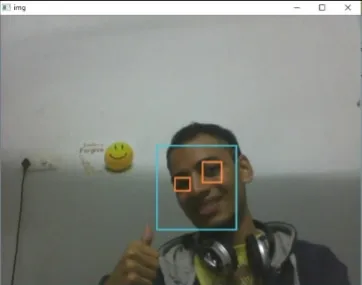
L'obiettivo del programma fornito è rilevare l'oggetto di interesse (viso) in tempo reale e continuare a monitorare lo stesso oggetto. Questo è un semplice esempio di come rilevare un volto in Python. Puoi provare a utilizzare campioni di addestramento di qualsiasi altro oggetto di tua scelta da rilevare addestrando il classificatore sugli oggetti richiesti. Ecco i passaggi per scaricare i requisiti di seguito.
Passaggi:
- Scarica Python 2.7.x versione numpy e Opencv 2.7.x versione. Controlla se il tuo Windows a 32 bit o 64 bit è compatibile e installa di conseguenza.
- Assicurati che Numpy sia in esecuzione nel tuo Python, quindi prova a installare opencv.
- Inserisci i file haarcascade_eye.xml e haarcascade_frontalface_default.xml nella stessa cartella (link forniti nel codice seguente).
Attuazione
Python # OpenCV program to detect face in real time # import libraries of python OpenCV # where its functionality resides import cv2 # load the required trained XML classifiers # https://github.com/opencv/opencv/tree/master # data/haarcascades/haarcascade_frontalface_default.xml # Trained XML classifiers describes some features of some # object we want to detect a cascade function is trained # from a lot of positive(faces) and negative(non-faces) # images. face_cascade = cv2 . CascadeClassifier ( 'haarcascade_frontalface_default.xml' ) # https://github.com/opencv/opencv/tree/master # /data/haarcascades/haarcascade_eye.xml # Trained XML file for detecting eyes eye_cascade = cv2 . CascadeClassifier ( 'haarcascade_eye.xml' ) # capture frames from a camera cap = cv2 . VideoCapture ( 0 ) # loop runs if capturing has been initialized. while 1 : # reads frames from a camera ret img = cap . read () # convert to gray scale of each frames gray = cv2 . cvtColor ( img cv2 . COLOR_BGR2GRAY ) # Detects faces of different sizes in the input image faces = face_cascade . detectMultiScale ( gray 1.3 5 ) for ( x y w h ) in faces : # To draw a rectangle in a face cv2 . rectangle ( img ( x y )( x + w y + h )( 255 255 0 ) 2 ) roi_gray = gray [ y : y + h x : x + w ] roi_color = img [ y : y + h x : x + w ] # Detects eyes of different sizes in the input image eyes = eye_cascade . detectMultiScale ( roi_gray ) #To draw a rectangle in eyes for ( ex ey ew eh ) in eyes : cv2 . rectangle ( roi_color ( ex ey )( ex + ew ey + eh )( 0 127 255 ) 2 ) # Display an image in a window cv2 . imshow ( 'img' img ) # Wait for Esc key to stop k = cv2 . waitKey ( 30 ) & 0xff if k == 27 : break # Close the window cap . release () # De-allocate any associated memory usage cv2 . destroyAllWindows ()
Produzione:
Articolo successivo:
Programma Opencv C++ per il rilevamento dei volti Crea quiz