Classe Java.lang.Number in Java
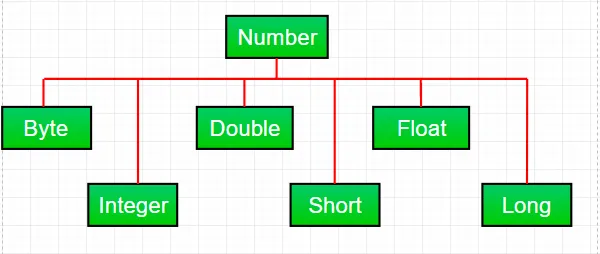
La maggior parte delle volte mentre lavoriamo con i numeri in Java usiamo tipi di dati primitivi . Ma Java fornisce anche vari numeri involucro sottoclassi della classe astratta Numero presente in java.lang pacchetto. Ci sono principalmente sei sottoclassi nella classe Numero. Queste sottoclassi definiscono alcuni metodi utili che vengono utilizzati frequentemente quando si ha a che fare con i numeri.
Queste classi "racchiudono" il tipo di dati primitivo in un oggetto corrispondente. Spesso il confezionamento viene eseguito dal compilatore. Se usi una primitiva in cui è previsto un oggetto, il compilatore inscatola la primitiva nella sua classe wrapper per te. Allo stesso modo, se si utilizza un oggetto Number quando è prevista una primitiva, il compilatore rimuove l'oggetto dalla casella. Questo è anche chiamato Autoboxing e Unboxing.
Perché utilizzare un oggetto della classe Number su dati primitivi?
- Le costanti definite dalla classe numerica come MIN_VALUE e MAX_VALUE che forniscono i limiti superiore e inferiore del tipo di dati sono molto utili.
- L'oggetto classe Number può essere utilizzato come argomento di un metodo che prevede un oggetto (spesso utilizzato quando si manipolano raccolte di numeri).
- I metodi di classe possono essere utilizzati per convertire valori in e da altri tipi primitivi per la conversione in e da stringhe e per la conversione tra sistemi numerici (binario decimale ottale esadecimale).
Metodi comuni a tutte le sottoclassi di Numero:
Syntax : byte byteValue() short shortValue() int intValue() long longValue() float floatValue() double doubleValue() Parameters : ---- Returns : the numeric value represented by this object after conversion to specified type
//Java program to demonstrate xxxValue() method public class Test { public static void main ( String [] args ) { // Creating a Double Class object with value '6.9685' Double d = new Double ( '6.9685' ); // Converting this Double(Number) object to // different primitive data types byte b = d . byteValue (); short s = d . shortValue (); int i = d . intValue (); long l = d . longValue (); float f = d . floatValue (); double d1 = d . doubleValue (); System . out . println ( 'value of d after converting it to byte : ' + b ); System . out . println ( 'value of d after converting it to short : ' + s ); System . out . println ( 'value of d after converting it to int : ' + i ); System . out . println ( 'value of d after converting it to long : ' + l ); System . out . println ( 'value of d after converting it to float : ' + f ); System . out . println ( 'value of d after converting it to double : ' + d1 ); } }
Produzione:
value of d after converting it to byte : 6 value of d after converting it to short : 6 value of d after converting it to int : 6 value of d after converting it to long : 6 value of d after converting it to float : 6.9685 value of d after converting it to double : 6.9685
Nota : Durante la conversione potrebbe verificarsi una possibile perdita di precisione. Ad esempio, come possiamo vedere, la frazione part('.9685') è stata omessa durante la conversione dall'oggetto Double al tipo di dati int.
Syntax : public int compareTo( NumberSubClass referenceName ) Parameters : referenceName - any NumberSubClass type value Returns : the value 0 if the Number is equal to the argument. the value 1 if the Number is less than the argument. the value -1 if the Number is greater than the argument.
//Java program to demonstrate compareTo() method public class Test { public static void main ( String [] args ) { // creating an Integer Class object with value '10' Integer i = new Integer ( '10' ); // comparing value of i System . out . println ( i . compareTo ( 7 )); System . out . println ( i . compareTo ( 11 )); System . out . println ( i . compareTo ( 10 )); } }
Produzione:
1 -1 0
Syntax : public boolean equals(Object obj) Parameters : obj - any object Returns : The method returns true if the argument is not null and is an object of the same type and with the same numeric value otherwise false.
//Java program to demonstrate equals() method public class Test { public static void main ( String [] args ) { // creating a Short Class object with value '15' Short s = new Short ( '15' ); // creating a Short Class object with value '10' Short x = 10 ; // creating an Integer Class object with value '15' Integer y = 15 ; // creating another Short Class object with value '15' Short z = 15 ; //comparing s with other objects System . out . println ( s . equals ( x )); System . out . println ( s . equals ( y )); System . out . println ( s . equals ( z )); } }
Produzione:
false false true
Syntax : static int parseInt(String s int radix) Parameters : s - any String representation of decimal radix - any radix value Returns : the integer value represented by the argument in decimal. Throws : NumberFormatException : if the string does not contain a parsable integer.
//Java program to demonstrate Integer.parseInt() method public class Test { public static void main ( String [] args ) { // parsing different strings int z = Integer . parseInt ( '654' 8 ); int a = Integer . parseInt ( '-FF' 16 ); long l = Long . parseLong ( '2158611234' 10 ); System . out . println ( z ); System . out . println ( a ); System . out . println ( l ); // run-time NumberFormatException will occur here // 'Geeks' is not a parsable string int x = Integer . parseInt ( 'Geeks' 8 ); // run-time NumberFormatException will occur here // (for octal(8)allowed digits are [0-7]) int y = Integer . parseInt ( '99' 8 ); } }
Produzione:
428 -255 2158611234 Exception in thread 'main' java.lang.NumberFormatException: For input string: 'Geeks' at java.lang.NumberFormatException.forInputString(NumberFormatException.java:65) at java.lang.Integer.parseInt(Integer.java:580) at Test.main(Test.java:17)
Syntax : static int parseInt(String s) Parameters : s - any String representation of decimal Returns : the integer value represented by the argument in decimal. Throws : NumberFormatException : if the string does not contain a parsable integer.
//Java program to demonstrate Integer.parseInt() method public class Test { public static void main ( String [] args ) { // parsing different strings int z = Integer . parseInt ( '654' ); long l = Long . parseLong ( '2158611234' ); System . out . println ( z ); System . out . println ( l ); // run-time NumberFormatException will occur here // 'Geeks' is not a parsable string int x = Integer . parseInt ( 'Geeks' ); // run-time NumberFormatException will occur here // (for decimal(10)allowed digits are [0-9]) int a = Integer . parseInt ( '-FF' ); } }
Produzione:
654 2158611234 Exception in thread 'main' java.lang.NumberFormatException: For input string: 'Geeks' at java.lang.NumberFormatException.forInputString(NumberFormatException.java:65) at java.lang.Integer.parseInt(Integer.java:580) at java.lang.Integer.parseInt(Integer.java:615) at Test.main(Test.java:15)
Syntax : String toString() String toString(int i) Parameters : String toString() - no parameter String toString(int i) - i: any integer value Returns : String toString() - returns a String object representing the value of the Number object on which it is invoked. String toString(int i) - returns a decimal String object representing the specified integer(i)Java
//Java program to demonstrate Integer.toString() //and Integer.toString(int i) method public class Test { public static void main ( String [] args ) { // demonstrating toString() method Integer x = 12 ; System . out . println ( x . toString ()); // demonstrating toString(int i) method System . out . println ( Integer . toString ( 12 )); System . out . println ( Integer . toBinaryString ( 152 )); System . out . println ( Integer . toHexString ( 152 )); System . out . println ( Integer . toOctalString ( 152 )); } }
Produzione:
12 12 10011000 98 230
Syntax : Integer valueOf(int i) Integer valueOf(String s) Integer valueOf(String s int radix) Parameters : i - any integer value s - any String representation of decimal radix - any radix value Returns : valueOf(int i) : an Integer object holding the valuerepresented by the int argument. valueOf(String s) : an Integer object holding value represented by the string argument. valueOf(String s int radix) : an Integer object holding the value represented by the string argument with base radix. Throws : valueOf(String s) - NumberFormatException : if the string does not contain a parsable integer. valueOf(String s int radix) - NumberFormatException : if the string does not contain a parsable integer.
// Java program to demonstrate valueOf() method public class Test { public static void main ( String [] args ) { // demonstrating valueOf(int i) method System . out . println ( 'Demonstrating valueOf(int i) method' ); Integer i = Integer . valueOf ( 50 ); Double d = Double . valueOf ( 9.36 ); System . out . println ( i ); System . out . println ( d ); // demonstrating valueOf(String s) method System . out . println ( 'Demonstrating valueOf(String s) method' ); Integer n = Integer . valueOf ( '333' ); Integer m = Integer . valueOf ( '-255' ); System . out . println ( n ); System . out . println ( m ); // demonstrating valueOf(String sint radix) method System . out . println ( 'Demonstrating (String sint radix) method' ); Integer y = Integer . valueOf ( '333' 8 ); Integer x = Integer . valueOf ( '-255' 16 ); Long l = Long . valueOf ( '51688245' 16 ); System . out . println ( y ); System . out . println ( x ); System . out . println ( l ); // run-time NumberFormatException will occur in below cases Integer a = Integer . valueOf ( 'Geeks' ); Integer b = Integer . valueOf ( 'Geeks' 16 ); } }
Produzione:
Demonstrating valueOf(int i) method 50 9.36 Demonstrating valueOf(String s) method 333 -255 Demonstrating (String sint radix) method 219 -597 1365803589 Exception in thread 'main' java.lang.NumberFormatException: For input string: 'Geeks' at java.lang.NumberFormatException.forInputString(NumberFormatException.java:65) at java.lang.Integer.parseInt(Integer.java:580) at java.lang.Integer.valueOf(Integer.java:766) at Test.main(Test.java:28)
Domanda pratica:
Qual è l'output del codice Java specificato?
public class Test { public static void main ( String [] args ) { Integer i = Integer . parseInt ( 'Kona' 27 ); System . out . println ( i ); } }
Opzioni:
A) NumberFormatException at run-time B) NumberFormatException at compile-time C) 411787
Risposta :
C) 411787
Spiegazione:
Poiché la radice è 27, i caratteri consentiti in una stringa letterale sono [0-9] [A-Q] (da 10 a 26). Quindi il suo valore verrà calcolato come segue:
=> a*(27^0) + n*(27^1) + o*(27^2) + k*(27^3)
=> 10*1 + 23*27 + 24*27*27 + 20*27*27*27
=> 10+621+17496+393660
=> 411787
Potrebbe Piacerti


Articoli Più






Categoria
Articoli Interessanti