Opencv Python program az arcfelismeréshez
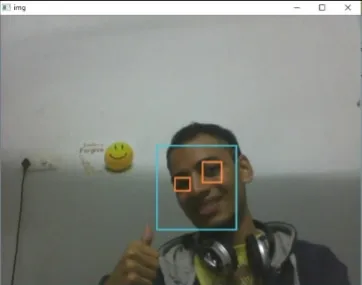
A megadott program célja az érdeklődésre számot tartó objektum(arc) valós időben történő észlelése, és ugyanazon objektum folyamatos nyomon követése. Ez egy egyszerű példa arra, hogyan lehet arcot észlelni Pythonban. Megpróbálhatja bármely más választott objektum betanítási mintáját használni, hogy az osztályozót a szükséges objektumokra betanítsa a felismeréshez. Az alábbiakban bemutatjuk a követelmények letöltésének lépéseit.
Lépések:
- Töltse le a Python 2.7.x verzióját numpy és az Opencv 2.7.x verzióját. Ellenőrizze, hogy a 32 bites vagy a 64 bites Windows kompatibilis-e, és ennek megfelelően telepítse.
- Győződjön meg arról, hogy a numpy fut a pythonban, majd próbálja meg telepíteni az opencv-t.
- Helyezze a haarcascade_eye.xml és haarcascade_frontalface_default.xml fájlokat ugyanabba a mappába (a hivatkozások az alábbi kódban találhatók).
Végrehajtás
Python # OpenCV program to detect face in real time # import libraries of python OpenCV # where its functionality resides import cv2 # load the required trained XML classifiers # https://github.com/opencv/opencv/tree/master # data/haarcascades/haarcascade_frontalface_default.xml # Trained XML classifiers describes some features of some # object we want to detect a cascade function is trained # from a lot of positive(faces) and negative(non-faces) # images. face_cascade = cv2 . CascadeClassifier ( 'haarcascade_frontalface_default.xml' ) # https://github.com/opencv/opencv/tree/master # /data/haarcascades/haarcascade_eye.xml # Trained XML file for detecting eyes eye_cascade = cv2 . CascadeClassifier ( 'haarcascade_eye.xml' ) # capture frames from a camera cap = cv2 . VideoCapture ( 0 ) # loop runs if capturing has been initialized. while 1 : # reads frames from a camera ret img = cap . read () # convert to gray scale of each frames gray = cv2 . cvtColor ( img cv2 . COLOR_BGR2GRAY ) # Detects faces of different sizes in the input image faces = face_cascade . detectMultiScale ( gray 1.3 5 ) for ( x y w h ) in faces : # To draw a rectangle in a face cv2 . rectangle ( img ( x y )( x + w y + h )( 255 255 0 ) 2 ) roi_gray = gray [ y : y + h x : x + w ] roi_color = img [ y : y + h x : x + w ] # Detects eyes of different sizes in the input image eyes = eye_cascade . detectMultiScale ( roi_gray ) #To draw a rectangle in eyes for ( ex ey ew eh ) in eyes : cv2 . rectangle ( roi_color ( ex ey )( ex + ew ey + eh )( 0 127 255 ) 2 ) # Display an image in a window cv2 . imshow ( 'img' img ) # Wait for Esc key to stop k = cv2 . waitKey ( 30 ) & 0xff if k == 27 : break # Close the window cap . release () # De-allocate any associated memory usage cv2 . destroyAllWindows ()
Kimenet:
Következő cikk:
Opencv C++ program arcfelismeréshez Kvíz létrehozása