Java.io.PipedOutputStream osztály Java nyelven
Java.io.PipedInputStream osztály Java nyelven
Csövek IO-ban biztosítanak kapcsolatot két JVM-ben egyidejűleg futó szál között. Tehát a csöveket forrásként vagy célként is használják.
- A PipedInputStream a PipedOutputStream segítségével is csővezetékes. Tehát az adatok írhatók a PipedOutputStream segítségével, és írhatók a PipedInputStream segítségével. De mindkét szál egyidejű használata holtpontot hoz létre a szálak számára.
- A PipedOutputStream a cső végét küldi. Az adatok a PipedOutputStreambe íródnak. Azt mondják, hogy a cső megszakadt, ha az adatokat olvasó PipedInputStream már nincs meg.
Nyilatkozat:
 public class PipedOutputStream
  extends OutputStream
     Konstruktőr:
- PipedOutputStream() : létrehoz egy PipedOutputStream-et, amelyhez nincs csatlakoztatva.
- PipedOutputStream(PipedOutputStream inStream): létrehoz egy PipedOutputStream-et
csatlakozik a PipedInputStreamhez – 'inStream'.
Mód:
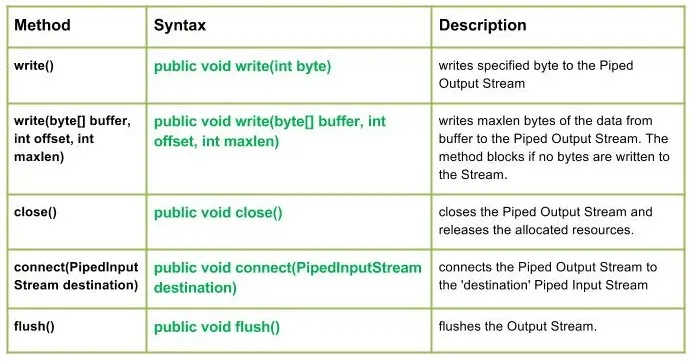
write() : java.io.PipedOutputStream.write(int byte) egy megadott bájtot ír a vezetékes kimeneti adatfolyamba.
Szintaxis:
public void write(int byte)
Parameters :
byte : byte to be written
Return : void
Exception :
-> IOException : if in case IO error occurs.write(byte[] puffer int offset int maxlen) : java.io.PipedOutputStream.write(byte[] puffer int offset int maxlen) maximum bájtnyi adatot ír a pufferből a Piped Output Streambe. A metódus blokkolja, ha nem írnak bájtot az adatfolyamba.
Szintaxis:
public void write(byte[] buffer int offset int maxlen)
Parameters :
buffer : data of the buffer
offset : starting in the destination array - 'buffer'.
maxlen : maximum length of array to be read
Return : void
Exception :
-> IOException : if in case IO error occurs. JavaKimenet:
Use of write(buffer offset maxlen) : J A V A
- close() : java.io.PipedOutputStream.close() bezárja a vezetékes kimeneti adatfolyamot, és felszabadítja a hozzárendelt erőforrásokat.
Szintaxis:
 public void close()
    Parameters :
 --------------
    Return :
 void
    Exception :
 ->      IOException :     if in case IO error occurs.
- connect(PipedInputStream cél) : java.io.PipedOutputStream.connect(PipedInputStream cél összeköti a vezetékes kimeneti adatfolyamot a "cél" vezetékes bemeneti adatfolyammal, és abban az esetben, ha a "cél" csövek, más adatfolyam IO kivétellel
Szintaxis:
 public void connect(PipedInputStream destination)
    Parameters :
 destination : the Piped Input Stream to be connected to
    Return :
 void
    Exception :
 ->      IOException :     if in case IO error occurs.
- flush() : java.io.PipedOutputStream.flush() kiöblíti a kimeneti adatfolyamot.
Szintaxis:
public void flush()
Parameters :
------------
Return :
void
Exception :
-> IOException : if in case IO error occurs.
Java kód, amely a PipedOutputStream osztálymetódusok működését illusztrálja:
JavaKimenet:
Use of flush() method :
G E E K S
Closing the Output stream
Kvíz létrehozása