Jelszó és OTP generálása Java-ban
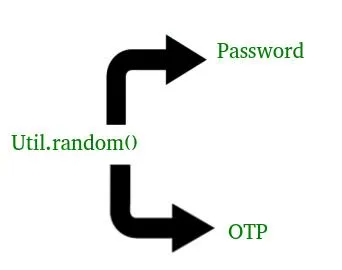
Át lehet menni a egyszeri jelszót vagy egyedi azonosító URL-t generál cikk előtt, hogy jobban megértse, hogyan lehet jelszavakat és OTP-t generálni Java-ban. 
Előfordult már, hogy rákattintott az "Elfelejtette a jelszavát" gombra, és azonnal kapott új jelszót vagy OTP-t e-mailben vagy telefonjában? Ez a folyamat dinamikusan generált jelszavakat és egyszeri jelszavakat (OTP) használ a biztonság fokozása érdekében. Ebből a cikkből megtudhatja, hogyan hozhat létre biztonságos jelszavakat és OTP-ket Java nyelven egyszerű technikák segítségével.
Mik azok a jelszavak és az OTP-k?
Jelszó: Statikus titkos karakterlánc, amely a bejelentkezés során a személyazonosság ellenőrzésére szolgál.
OTP (egyszeri jelszó): Egy ideiglenes, véletlenszerűen generált kód, amelyet egyszer használnak ellenőrzésre (gyakran 2FA-ban).
1. módszer:
Java program, amely elmagyarázza a jelszó generálását
Java // Java code to explain how to generate random // password // Here we are using random() method of util // class in Java import java.util.* ; public class NewClass { public static void main ( String [] args ) { // Length of your password as I have choose // here to be 8 int length = 10 ; System . out . println ( geek_Password ( length )); } // This our Password generating method // We have use static here so that we not to // make any object for it static char [] geek_Password ( int len ) { System . out . println ( & quot ; Generating password using random () : & quot ;); System . out . print ( & quot ; Your new password is : & quot ;); // A strong password has Cap_chars Lower_chars // numeric value and symbols. So we are using all of // them to generate our password String Capital_chars = & quot ; ABCDEFGHIJKLMNOPQRSTUVWXYZ & quot ;; String Small_chars = & quot ; abcdefghijklmnopqrstuvwxyz & quot ;; String numbers = & quot ; 01234567 89 & quot ;; String symbols = & quot ; ! @# $ %^& amp ; * _ =+-/ . ?& lt ; & gt ;) & quot ;; String values = Capital_chars + Small_chars + numbers + symbols ; // Using random method Random rndm_method = new Random (); char [] password = new char [ len ] ; for ( int i = 0 ; i & lt ; len ; i ++ ) { // Use of charAt() method : to get character value // Use of nextInt() as it is scanning the value as int password [ i ] = values . charAt ( rndm_method . nextInt ( values . length ())); } return password ; } }
Megjegyzés: Az általunk generált jelszó minden alkalommal megváltozik. Mivel a random() metódust használtuk a jelszó generálásához.
Kimenet:
Generating password using random() :
Your new password is : KHeCZBTM;-Java program, amely elmagyarázza az OTP (One Time Password) generálását
JavaMegjegyzés: Az általunk generált OTP minden alkalommal változik. Ahogyan az OTP generálásához random() metódust használtunk.
Kimenet:
Generating OTP using random() :
You OTP is : 52912. módszer:
Java program, amely elmagyarázza a jelszó generálását
JavaMegjegyzés: Az általunk generált jelszó minden alkalommal megváltozik. Mivel a random() metódust használtuk a jelszó generálásához.
Kimenet:
Generating password using Math.random() and ascii code:
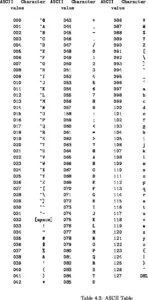
Your new password is : KHe%ZBT$ascii kódtábla:
Java program, amely elmagyarázza az OTP (One Time Password) generálását
JavaMegjegyzés: Az általunk generált OTP minden alkalommal változik. Ahogy a Math.random() függvényt is használtuk az OTP generálásához.
Kimenet:
Generating OTP using random() :
You OTP is : 5291Kvíz létrehozása