Jump Search
Pitää Binäärihaku Jump Search on lajiteltujen taulukoiden hakualgoritmi. Perusideana on tarkistaa vähemmän elementtejä (kuin lineaarinen haku ) hyppäämällä eteenpäin kiinteillä askelilla tai ohittamalla joitain elementtejä kaikkien elementtien etsimisen sijaan.
Oletetaan esimerkiksi, että meillä on taulukko arr[], jonka koko on n, ja lohko (hypättävä), jonka koko on m. Sitten etsitään hakemistoista arr[0] arr[m] arr[2m].....arr[km] ja niin edelleen. Kun olemme löytäneet intervallin (arr[km] < x < arr[(k+1)m]) we perform a linear search operation from the index km to find the element x.
Tarkastellaan seuraavaa taulukkoa: (0 1 1 2 3 5 8 13 21 34 55 89 144 233 377 610). Taulukon pituus on 16. Hyppyhaku löytää arvon 55 seuraavilla vaiheilla olettaen, että hypättävä lohkokoko on 4.
VAIHE 1: Hyppää indeksistä 0 indeksiin 4;
VAIHE 2: Hyppää indeksistä 4 indeksiin 8;
VAIHE 3: Hyppää indeksistä 8 indeksiin 12;
VAIHE 4: Koska indeksin 12 elementti on suurempi kuin 55, hyppäämme askeleen taaksepäin päästäksemme indeksiin 8.
VAIHE 5: Suorita lineaarinen haku indeksistä 8 saadaksesi elementin 55.
Suorituskyky verrattuna lineaariseen ja binaarihakuun:
Jos vertaamme sitä lineaariseen ja binaarihakuun, niin se tulee ulos, niin se on parempi kuin lineaarinen haku, mutta ei parempi kuin binäärihaku.
Kasvava suoritusjärjestys on:
lineaarinen haku < jump search < binary search
Mikä on optimaalinen ohitettavan lohkon koko?
Pahimmassa tapauksessa joudumme tekemään n/m hyppyjä ja jos viimeksi tarkistettu arvo on suurempi kuin haettava elementti, suoritamme m-1 vertailuja enemmän lineaariselle haulle. Siksi vertailujen kokonaismäärä pahimmassa tapauksessa on ((n/m) + m-1). Funktion arvo ((n/m) + m-1) on pienin, kun m = √n. Siksi paras askelkoko on m = √ n.
Algoritmin vaiheet
- Jump Search on algoritmi tietyn arvon löytämiseksi lajitetusta taulukosta hyppäämällä taulukon tiettyjen vaiheiden läpi.
- Vaiheet määräytyvät taulukon pituuden sqrt:n mukaan.
- Tässä on vaiheittainen algoritmi hyppyhakuun:
- Määritä askelkoko m ottamalla taulukon n pituuden sqrt.
- Aloita taulukon ensimmäisestä elementistä ja hyppää m askelta, kunnes arvo kyseisessä paikassa on suurempi kuin tavoitearvo.
Kun kohdetta suurempi arvo on löydetty, suorita lineaarinen haku alkaen edellisestä vaiheesta, kunnes kohde löytyy tai on selvää, että kohde ei ole taulukossa.
Jos kohde löytyy, palauta sen indeksi. Jos ei, palauta -1 osoittamaan, että kohdetta ei löydy taulukosta.
Esimerkki 1:
C++ // C++ program to implement Jump Search #include using namespace std ; int jumpSearch ( int arr [] int x int n ) { // Finding block size to be jumped int step = sqrt ( n ); // Finding the block where element is // present (if it is present) int prev = 0 ; while ( arr [ min ( step n ) -1 ] < x ) { prev = step ; step += sqrt ( n ); if ( prev >= n ) return -1 ; } // Doing a linear search for x in block // beginning with prev. while ( arr [ prev ] < x ) { prev ++ ; // If we reached next block or end of // array element is not present. if ( prev == min ( step n )) return -1 ; } // If element is found if ( arr [ prev ] == x ) return prev ; return -1 ; } // Driver program to test function int main () { int arr [] = { 0 1 1 2 3 5 8 13 21 34 55 89 144 233 377 610 }; int x = 55 ; int n = sizeof ( arr ) / sizeof ( arr [ 0 ]); // Find the index of 'x' using Jump Search int index = jumpSearch ( arr x n ); // Print the index where 'x' is located cout < < ' n Number ' < < x < < ' is at index ' < < index ; return 0 ; } // Contributed by nuclode
C #include #include int min ( int a int b ){ if ( b > a ) return a ; else return b ; } int jumpsearch ( int arr [] int x int n ) { // Finding block size to be jumped int step = sqrt ( n ); // Finding the block where element is // present (if it is present) int prev = 0 ; while ( arr [ min ( step n ) -1 ] < x ) { prev = step ; step += sqrt ( n ); if ( prev >= n ) return -1 ; } // Doing a linear search for x in block // beginning with prev. while ( arr [ prev ] < x ) { prev ++ ; // If we reached next block or end of // array element is not present. if ( prev == min ( step n )) return -1 ; } // If element is found if ( arr [ prev ] == x ) return prev ; return -1 ; } int main () { int arr [] = { 0 1 1 2 3 5 8 13 21 34 55 89 144 233 377 610 }; int x = 55 ; int n = sizeof ( arr ) / sizeof ( arr [ 0 ]); int index = jumpsearch ( arr x n ); if ( index >= 0 ) printf ( 'Number is at %d index' index ); else printf ( 'Number is not exist in the array' ); return 0 ; } // This code is contributed by Susobhan Akhuli
Java // Java program to implement Jump Search. public class JumpSearch { public static int jumpSearch ( int [] arr int x ) { int n = arr . length ; // Finding block size to be jumped int step = ( int ) Math . floor ( Math . sqrt ( n )); // Finding the block where element is // present (if it is present) int prev = 0 ; for ( int minStep = Math . min ( step n ) - 1 ; arr [ minStep ] < x ; minStep = Math . min ( step n ) - 1 ) { prev = step ; step += ( int ) Math . floor ( Math . sqrt ( n )); if ( prev >= n ) return - 1 ; } // Doing a linear search for x in block // beginning with prev. while ( arr [ prev ] < x ) { prev ++ ; // If we reached next block or end of // array element is not present. if ( prev == Math . min ( step n )) return - 1 ; } // If element is found if ( arr [ prev ] == x ) return prev ; return - 1 ; } // Driver program to test function public static void main ( String [ ] args ) { int arr [] = { 0 1 1 2 3 5 8 13 21 34 55 89 144 233 377 610 }; int x = 55 ; // Find the index of 'x' using Jump Search int index = jumpSearch ( arr x ); // Print the index where 'x' is located System . out . println ( 'nNumber ' + x + ' is at index ' + index ); } }
Python # Python3 code to implement Jump Search import math def jumpSearch ( arr x n ): # Finding block size to be jumped step = math . sqrt ( n ) # Finding the block where element is # present (if it is present) prev = 0 while arr [ int ( min ( step n ) - 1 )] < x : prev = step step += math . sqrt ( n ) if prev >= n : return - 1 # Doing a linear search for x in # block beginning with prev. while arr [ int ( prev )] < x : prev += 1 # If we reached next block or end # of array element is not present. if prev == min ( step n ): return - 1 # If element is found if arr [ int ( prev )] == x : return prev return - 1 # Driver code to test function arr = [ 0 1 1 2 3 5 8 13 21 34 55 89 144 233 377 610 ] x = 55 n = len ( arr ) # Find the index of 'x' using Jump Search index = jumpSearch ( arr x n ) # Print the index where 'x' is located print ( 'Number' x 'is at index' ' %.0f ' % index ) # This code is contributed by 'Sharad_Bhardwaj'.
C# // C# program to implement Jump Search. using System ; public class JumpSearch { public static int jumpSearch ( int [] arr int x ) { int n = arr . Length ; // Finding block size to be jumped int step = ( int ) Math . Sqrt ( n ); // Finding the block where the element is // present (if it is present) int prev = 0 ; for ( int minStep = Math . Min ( step n ) - 1 ; arr [ minStep ] < x ; minStep = Math . Min ( step n ) - 1 ) { prev = step ; step += ( int ) Math . Sqrt ( n ); if ( prev >= n ) return - 1 ; } // Doing a linear search for x in block // beginning with prev. while ( arr [ prev ] < x ) { prev ++ ; // If we reached next block or end of // array element is not present. if ( prev == Math . Min ( step n )) return - 1 ; } // If element is found if ( arr [ prev ] == x ) return prev ; return - 1 ; } // Driver program to test function public static void Main () { int [] arr = { 0 1 1 2 3 5 8 13 21 34 55 89 144 233 377 610 }; int x = 55 ; // Find the index of 'x' using Jump Search int index = jumpSearch ( arr x ); // Print the index where 'x' is located Console . Write ( 'Number ' + x + ' is at index ' + index ); } }
JavaScript < script > // Javascript program to implement Jump Search function jumpSearch ( arr x n ) { // Finding block size to be jumped let step = Math . sqrt ( n ); // Finding the block where element is // present (if it is present) let prev = 0 ; for ( int minStep = Math . Min ( step n ) - 1 ; arr [ minStep ] < x ; minStep = Math . Min ( step n ) - 1 ) { prev = step ; step += Math . sqrt ( n ); if ( prev >= n ) return - 1 ; } // Doing a linear search for x in block // beginning with prev. while ( arr [ prev ] < x ) { prev ++ ; // If we reached next block or end of // array element is not present. if ( prev == Math . min ( step n )) return - 1 ; } // If element is found if ( arr [ prev ] == x ) return prev ; return - 1 ; } // Driver program to test function let arr = [ 0 1 1 2 3 5 8 13 21 34 55 89 144 233 377 610 ]; let x = 55 ; let n = arr . length ; // Find the index of 'x' using Jump Search let index = jumpSearch ( arr x n ); // Print the index where 'x' is located document . write ( `Number ${ x } is at index ${ index } ` ); // This code is contributed by _saurabh_jaiswal < /script>
PHP // PHP program to implement Jump Search function jumpSearch ( $arr $x $n ) { // Finding block size to be jumped $step = sqrt ( $n ); // Finding the block where element is // present (if it is present) $prev = 0 ; while ( $arr [ min ( $step $n ) - 1 ] < $x ) { $prev = $step ; $step += sqrt ( $n ); if ( $prev >= $n ) return - 1 ; } // Doing a linear search for x in block // beginning with prev. while ( $arr [ $prev ] < $x ) { $prev ++ ; // If we reached next block or end of // array element is not present. if ( $prev == min ( $step $n )) return - 1 ; } // If element is found if ( $arr [ $prev ] == $x ) return $prev ; return - 1 ; } // Driver program to test function $arr = array ( 0 1 1 2 3 5 8 13 21 34 55 89 144 233 377 610 ); $x = 55 ; $n = sizeof ( $arr ) / sizeof ( $arr [ 0 ]); // Find the index of '$x' using Jump Search $index = jumpSearch ( $arr $x $n ); // Print the index where '$x' is located echo 'Number ' . $x . ' is at index ' . $index ; return 0 ; ?>
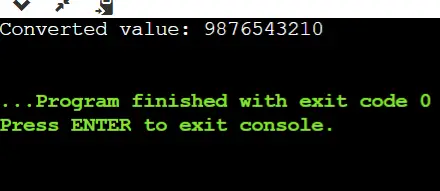
Lähtö:
Number 55 is at index 10
Aika monimutkaisuus: O(?n)
Aputila: O(1)Jump Searchin edut:
- Parempi kuin lineaarinen haku taulukoille, joissa elementit ovat jakautuneet tasaisesti.
- Hyppyhaulla on pienempi aikamonimutkaisuus verrattuna lineaariseen hakuun suurille taulukoille.
- Hyppyhaun vaiheiden määrä on verrannollinen taulukon koon neliöjuureen, mikä tekee siitä tehokkaamman suurille taulukoille.
- Se on helpompi toteuttaa verrattuna muihin hakualgoritmeihin, kuten binäärihakuun tai kolmihakuun.
- Hyppyhaku toimii hyvin taulukoissa, joissa elementit ovat järjestyksessä ja tasaisesti jakautuneita, koska se voi hypätä lähempään kohtaan taulukossa jokaisen iteroinnin yhteydessä.
Tärkeitä kohtia:
- Toimii vain lajiteltujen taulukoiden kanssa.
- Hyppyttävän lohkon optimaalinen koko on (? n). Tämä tekee hyppyhaun aikamonimutkaisuuden O(? n).
- Pikahaun aikamonimutkaisuus on lineaarihaun ((O(n)) ja binaarihaun (O(Log n)) välillä.
- Binäärihaku on parempi kuin hyppyhaku, mutta hyppyhaulla on se etu, että kuljemme taaksepäin vain kerran (binäärihaku voi vaatia jopa O(Log n) hyppyä, kun otetaan huomioon tilanne, jossa haettava elementti on pienin elementti tai vain suurempi kuin pienin). Joten järjestelmässä, jossa binäärihaku on kallista, käytämme Jump Searchia.
Viitteet:
https://en.wikipedia.org/wiki/Jump_search
Jos pidät GeeksforGeeksistä ja haluat osallistua, voit myös kirjoittaa artikkelin käyttämällä write.geeksforgeeks.org tai lähetä artikkelisi osoitteeseen [email protected]. Katso artikkelisi ilmestyvän GeeksforGeeks-pääsivulle ja auta muita nörtejä. Kirjoita kommentteja, jos huomaat jotain väärin tai haluat jakaa lisätietoja yllä käsitellystä aiheesta.