Análisis XML en Python
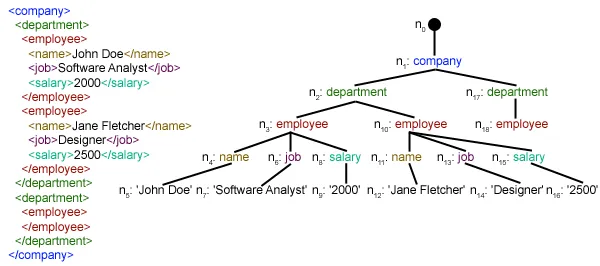
Este artículo se centra en cómo se puede analizar un archivo XML determinado y extraer algunos datos útiles de forma estructurada. XML: XML significa lenguaje de marcado extensible. Fue diseñado para almacenar y transportar datos. Fue diseñado para ser legible tanto por humanos como por máquinas. Es por eso que los objetivos de diseño de XML enfatizan la simplicidad, la generalidad y la usabilidad en Internet. El archivo XML que se analizará en este tutorial es en realidad una fuente RSS. RSS: RSS (Resumen de sitio enriquecido, a menudo denominado Sindicación realmente simple) utiliza una familia de formatos de alimentación web estándar para publicar información actualizada con frecuencia, como entradas de blog, titulares de noticias, audio y vídeo. RSS es texto plano con formato XML.
- El formato RSS en sí es relativamente fácil de leer tanto para procesos automatizados como para humanos.
- El RSS procesado en este tutorial es la fuente RSS de las principales noticias de un sitio web de noticias popular. Puedes comprobarlo aquí . Nuestro objetivo es procesar este feed RSS (o archivo XML) y guardarlo en algún otro formato para uso futuro.
#Python code to illustrate parsing of XML files # importing the required modules import csv import requests import xml.etree.ElementTree as ET def loadRSS (): # url of rss feed url = 'http://www.hindustantimes.com/rss/topnews/rssfeed.xml' # creating HTTP response object from given url resp = requests . get ( url ) # saving the xml file with open ( 'topnewsfeed.xml' 'wb' ) as f : f . write ( resp . content ) def parseXML ( xmlfile ): # create element tree object tree = ET . parse ( xmlfile ) # get root element root = tree . getroot () # create empty list for news items newsitems = [] # iterate news items for item in root . findall ( './channel/item' ): # empty news dictionary news = {} # iterate child elements of item for child in item : # special checking for namespace object content:media if child . tag == '{https://video.search.yahoo.com/mrss' : news [ 'media' ] = child . attrib [ 'url' ] else : news [ child . tag ] = child . text . encode ( 'utf8' ) # append news dictionary to news items list newsitems . append ( news ) # return news items list return newsitems def savetoCSV ( newsitems filename ): # specifying the fields for csv file fields = [ 'guid' 'title' 'pubDate' 'description' 'link' 'media' ] # writing to csv file with open ( filename 'w' ) as csvfile : # creating a csv dict writer object writer = csv . DictWriter ( csvfile fieldnames = fields ) # writing headers (field names) writer . writeheader () # writing data rows writer . writerows ( newsitems ) def main (): # load rss from web to update existing xml file loadRSS () # parse xml file newsitems = parseXML ( 'topnewsfeed.xml' ) # store news items in a csv file savetoCSV ( newsitems 'topnews.csv' ) if __name__ == '__main__' : # calling main function main ()
Above code will: - Cargue la fuente RSS desde la URL especificada y guárdela como un archivo XML.
- Analice el archivo XML para guardar noticias como una lista de diccionarios donde cada diccionario es una única noticia.
- Guarde las noticias en un archivo CSV.
- Puede echar un vistazo a más canales rss del sitio web de noticias utilizado en el ejemplo anterior. Puede intentar crear una versión extendida del ejemplo anterior analizando también otros feeds rss.
- ¿Eres fanático del cricket? Entonces este ¡El feed rss debe ser de tu interés! ¡Puedes analizar este archivo XML para extraer información sobre los partidos de cricket en vivo y usarlo para crear un notificador de escritorio!
def loadRSS(): # url of rss feed url = 'http://www.hindustantimes.com/rss/topnews/rssfeed.xml' # creating HTTP response object from given url resp = requests.get(url) # saving the xml file with open('topnewsfeed.xml' 'wb') as f: f.write(resp.content) Here we first created a HTTP response object by sending an HTTP request to the URL of the RSS feed. The content of response now contains the XML file data which we save as topnewsfeed.xml en nuestro directorio local. Para obtener más información sobre cómo funciona el módulo de solicitudes, siga este artículo: Solicitudes GET y POST usando Python  Aquí estamos usando xml.etree.ElementTree (llámelo ET para abreviar) módulo. Element Tree tiene dos clases para este propósito: ElementoÁrbol representa todo el documento XML como un árbol y Elemento representa un único nodo en este árbol. Las interacciones con todo el documento (lectura y escritura en/desde archivos) generalmente se realizan en el ElementoÁrbol nivel. Las interacciones con un único elemento XML y sus subelementos se realizan en el Elemento nivel. Ok, entonces repasemos el analizarXML() function now:
 tree = ET.parse(xmlfile)Here we create an ElementoÁrbol objeto analizando el pasado archivo xml.
root = tree.getroot()rootear() función devuelve la raíz de árbol como un Elemento object.
for item in root.findall('./channel/item'): Now once you have taken a look at the structure of your XML file you will notice that we are interested only in artículo elemento. ./canal/elemento es en realidad XPath sintaxis (XPath es un lenguaje para abordar partes de un documento XML). Aquí queremos encontrar todos artículo nietos de canal hijos de la raíz (indicado por '.') elemento. Puede leer más sobre la sintaxis XPath admitida. aquí . for item in root.findall('./channel/item'): # empty news dictionary news = {} # iterate child elements of item for child in item: # special checking for namespace object content:media if child.tag == '{https://video.search.yahoo.com/mrss': news['media'] = child.attrib['url'] else: news[child.tag] = child.text.encode('utf8') # append news dictionary to news items list newsitems.append(news) Now we know that we are iterating through artículo elementos donde cada artículo El elemento contiene una noticia. Entonces creamos un vacío. noticias dictionary in which we will store all data available about news item. To iterate though each child element of an element we simply iterate through it like this: for child in item:Now notice a sample item element here:
 We will have to handle namespace tags separately as they get expanded to their original value when parsed. So we do something like this:
 if child.tag == '{https://video.search.yahoo.com/mrss': news['media'] = child.attrib['url'] atributo.niño es un diccionario de todos los atributos relacionados con un elemento. Aquí nos interesa URL atributo de medios: contenido namespace tag. Now for all other children we simply do: news[child.tag] = child.text.encode('utf8') etiqueta.niño contiene el nombre del elemento secundario. niño.texto stores all the text inside that child element. So finally a sample item element is converted to a dictionary and looks like this: {'description': 'Ignis has a tough competition already from Hyun.... 'guid': 'http://www.hindustantimes.com/autos/maruti-ignis-launch.... 'link': 'http://www.hindustantimes.com/autos/maruti-ignis-launch.... 'media': 'http://www.hindustantimes.com/rf/image_size_630x354/HT/... 'pubDate': 'Thu 12 Jan 2017 12:33:04 GMT ' 'title': 'Maruti Ignis launches on Jan 13: Five cars that threa..... } Then we simply append this dict element to the list noticias . Finalmente se devuelve esta lista.  Como puede ver, los datos del archivo XML jerárquico se han convertido en un archivo CSV simple para que todas las noticias se almacenen en forma de tabla. Esto también facilita la ampliación de la base de datos. ¡También se pueden utilizar datos tipo JSON directamente en sus aplicaciones! Esta es la mejor alternativa para extraer datos de sitios web que no proporcionan una API pública pero sí algunos canales RSS. Todo el código y los archivos utilizados en el artículo anterior se pueden encontrar aquí . ¿Qué sigue?

Artículos Más Populares