Clase Java.lang.Number en Java
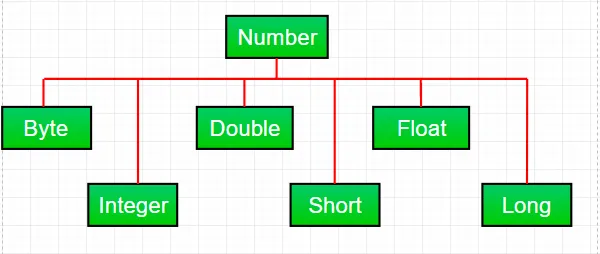
La mayor parte del tiempo, mientras trabajamos con números en Java, utilizamos tipos de datos primitivos . Pero Java también proporciona varias funciones numéricas. envoltura subclases bajo la clase abstracta Número presente en java.lang paquete. Hay principalmente seis subclases en la clase Número. Estas subclases definen algunos métodos útiles que se usan con frecuencia al tratar con números.
Estas clases 'envuelven' el tipo de datos primitivo en un objeto correspondiente. A menudo, el compilador realiza el ajuste. Si utiliza una primitiva donde se espera un objeto, el compilador encuadra la primitiva en su clase contenedora. De manera similar, si usa un objeto Número cuando se espera una primitiva, el compilador desempaqueta el objeto por usted. Esto también se llama Autoboxing y Unboxing.
¿Por qué utilizar un objeto de clase Número sobre datos primitivos?
- Las constantes definidas por la clase numérica como MIN_VALUE y MAX_VALUE que proporcionan los límites superior e inferior del tipo de datos son muy útiles.
- El objeto de clase numérica se puede utilizar como argumento de un método que espera un objeto (a menudo se utiliza al manipular colecciones de números).
- Los métodos de clase se pueden utilizar para convertir valores hacia y desde otros tipos primitivos, para convertir hacia y desde cadenas y para convertir entre sistemas numéricos (binario hexadecimal octal decimal).
Métodos comunes a todas las subclases de Número:
Syntax : byte byteValue() short shortValue() int intValue() long longValue() float floatValue() double doubleValue() Parameters : ---- Returns : the numeric value represented by this object after conversion to specified type
//Java program to demonstrate xxxValue() method public class Test { public static void main ( String [] args ) { // Creating a Double Class object with value '6.9685' Double d = new Double ( '6.9685' ); // Converting this Double(Number) object to // different primitive data types byte b = d . byteValue (); short s = d . shortValue (); int i = d . intValue (); long l = d . longValue (); float f = d . floatValue (); double d1 = d . doubleValue (); System . out . println ( 'value of d after converting it to byte : ' + b ); System . out . println ( 'value of d after converting it to short : ' + s ); System . out . println ( 'value of d after converting it to int : ' + i ); System . out . println ( 'value of d after converting it to long : ' + l ); System . out . println ( 'value of d after converting it to float : ' + f ); System . out . println ( 'value of d after converting it to double : ' + d1 ); } }
Producción:
value of d after converting it to byte : 6 value of d after converting it to short : 6 value of d after converting it to int : 6 value of d after converting it to long : 6 value of d after converting it to float : 6.9685 value of d after converting it to double : 6.9685
Nota : Durante la conversión puede producirse una posible pérdida de precisión. Por ejemplo, como podemos ver, la parte fraccionaria ('.9685') se ha omitido al convertir del objeto Doble al tipo de datos int.
Syntax : public int compareTo( NumberSubClass referenceName ) Parameters : referenceName - any NumberSubClass type value Returns : the value 0 if the Number is equal to the argument. the value 1 if the Number is less than the argument. the value -1 if the Number is greater than the argument.
//Java program to demonstrate compareTo() method public class Test { public static void main ( String [] args ) { // creating an Integer Class object with value '10' Integer i = new Integer ( '10' ); // comparing value of i System . out . println ( i . compareTo ( 7 )); System . out . println ( i . compareTo ( 11 )); System . out . println ( i . compareTo ( 10 )); } }
Producción:
1 -1 0
Syntax : public boolean equals(Object obj) Parameters : obj - any object Returns : The method returns true if the argument is not null and is an object of the same type and with the same numeric value otherwise false.
//Java program to demonstrate equals() method public class Test { public static void main ( String [] args ) { // creating a Short Class object with value '15' Short s = new Short ( '15' ); // creating a Short Class object with value '10' Short x = 10 ; // creating an Integer Class object with value '15' Integer y = 15 ; // creating another Short Class object with value '15' Short z = 15 ; //comparing s with other objects System . out . println ( s . equals ( x )); System . out . println ( s . equals ( y )); System . out . println ( s . equals ( z )); } }
Producción:
false false true
Syntax : static int parseInt(String s int radix) Parameters : s - any String representation of decimal radix - any radix value Returns : the integer value represented by the argument in decimal. Throws : NumberFormatException : if the string does not contain a parsable integer.
//Java program to demonstrate Integer.parseInt() method public class Test { public static void main ( String [] args ) { // parsing different strings int z = Integer . parseInt ( '654' 8 ); int a = Integer . parseInt ( '-FF' 16 ); long l = Long . parseLong ( '2158611234' 10 ); System . out . println ( z ); System . out . println ( a ); System . out . println ( l ); // run-time NumberFormatException will occur here // 'Geeks' is not a parsable string int x = Integer . parseInt ( 'Geeks' 8 ); // run-time NumberFormatException will occur here // (for octal(8)allowed digits are [0-7]) int y = Integer . parseInt ( '99' 8 ); } }
Producción:
428 -255 2158611234 Exception in thread 'main' java.lang.NumberFormatException: For input string: 'Geeks' at java.lang.NumberFormatException.forInputString(NumberFormatException.java:65) at java.lang.Integer.parseInt(Integer.java:580) at Test.main(Test.java:17)
Syntax : static int parseInt(String s) Parameters : s - any String representation of decimal Returns : the integer value represented by the argument in decimal. Throws : NumberFormatException : if the string does not contain a parsable integer.
//Java program to demonstrate Integer.parseInt() method public class Test { public static void main ( String [] args ) { // parsing different strings int z = Integer . parseInt ( '654' ); long l = Long . parseLong ( '2158611234' ); System . out . println ( z ); System . out . println ( l ); // run-time NumberFormatException will occur here // 'Geeks' is not a parsable string int x = Integer . parseInt ( 'Geeks' ); // run-time NumberFormatException will occur here // (for decimal(10)allowed digits are [0-9]) int a = Integer . parseInt ( '-FF' ); } }
Producción:
654 2158611234 Exception in thread 'main' java.lang.NumberFormatException: For input string: 'Geeks' at java.lang.NumberFormatException.forInputString(NumberFormatException.java:65) at java.lang.Integer.parseInt(Integer.java:580) at java.lang.Integer.parseInt(Integer.java:615) at Test.main(Test.java:15)
Syntax : String toString() String toString(int i) Parameters : String toString() - no parameter String toString(int i) - i: any integer value Returns : String toString() - returns a String object representing the value of the Number object on which it is invoked. String toString(int i) - returns a decimal String object representing the specified integer(i)Java
//Java program to demonstrate Integer.toString() //and Integer.toString(int i) method public class Test { public static void main ( String [] args ) { // demonstrating toString() method Integer x = 12 ; System . out . println ( x . toString ()); // demonstrating toString(int i) method System . out . println ( Integer . toString ( 12 )); System . out . println ( Integer . toBinaryString ( 152 )); System . out . println ( Integer . toHexString ( 152 )); System . out . println ( Integer . toOctalString ( 152 )); } }
Producción:
12 12 10011000 98 230
Syntax : Integer valueOf(int i) Integer valueOf(String s) Integer valueOf(String s int radix) Parameters : i - any integer value s - any String representation of decimal radix - any radix value Returns : valueOf(int i) : an Integer object holding the valuerepresented by the int argument. valueOf(String s) : an Integer object holding value represented by the string argument. valueOf(String s int radix) : an Integer object holding the value represented by the string argument with base radix. Throws : valueOf(String s) - NumberFormatException : if the string does not contain a parsable integer. valueOf(String s int radix) - NumberFormatException : if the string does not contain a parsable integer.
// Java program to demonstrate valueOf() method public class Test { public static void main ( String [] args ) { // demonstrating valueOf(int i) method System . out . println ( 'Demonstrating valueOf(int i) method' ); Integer i = Integer . valueOf ( 50 ); Double d = Double . valueOf ( 9.36 ); System . out . println ( i ); System . out . println ( d ); // demonstrating valueOf(String s) method System . out . println ( 'Demonstrating valueOf(String s) method' ); Integer n = Integer . valueOf ( '333' ); Integer m = Integer . valueOf ( '-255' ); System . out . println ( n ); System . out . println ( m ); // demonstrating valueOf(String sint radix) method System . out . println ( 'Demonstrating (String sint radix) method' ); Integer y = Integer . valueOf ( '333' 8 ); Integer x = Integer . valueOf ( '-255' 16 ); Long l = Long . valueOf ( '51688245' 16 ); System . out . println ( y ); System . out . println ( x ); System . out . println ( l ); // run-time NumberFormatException will occur in below cases Integer a = Integer . valueOf ( 'Geeks' ); Integer b = Integer . valueOf ( 'Geeks' 16 ); } }
Producción:
Demonstrating valueOf(int i) method 50 9.36 Demonstrating valueOf(String s) method 333 -255 Demonstrating (String sint radix) method 219 -597 1365803589 Exception in thread 'main' java.lang.NumberFormatException: For input string: 'Geeks' at java.lang.NumberFormatException.forInputString(NumberFormatException.java:65) at java.lang.Integer.parseInt(Integer.java:580) at java.lang.Integer.valueOf(Integer.java:766) at Test.main(Test.java:28)
Pregunta de práctica:
¿Cuál es el resultado del código Java dado?
public class Test { public static void main ( String [] args ) { Integer i = Integer . parseInt ( 'Kona' 27 ); System . out . println ( i ); } }
Opciones:
A) NumberFormatException at run-time B) NumberFormatException at compile-time C) 411787
Respuesta :
C) 411787
Explicación :
Dado que la base es 27, los caracteres permitidos en un literal de cadena son [0-9][A-Q](de 10 a 26). Por lo tanto, su valor se calculará de la siguiente manera:
=> a*(27^0) + n*(27^1) + o*(27^2) + k*(27^3)
=> 10*1 + 23*27 + 24*27*27 + 20*27*27*27
=> 10 + 621 + 17496 + 393660
=> 411787
Artículos Más Populares







![Los 10 países más poderosos del mundo por fuerza militar [2023]](https://techcodeview.com/img/current-gk/40/top-10-most-powerful-country-world-military-strength.webp)