Jak číst a psát textový soubor v C#?
Ukončení programu vede ke smazání všech dat s ním souvisejících. Proto musíme data někam uložit. Soubory slouží k trvalému ukládání a sdílení dat. C# lze použít k načítání a manipulaci s daty uloženými v textových souborech.
Čtení textového souboru: Třída souboru v C# definuje dvě statické metody pro čtení textového souboru, jmenovitě File.ReadAllText() a File.ReadAllLines() .
- File.ReadAllText() přečte celý soubor najednou a vrátí řetězec. Tento řetězec musíme uložit do proměnné a použít ji k zobrazení obsahu na obrazovce.
- File.ReadAllLines() čte soubor jeden řádek po druhém a vrací tento řádek ve formátu řetězce. Pro uložení každého řádku potřebujeme pole řetězců. Obsah souboru zobrazíme pomocí stejného pole řetězců.
Existuje další způsob, jak číst soubor, a to pomocí objektu StreamReader. StreamReader také čte jeden řádek po druhém a vrací řetězec. Všechny výše uvedené způsoby čtení souboru jsou ilustrovány v níže uvedeném příkladu kódu.
// C# program to illustrate how> // to read a file in C#> using> System;> using> System.IO;> > class> Program {> > static> void> Main(> string> [] args)> > {> > // Store the path of the textfile in your system> > string> file => @'M:DocumentsTextfile.txt'> ;> > > Console.WriteLine(> 'Reading File using File.ReadAllText()'> );> > > // To read the entire file at once> > if> (File.Exists(file)) {> > // Read all the content in one string> > // and display the string> > string> str = File.ReadAllText(file);> > Console.WriteLine(str);> > }> > Console.WriteLine();> > > Console.WriteLine(> 'Reading File using File.ReadAllLines()'> );> > > // To read a text file line by line> > if> (File.Exists(file)) {> > // Store each line in array of strings> > string> [] lines = File.ReadAllLines(file);> > > foreach> (> string> ln> in> lines)> > Console.WriteLine(ln);> > }> > Console.WriteLine();> > > Console.WriteLine(> 'Reading File using StreamReader'> );> > > // By using StreamReader> > if> (File.Exists(file)) {> > // Reads file line by line> > StreamReader Textfile => new> StreamReader(file);> > string> line;> > > while> ((line = Textfile.ReadLine()) !=> null> ) {> > Console.WriteLine(line);> > }> > > Textfile.Close();> > > Console.ReadKey();> > }> > Console.WriteLine();> > }> }> |
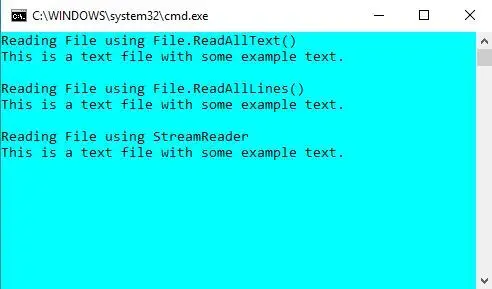
Chcete-li spustit tento program, uložte soubor s .cs rozšíření a poté lze spustit pomocí csc název_souboru.cs příkaz na cmd. Nebo můžete použít Visual Studio . Zde máme textový soubor s názvem as Textfile.txt které mají obsah zobrazený na výstupu.
Výstup:
Psaní textového souboru: Třída File v C# definuje dvě statické metody pro zápis textového souboru, jmenovitě File.WriteAllText() a File.WriteAllLines() .
- File.WriteAllText() zapíše celý soubor najednou. Vyžaduje dva argumenty, cestu k souboru a text, který má být zapsán.
- File.WriteAllLines() zapisuje soubor jeden řádek po druhém. Vyžaduje dva argumenty, cestu k souboru a text, který má být zapsán, což je pole řetězců.
Existuje další způsob, jak zapisovat do souboru, a to pomocí objektu StreamWriter. StreamWriter také zapisuje jeden řádek po druhém. Všechny tři metody zápisu vytvoří nový soubor, pokud soubor neexistuje, ale pokud se soubor již v daném umístění nachází, bude přepsán. Všechny výše uvedené způsoby zápisu do textového souboru jsou ilustrovány v níže uvedeném příkladu kódu.
// C# program to illustrate how> // to write a file in C#> using> System;> using> System.IO;> > class> Program {> > static> void> Main(> string> [] args)> > {> > // Store the path of the textfile in your system> > string> file => @'M:DocumentsTextfile.txt'> ;> > > // To write all of the text to the file> > string> text => 'This is some text.'> ;> > File.WriteAllText(file, text);> > > // To display current contents of the file> > Console.WriteLine(File.ReadAllText(file));> > Console.WriteLine();> > > // To write text to file line by line> > string> [] textLines1 = {> 'This is the first line'> ,> > 'This is the second line'> ,> > 'This is the third line'> };> > > File.WriteAllLines(file, textLines1);> > > // To display current contents of the file> > Console.WriteLine(File.ReadAllText(file));> > > // To write to a file using StreamWriter> > // Writes line by line> > string> [] textLines2 = {> 'This is the new first line'> ,> > 'This is the new second line'> };> > > using> (StreamWriter writer => new> StreamWriter(file))> > {> > foreach> (> string> ln> in> textLines2)> > {> > writer.WriteLine(ln);> > }> > }> > // To display current contents of the file> > Console.WriteLine(File.ReadAllText(file));> > > Console.ReadKey();> > }> }> |
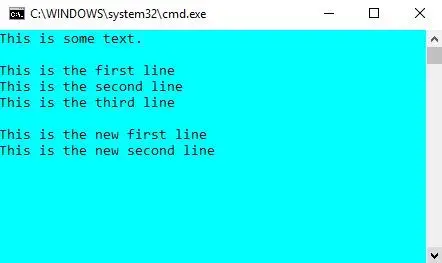
Chcete-li spustit tento program, uložte soubor s .cs rozšíření a poté lze spustit pomocí csc název_souboru.cs příkaz na cmd. Nebo můžete použít Visual Studio .
Výstup:
V případě, že chcete do existujícího souboru přidat další text, aniž byste přepsali data v něm již uložená, můžete použít metody připojení, které poskytuje třída File System.IO.
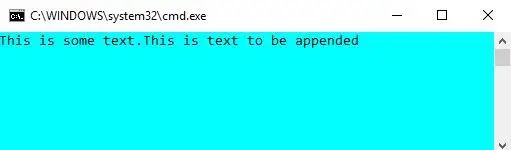
using> System;> using> System.IO;> > class> Program {> > static> void> Main(> string> [] args)> > {> > // Store the path of the textfile in your system> > string> file => @'M:DocumentsTextfile.txt'> ;> > > // To write all of the text to the file> > string> text1 => 'This is some text.'> ;> > File.WriteAllText(file, text1);> > > // To append text to a file> > string> text2 => 'This is text to be appended'> ;> > File.AppendAllText(file, text2);> > > // To display current contents of the file> > Console.WriteLine(File.ReadAllText(file));> > Console.ReadKey();> > }> }> |
Výstup: