إنشاء كلمة المرور وOTP في جافا

إنشاء كلمة المرور وOTP في جافا
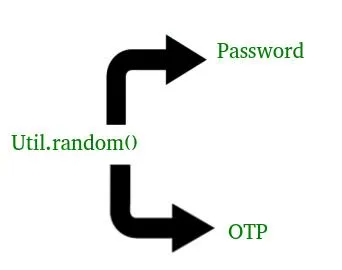
يمكنك المرور عبر إنشاء كلمة مرور لمرة واحدة أو عنوان URL فريد للتعريف المقالة قبل ذلك لفهم أفضل لكيفية إنشاء كلمات المرور وكلمة المرور لمرة واحدة (OTP) في Java. إنشاء كلمة المرور وOTP في جافا  
هل سبق لك أن نقرت على "نسيت كلمة المرور" وتلقيت كلمة مرور جديدة أو كلمة المرور لمرة واحدة (OTP) على الفور على بريدك الإلكتروني أو هاتفك؟ تستخدم هذه العملية كلمات مرور تم إنشاؤها ديناميكيًا وكلمات مرور لمرة واحدة (OTPs) لتعزيز الأمان. ستتعلم في هذه المقالة كيفية إنشاء كلمات مرور آمنة وكلمات المرور لمرة واحدة (OTP) في Java باستخدام تقنيات بسيطة.

ما هي كلمات المرور وكلمات المرور لمرة واحدة؟

كلمة المرور: سلسلة سرية ثابتة تستخدم للتحقق من الهوية أثناء تسجيل الدخول.

OTP (كلمة المرور لمرة واحدة): رمز مؤقت يتم إنشاؤه عشوائيًا يُستخدم مرة واحدة للتحقق (غالبًا في المصادقة الثنائية).

الطريقة الأولى:

برنامج جافا يشرح توليد كلمة المرور  

Java
   // Java code to explain how to generate random   // password   // Here we are using random() method of util   // class in Java   import     java.util.*  ;   public     class   NewClass   {      public     static     void     main  (  String  []     args  )      {      // Length of your password as I have choose      // here to be 8      int     length     =     10  ;      System  .  out  .  println  (  geek_Password  (  length  ));      }      // This our Password generating method      // We have use static here so that we not to      // make any object for it      static     char  []     geek_Password  (  int     len  )      {      System  .  out  .  println  (  &  quot  ;  Generating     password     using     random  ()     :     &  quot  ;);      System  .  out  .  print  (  &  quot  ;  Your     new     password     is     :     &  quot  ;);      // A strong password has Cap_chars Lower_chars      // numeric value and symbols. So we are using all of      // them to generate our password      String     Capital_chars     =     &  quot  ;  ABCDEFGHIJKLMNOPQRSTUVWXYZ  &  quot  ;;      String     Small_chars     =     &  quot  ;  abcdefghijklmnopqrstuvwxyz  &  quot  ;;      String     numbers     =     &  quot  ;  01234567  89  &  quot  ;;      String     symbols     =     &  quot  ;  !  @#  $  %^&  amp  ;  *  _  =+-/  .  ?&  lt  ;  &  gt  ;)  &  quot  ;;      String     values     =     Capital_chars     +     Small_chars     +      numbers     +     symbols  ;      // Using random method      Random     rndm_method     =     new     Random  ();      char  []     password     =     new     char  [  len  ]  ;      for     (  int     i     =     0  ;     i     &  lt  ;     len  ;     i  ++  )      {      // Use of charAt() method : to get character value      // Use of nextInt() as it is scanning the value as int      password  [  i  ]     =      values  .  charAt  (  rndm_method  .  nextInt  (  values  .  length  ()));      }      return     password  ;      }   }   

ملحوظة : سوف تتغير كلمة المرور التي نقوم بإنشائها في كل مرة. كما استخدمنا طريقة عشوائية () لإنشاء كلمة المرور. 

الإخراج : 

 Generating password using random() :    
Your new password is : KHeCZBTM;-

برنامج جافا يشرح إنشاء OTP (كلمة المرور لمرة واحدة)

Java
   // Java code to explain how to generate OTP   // Here we are using random() method of util   // class in Java   import     java.util.*  ;   public     class   NewClass   {      static     char  []     OTP  (  int     len  )      {      System  .  out  .  println  (  &  quot  ;  Generating     OTP     using     random  ()     :     &  quot  ;);      System  .  out  .  print  (  &  quot  ;  You     OTP     is     :     &  quot  ;);      // Using numeric values      String     numbers     =     &  quot  ;  01234567  89  &  quot  ;;      // Using random method      Random     rndm_method     =     new     Random  ();      char  []     otp     =     new     char  [  len  ]  ;      for     (  int     i     =     0  ;     i     &  lt  ;     len  ;     i  ++  )      {      // Use of charAt() method : to get character value      // Use of nextInt() as it is scanning the value as int      otp  [  i  ]     =      numbers  .  charAt  (  rndm_method  .  nextInt  (  numbers  .  length  ()));      }      return     otp  ;      }      public     static     void     main  (  String  []     args  )      {      int     length     =     4  ;      System  .  out  .  println  (  OTP  (  length  ));      }   }   

ملحوظة : سوف يتغير OTP الذي نقوم بإنشائه في كل مرة. كما استخدمنا طريقة عشوائية () لإنشاء OTP. 

الإخراج : 

 Generating OTP using random() :    
You OTP is : 5291

الطريقة الثانية:

برنامج جافا يشرح توليد كلمة المرور  

Java
   // Java code to explain how to generate random   // password   class   uniquePassword   {   public     static     long     Code  ()     //this code returns the unique 16 digit code    {     //creating a 16 digit code using Math.random function      long     code     =  (  long  )((  Math  .  random  ()  *  9  *  Math  .  pow  (  10    15  ))  +  Math  .  pow  (  10    15  ));      return     code  ;     //returning the code   }      //method to generate the password      //by converting every two digits as an ascii value of a character   public     static     void     main  (  String     args  []  )      {   long     code  =  Code  ();  //function calling   String     unique_password  =&  quot  ;  &  quot  ;;   for     (  long     i  =  code  ;  i  !=  0  ;  i  /=  100  )  //a loop extracting 2 digits from the code       {      long     digit  =  i  %  100  ;  //extracting two digits      if     (  digit  &  lt  ;  =  90  )      digit  =  digit  +  32  ;         //converting those two digits(ascii value) to its character value      char     ch  =  (  char  )     digit  ;      // adding 32 so that our least value be a valid character       unique_password  =  ch  +  unique_password  ;  //adding the character to the string      }      System  .  out  .  println  (  &  quot  ;  unique     password     =&  quot  ;  +  unique_password  );      }   }   // Here we are using random() method of util   // class in Java       

ملحوظة : سوف تتغير كلمة المرور التي نقوم بإنشائها في كل مرة. كما استخدمنا طريقة عشوائية () لإنشاء كلمة المرور. 

الإخراج : 

 Generating password using Math.random() and ascii code:    
Your new password is : KHe%ZBT$

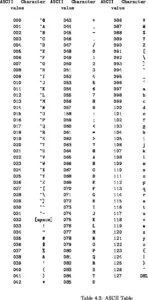
جدول كود ascii:

إنشاء كلمة المرور وOTP في جافا

برنامج جافا يشرح إنشاء OTP (كلمة المرور لمرة واحدة)

Java
   // Java code to explain how to generate OTP   public     class   GenerateOTP     {   //declaring a of return type String   //which on calling provides the otp      public     static     String     generateOTP  ()         {     //int randomPin declared to store the otp      //since we using Math.random() hence we have to type cast it int      //because Math.random() returns decimal value      int     randomPin     =  (  int  )     (  Math  .  random  ()  *  9000  )  +  1000  ;      String     otp     =     String  .  valueOf  (  randomPin  );      return     otp  ;     //returning value of otp      }      public     static     void     main  (  String     args  []  )  //method to call and print otp      {      String     otpSting     =  generateOTP  ();  //function calling      System  .  out  .  println  (  &  quot  ;  OTP     :     &  quot  ;  +  otpSting  );      }   }  // Here we are using Math.random() function.   // class in Java   

ملحوظة : سوف يتغير OTP الذي نقوم بإنشائه في كل مرة. كما استخدمنا وظيفة Math.random() لإنشاء OTP. 

الإخراج : 

 Generating OTP using random() :    
You OTP is : 5291

إنشاء اختبار